M6-2 031914
REPLACE SCALE ASSEMBLY
STEP 1 TURN “OFF”THE MAIN POWER AND
THE MAIN AIR
ADANGER!
Follow your company’s Lockout/Tagout
procedures when performing any
maintenance on your Formax machine.
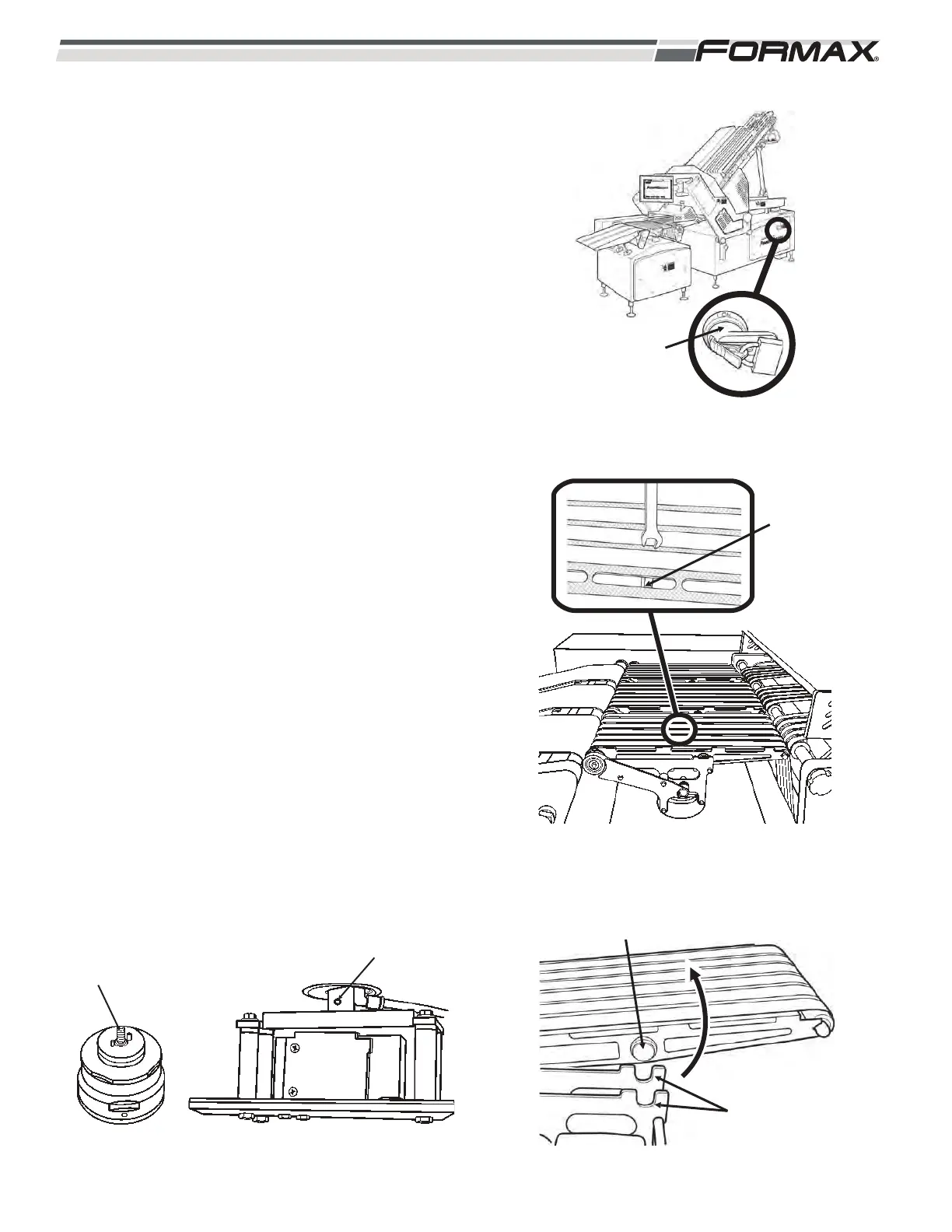
(Illustration 3)
STEP 2 REMOVE THE DYNAMIC SCALE
CONVEYORS
1. Loosen the locking nut with a 13-mm
wrench. (Illustration 4)
2. Lift the rear of the conveyor and slide it out of
the retaining slots. (Illustration 5)
3. Loosen and remove the conveyor-mounting
nut. The drive assembly can now be
removed.
STEP 3 REMOVE THE LOAD CELL
ASSEMBLY
1. Remove the side covers from the scale
cabinet.
2. Loosen the scale support bolt. (Illustration 6)
ILLUSTRATION 6
SCALE GRID
SUPPORT POST
SUPPORT BOLT
MAIN POWER
HANDLE WITH
LOCKOUT
DEVICE
ILLUSTRATION 3
ILLUSTRATION 4
LOOSEN
LOCKING NUT
ILLUSTRATION 5
MOUNTING STUDS
MOUNTING
BRACKET SLOTS



 To Next Page