M3-54 031914
STEP 3 INSTALLATION OF THE MOTION
CONTROLLER (U2/U9)
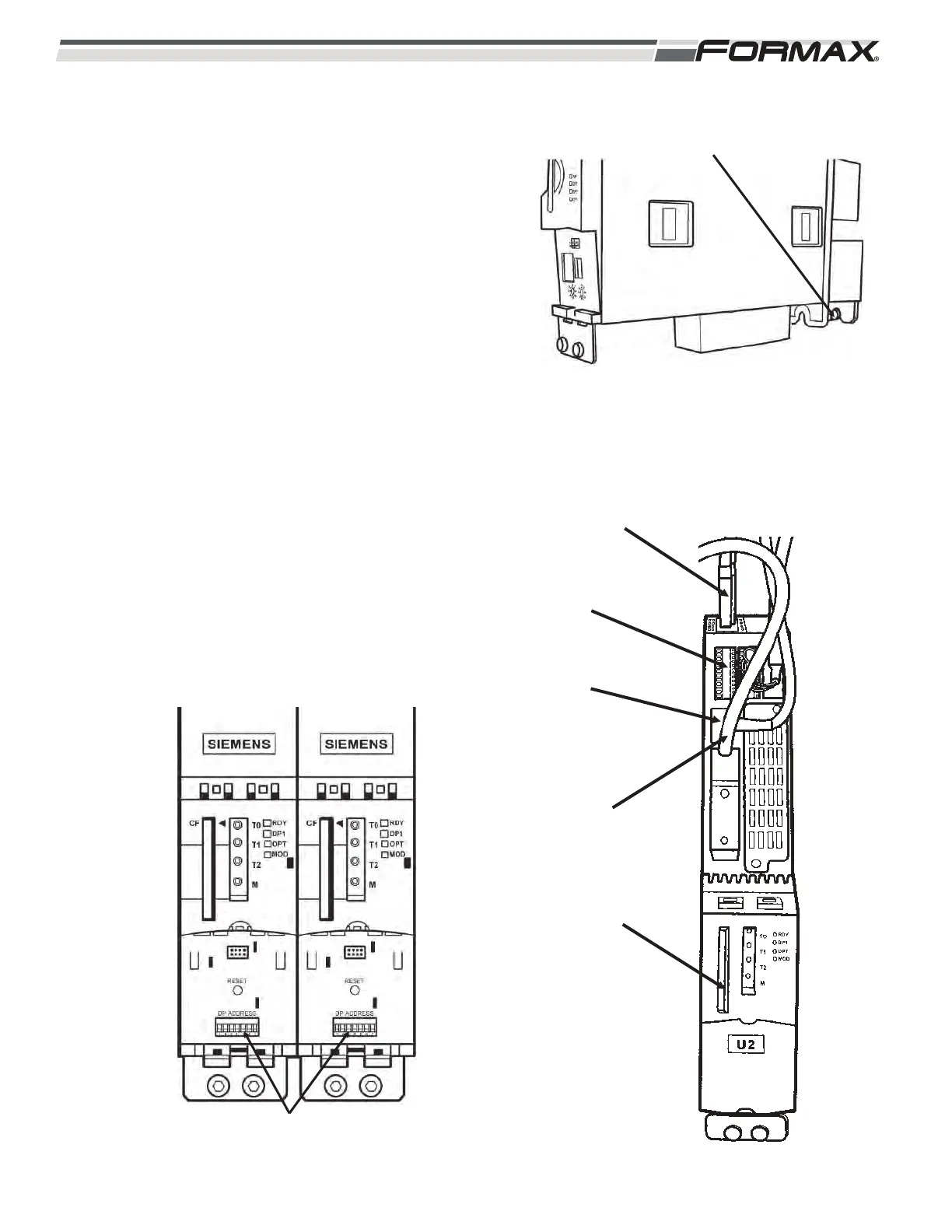
1. Install the Motion Controller. (straight in, down)
(Illustration 3)
2. Tighten the top and bottom retaining screws.
Reference the wiring diagram - computer/controllers.
3. Push in the cables on the top of module. (X100- X103)
(Illustration 4)
4. Push in the terminal plugs. (X122 and X132)
5. Push in the power terminal plug. (X124)
6. Push in the Profibus terminal plug. (X136)
7. Tighten the Profibus terminal plug retaining screws.
8. Push in the software chip.
Reference the schematics - Profibus routing and address
information.
9. Set the addresses on the module. (Illustration 5)
ILLUSTRATION 5
U2/U9 ADDRESS SETTINGS
ILLUSTRATION 3
RETAINING SCREW
(TOP AND BOTTOM)
ILLUSTRATION 4
X100-X103
X122 AND
X132
X124
PROFIBUS
CABLES
PROGRAMMED
FLASH CHIPS



 To Next Page