M6-6 031914
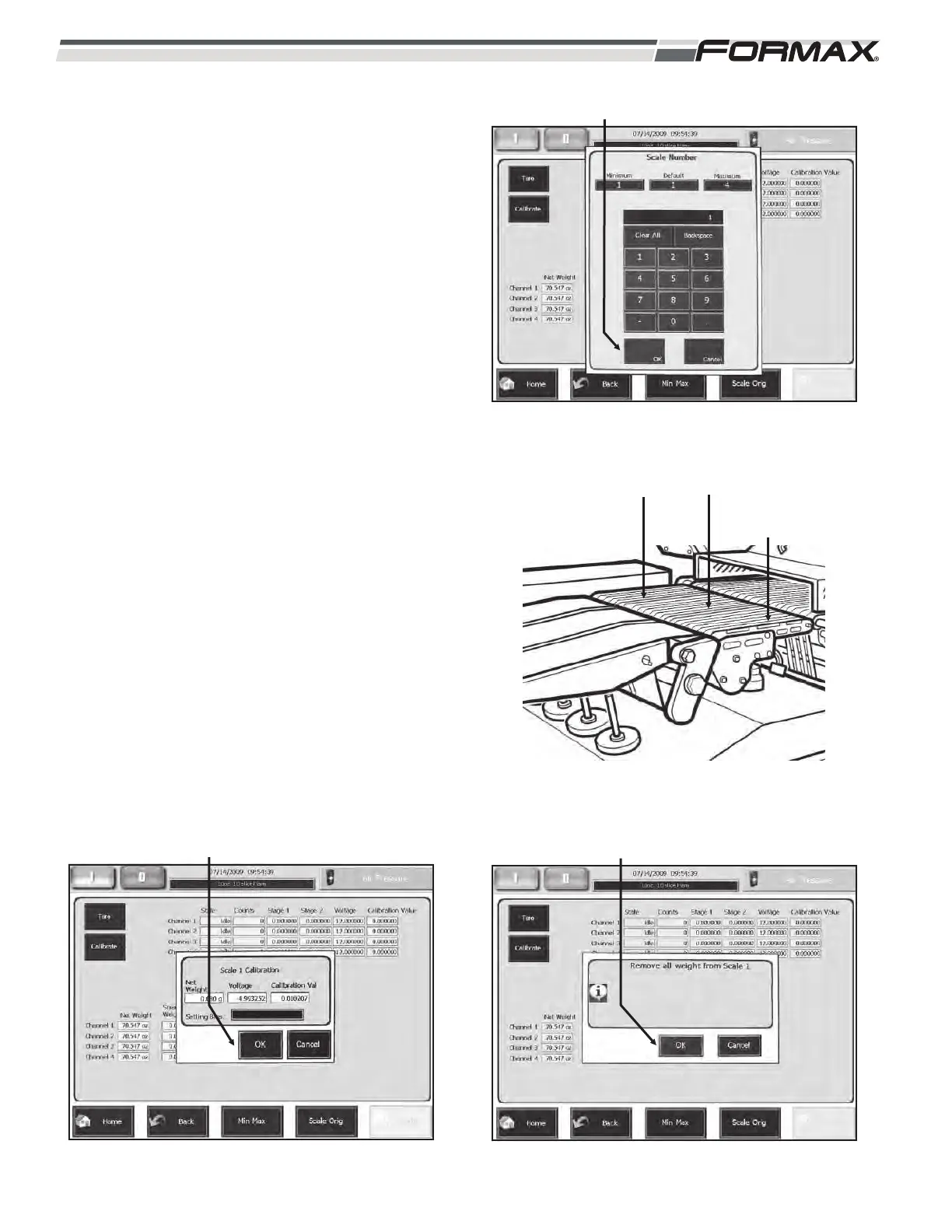
STEP 7 SELECT THE SCALE
1. Enter the position number of the scale
that needs to be calibrated.
2. Press 1, 2, 3 or 4 depending on your
machines configuration. Then press “OK.”
(Illustration 19 and 20)
STEP 8 REMOVE ALL WEIGHT FROM
SCALE
1. Press the “OK” button. (Illustration 21)
STEP 9 SET THE BIAS VOLTAGE
1. The computer will set the Bias voltage. It
will take approximately 30 seconds to set.
(Illustration 22)
ILLUSTRATION 19
“OK” BUTTON
ILLUSTRATION 21
“OK” BUTTON
ILLUSTRATION 22
“OK” BUTTON
ILLUSTRATION 20
DYNAMIC SCALE
CONVEYOR #3
DYNAMIC SCALE
CONVEYOR #2
DYNAMIC SCALE
CONVEYOR #1



 To Next Page