STEP 2 ASSEMBLE THE TRANSFER
CONVEYOR
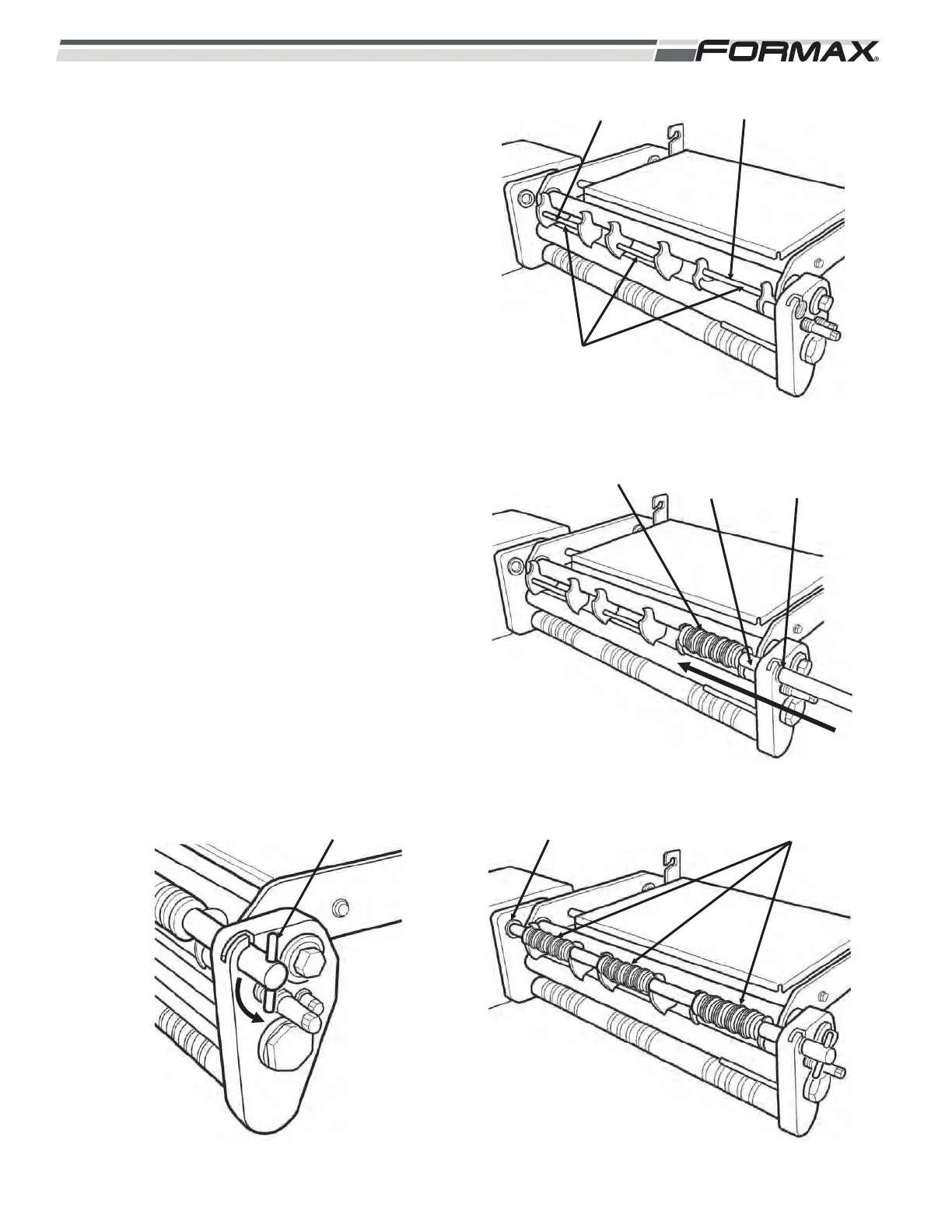
1. Install Roller Brackets. (Illustration 4)
Install smallest bracket in the #1
position. The second smallest in the #2
position and the largest in the #3
position
2. Insert the Roller shaft through the
guide bushing in the Side Bracket.
(Illustration 5)
3. Install the 3 Rollers as you slide the
shaft “in.”
4. Slide the shaft into the far guide
bushing. (Illustration 6)
5. Push the knob “in” and turn it to the left
(counter-clockwise) to lock the shaft in
place. (Illustration 7)
5-2 031914
ILLUSTRATION 5
ROLLER ROLLER
SHAFT
GUIDE
BUSHING
ILLUSTRATION 6
FAR GUIDE BUSHING ROLLERS
ILLUSTRATION 7
LOCK KNOB
ILLUSTRATION 4
ROLLER
BRACKETS
LARGEST SMALLEST



 To Next Page