GE HEALTHCARE PROPRIETARY TO GE
D
IRECTION 5344303-100, REVISION 3 VIVID P3 SERVICE MANUAL
8-4 Section 8-2 - Disassembly/Re-assembly of VIVID P3
8-2-4 LCD Assy (FRU P/N: 5315112)
Purpose: This is a description on how to remove and replace the LCD Assy.
8-2-4-1 FRU BOM
This FRU Kit P/N:5315112 consists of following parts.
8-2-4-2 Tools
• Common phillips screwdrivers
• Allen/Unbraco wrench
8-2-4-3 Needed Manpower
• 1 person, 11 minutes + travel
8-2-4-4 Preparations
• Shut Down the System Switch of the circuit breaker at the bottom rear side of the system.
8-2-4-5 Removal procedure
1) Shut down the Vivid P3 system.
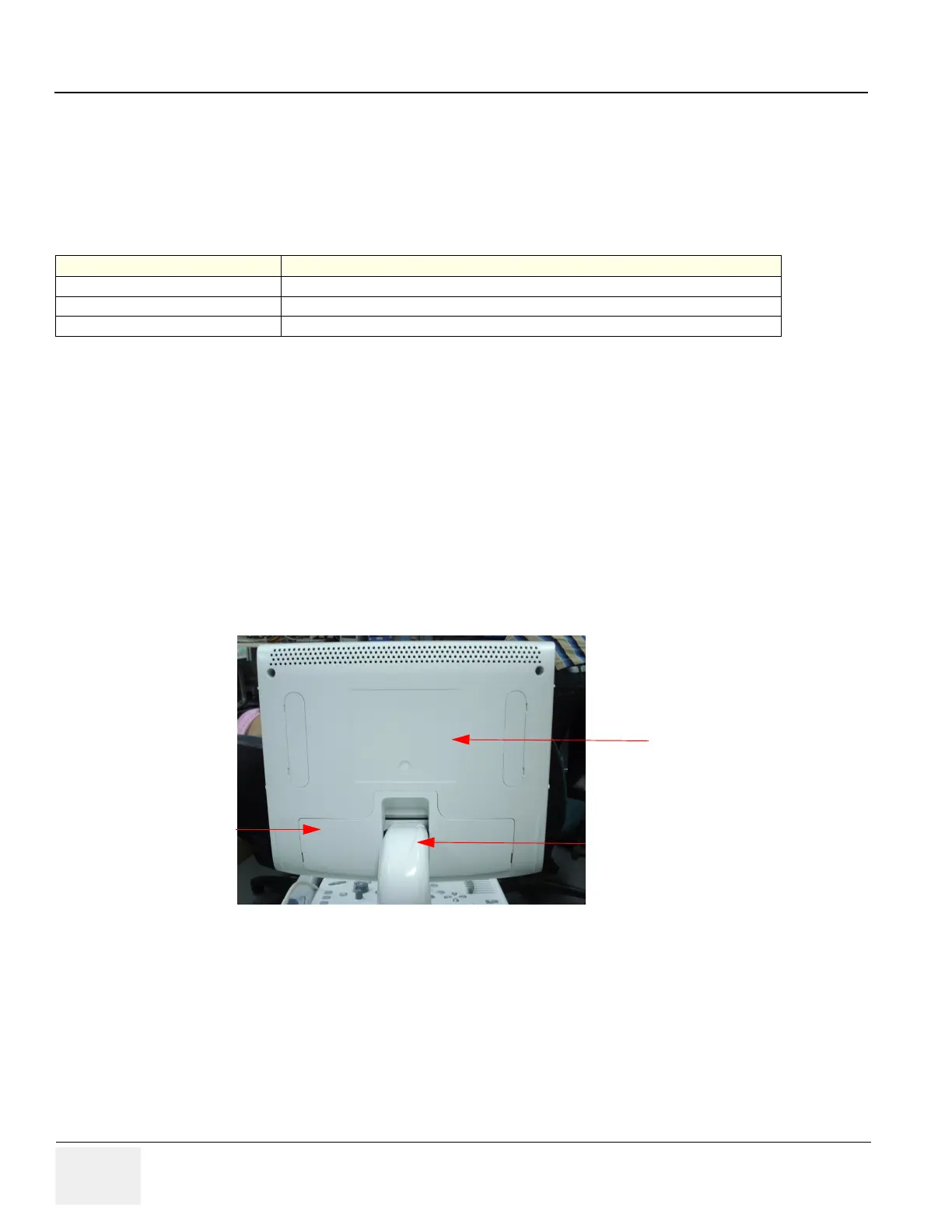
2) LCD monitor rearcover of Vivid P3 system.as shown below Figure 8-1 on page 8-4
Figure 8-1 LCD rear cover
3) Bend down the LCD monitor by 90 degree.
4) Bend the LCD monitor as shown below Figure 8-2 on page 8-5
PART NO DESCRIPTION
5245083 LCDMON II
5314204 Fasteners-M5 X 16 Socket Head Screw
5314209 Monitor Label Vivid P3
LCD Rear cover
LCD Arm cover
LCD power
cable cover



 To Next Page