Operating Instructions • Thermal Transfer Printer TT4030 • 06-2017 • 031-93478
Troubleshooting
19
GBDEFRESPTITNLDKNOSEFIPLCZHUSIROTR
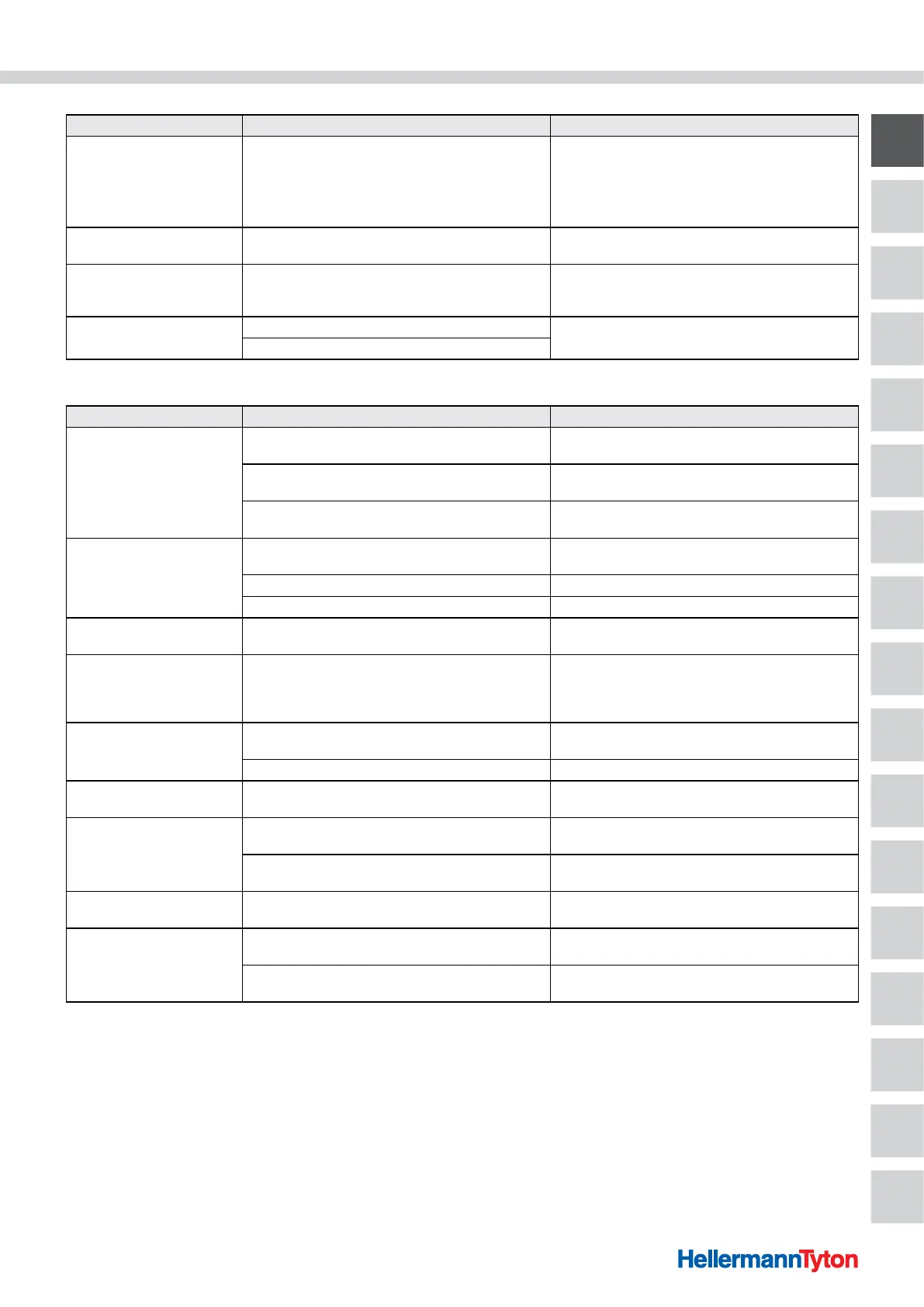
Error Cause Remedy
Voltage error
Hardware error
Switch the device off and then on again.
Æ Section 5.4
If error recurs, contact Service.
The failed voltage is shown.
Please write it down.
Memory overow
Current print job contains too much information, e.g. due
to selected font, large graphics.
Cancel current print job.
Reduce amount of data to be printed.
Syntax error
The device has received an unknown or invalid command
from the computer.
Press Ignore to skip the command or press the Cancel
to cancel the
print job.
Unknown card
The memory device is not formatted
Format the memory device, use a different memory
device.
Memory device type is not supported
8.3 Problem solving
Error Cause Remedy
Colour ribbon wrinkled
Colour ribbon guide roll is not adjusted
Adjust the colour ribbon feed.
Æ Section 6.6
Head locking system is not adjusted
Set the head locking system.
Æ Section 6.3
Colour ribbon is too wide
Use colour ribbon that is only slightly wider than the
material.
Print image has smears or
voids
Printhead is dirty
Clean the printhead.
Æ Section 9.2.5
Temperature is too high Decrease the temperature in the software.
Unsuitable combination of materials and colour ribbon Use a different colour ribbon type or brand.
The device does not stop af-
ter colour ribbon runs out
Thermal printing is selected in the software Change to thermal transfer print in the software.
The device prints a
sequence of characters
instead of the material
format
The device is in monitor mode Cancel the monitor mode.
The device transports the
material, but not the colour
ribbon
The colour ribbon is not properly inserted
Check and, if necessary, correct the feed path of the
colour ribbon and the orientation of the coated side.
Unsuitable combination of materials and colour ribbon Use a different colour ribbon type or brand.
The device only prints each
second material
Setting of the format in the software is too large Change the format setting in the software.
Vertical white lines in the
print image
Printhead is dirty
Clean the printhead.
Æ Section 9.2.5
Printhead is defective (failure of heat elements)
Replace the printhead.
Æ Service instructions
Horizontal white lines in the
print image
In cut or dispensing mode, the device is operated with the
Backfeed > optimised setting
Change the setup to Backfeed > always.
Æ Configuration instructions
Print image is irregular, one
side is lighter
Printhead is dirty
Clean the printhead.
Æ Section 9.2.5
Head locking system is not adjusted
Set the head locking system.
Æ Section 6.3


 To Next Page
 Loading...

