Keyscan Technical Guide (PC109x - 04.12)
78
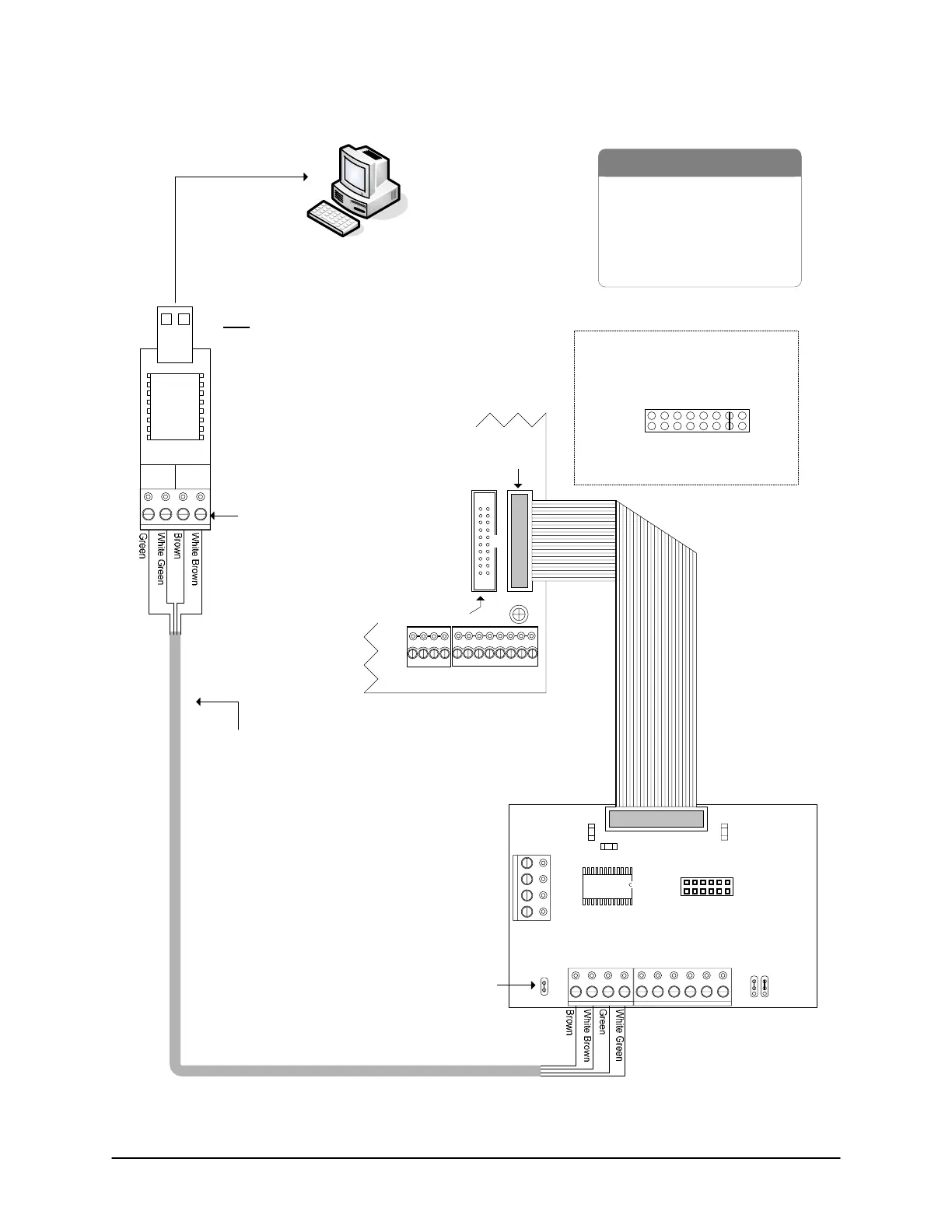
Figure 55 – Single ACU Communication - USB Adaptor/CB-485 (RS485)
PC with
Communication Manager
- USB Adaptor (USB-SER)
- CAT 5 Cable – 2 twisted pairs
- CB-485
- Control Board
- PC (requires USB port)
- USB extension cable optional
Jumper ON J1
To USB port on PC
(may require USB
extension cable)
Common AUX Inputs - E
24
2322
2120191817
CPB/CB MODULE
(COM4)
Parts List
Control Board
(PC 109x)
BRNWHTGRN WHT
+ TX - + RX -
485 OUT
485 IN
use 485
terminal block
Isolate and
tape the 3
loose RS-232
wires on the
USB adaptor.
Note
USB communication (RS-485) is slower than
direct serial or NETCOM communication.
Do not connect USB adaptor to modem.
CAT 5
2000 ft (609 m)
maximum
@ 9600 BPS
Connect CB-485 ribbon cable to
CPB/CB MODULE on control board.
Jumper ON J16-G to activate
CPB/CB MODULE (H1).
SYSTEM CONFIG.
J16 - HGABCDEF
H1
GND
CB-485
J1
RX
LED
TX
LED
TD
RD
NC
BRN WHT GRN WHT BRN WHTGRN WHT BLU WHT
RS485 IN RS485 OUT M
+-+-+-+-
Current Draw - 110 mA
Jumpers ON
Run
Run
Program
B LED
ECM/GCM MODULE
(COM2 & COM3)
H2
KI-00158E-07-11



 To Next Page
 Loading...