Spitfire – Maintenance Manual
135
AP-74096, Rev. 1.0, 09/06/05
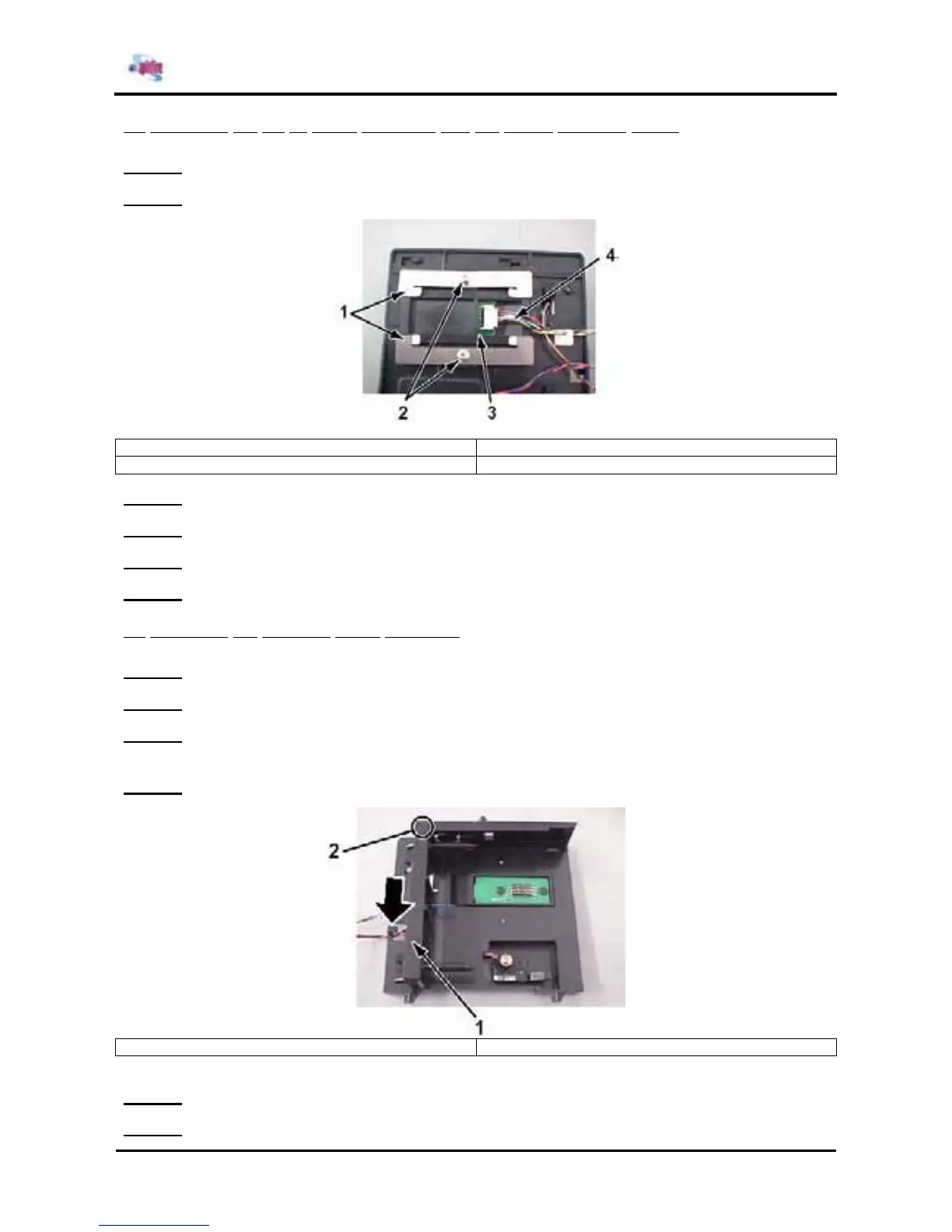
(2) Replacing the ink ID board assembly and the holder pressure spring
Step 1 : Remove the I/H assembly.
Step 2 : Remove the 2 screws fixing the holder pressure spring.
1 = Holder pressure spring (two-ply use) 2 = Screws (M3x6) fixing the holder pressure spring
3 = Ink ID board assembly 4 = SC cable assembly
Step 3 : Replace the holder pressure spring.
Step 4 : Remove the SC cable assembly connector from the ink ID board assembly.
Step 5 : Replace the ink ID board assembly.
Step 6 : Reinstall all parts in the opposite order of the removal procedure.
(3) Replacing the cartridge frame assembly
Step 1 : Remove the I/H assembly.
Step 2 : Remove the cables from the I/H assembly clamp.
Step 3 : Disengage the hook fixing the cartridge frame assembly, and then slide the cartridge frame
assembly in the direction of the arrow to remove it.
Step 4 : Slide the cartridge frame assembly in the direction of the arrow to remove it.
1 = Cartridge frame assembly 2 = Hook
Step 5 : Replace the cartridge frame assembly.
Step 6 : Reinstall all parts in the opposite order of the removal procedure.















 To Next Page