EasyManua.ls Logo

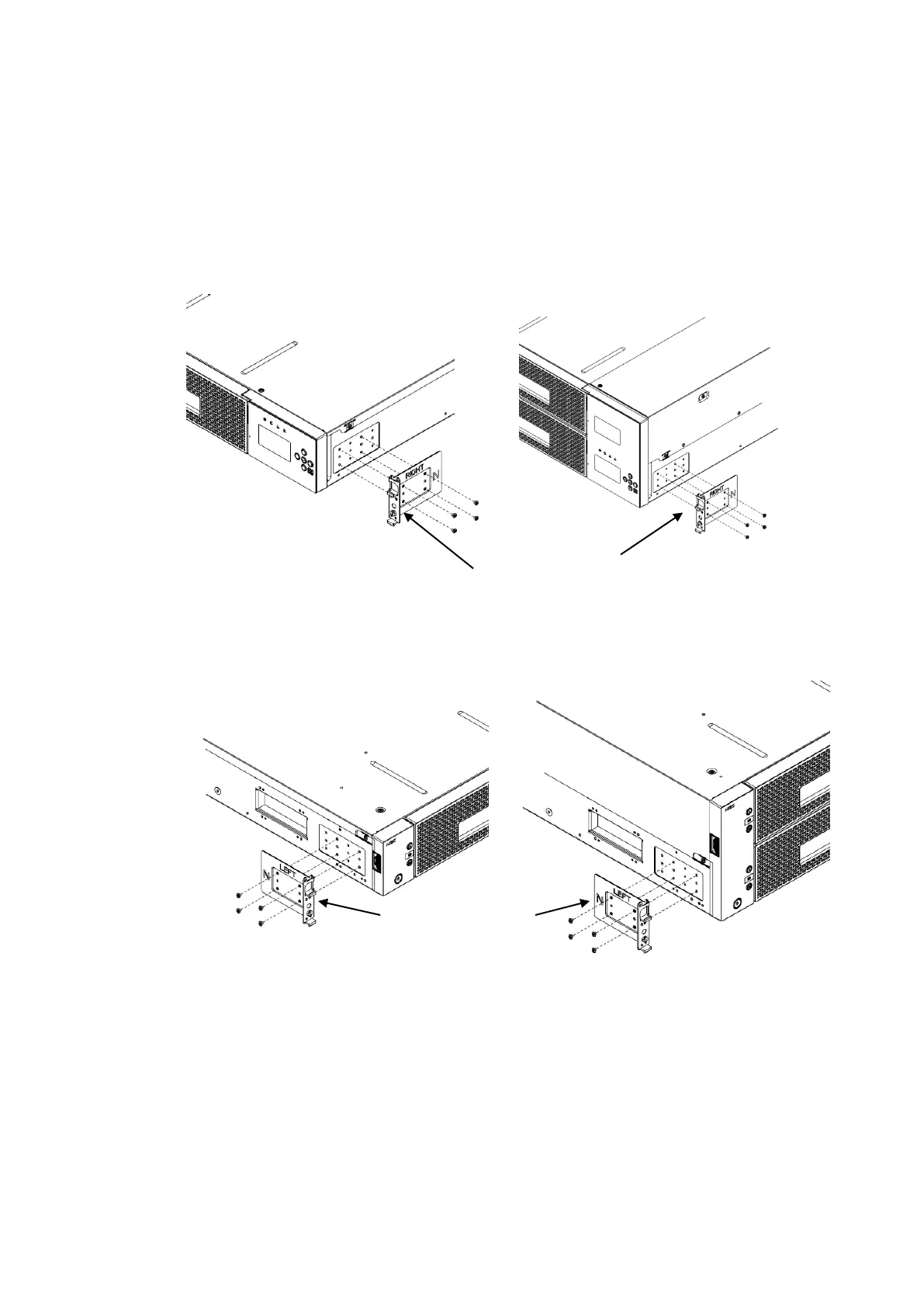
NEC T30A - Attachment of Rack Mount Bracket L;R; Figure 1-12 Attachment of Rack Mount Bracket R(Left:t30 A, Right:T60 A); Figure 1-13 Attachment of Rack Mount Bracket L(Left:t30 A, Right:T60 A)

NEC T30A
252 pages
Print Icon
To Next Page IconTo Next Page
To Previous Page IconTo Previous Page
Loading...
-21-
1.7.5 Attachment of Rack mount bracket L/R
Perform the following steps to attach the left and right rack mount brackets.
<1> Use four screws (M3) to attach the rack mount bracket R to the right of the library.
<2> Use four screws (M3) to attach the rack mount bracket L to the left of the library.
Figure 1-12 attachment of rack mount bracket R(left:T30A , right :T60A)
Figure 1-13 attachment of rack mount bracket L(left:T30A , right :T60A)

Rack mount bracket R
screws(M3)
screws(M3)
screws(M3)
screws(M3)
Rack mount bracket L

Table of Contents

Related product manuals