HOTSPOT GATEWAY
88 System Administration
GRE Tunneling {Gre Tunneling}
Use the following procedure to set the GRE Tunneling options.
1. From the Web Management Interface, click Configuration, then Gre Tuneling.
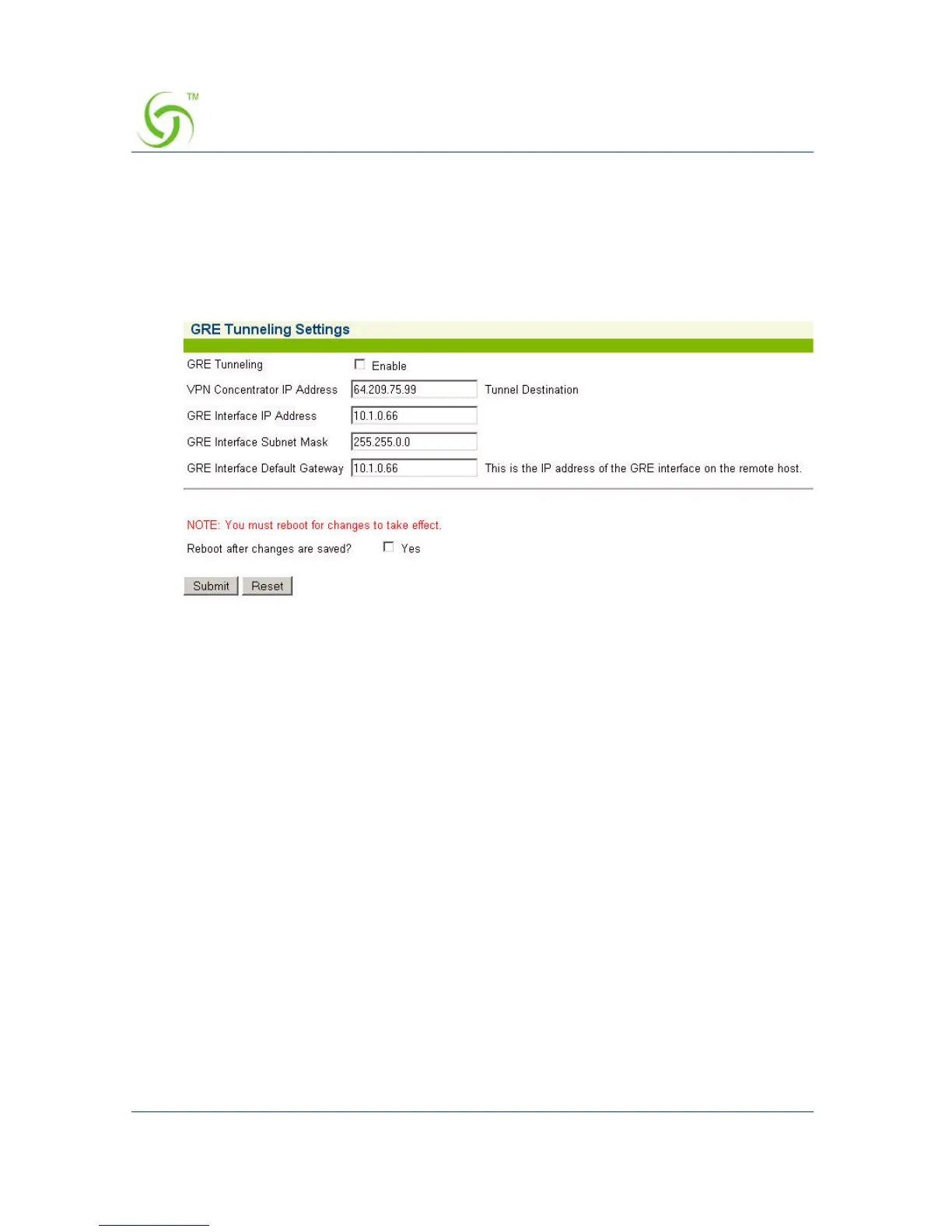
The GRE Tuneling screen appears:
2. Click the checkbox for GRE Tunneling to enable this feature.
3. Enter the VPN Concentrator IP Address. This is the IP address of the remote
server.
4. Enter the GRE Interface IP Address. This is the IP of the local GRE interface
on the HSG.
5. Enter the GRE Interface Subnet Mask. This is the subnet mask for the GRE
connection.
6. Enter the GRE Interface Default Gateway. This is the IP address of the GRE
interface of the remote host.
7. When finished, you must reboot the system for the new settings to take effect.
Click the check box for Reboot after changes are saved? to reboot the system
after saving your changes.
8. Click Submit to save your changes and reboot the system, or click Reset to reset
all the values to their previous state.



 To Next Page