HOTSPOT GATEWAY
System Administration 119
2. Enable or disable RADIUS Proxy Services, as required, by clicking on the
appropriate check box.
3. If you enabled RADIUS Proxy Services, you must provide the Authentication
Server Port and the
Accounting Server Port references.
4. Click on the Submit button to save your changes, or click on the Reset button if
you want to reset all the values to their previous state.
Adding an Upstream RADIUS NAS
5. If you want to add a new Upstream RADIUS NAS (for example, an 802.11
Access Point on the subscriber side of the HSG)., click on the
Add button.
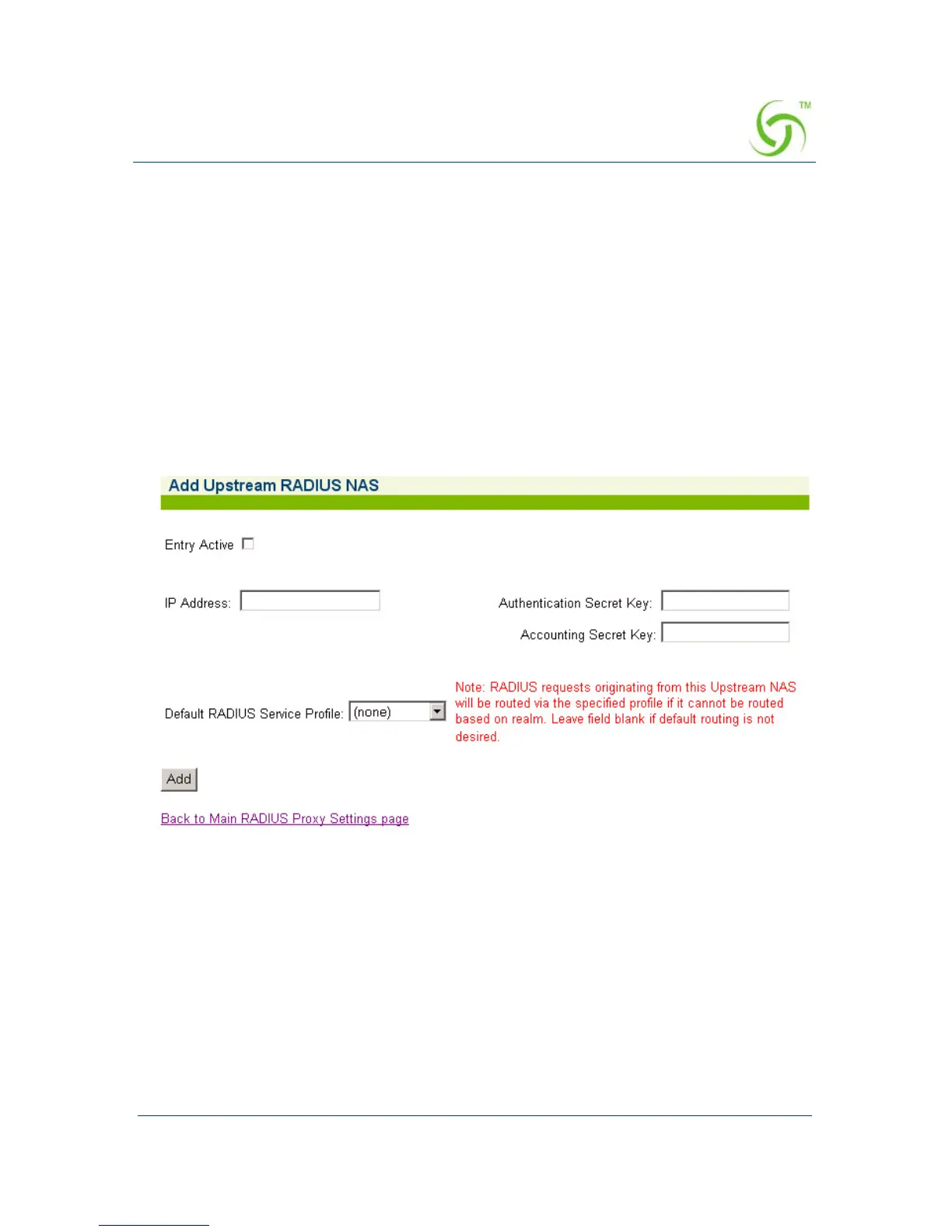
The Add Upstream RADIUS NAS screen appears:
6. To make this entry the “active” NAS entry, click on the Entry Active check box.
7. Enter an IP Address for the Upstream NAS.
8. Enter a secret key in the Authentication Secret Key field. During the
authentication process, the server and client exchange secret keys. The secret
keys must match for communication between the server and the client to
continue. The secret key is a valuable and necessary security measure.
9. Enter a secret key in the Accounting Secret Key field.



 To Next Page