HOTSPOT GATEWAY
System Administration 77
Setting Up Bandwidth Management {Bandwidth Management}
The HSG allows system administrators to manage the bandwidth for subscribers,
defined in Kbps (Kilobits per seconds) for both upstream and downstream data
transmissions. With the ICC feature enabled, subscribers can increase or decrease
their own bandwidth dynamically (by the minute, or on an hourly, daily, weekly, or
monthly basis), and also adjust the pricing plan for their service.
1. From the Web Management Interface, click on Configuration, then Bandwidth
Management.
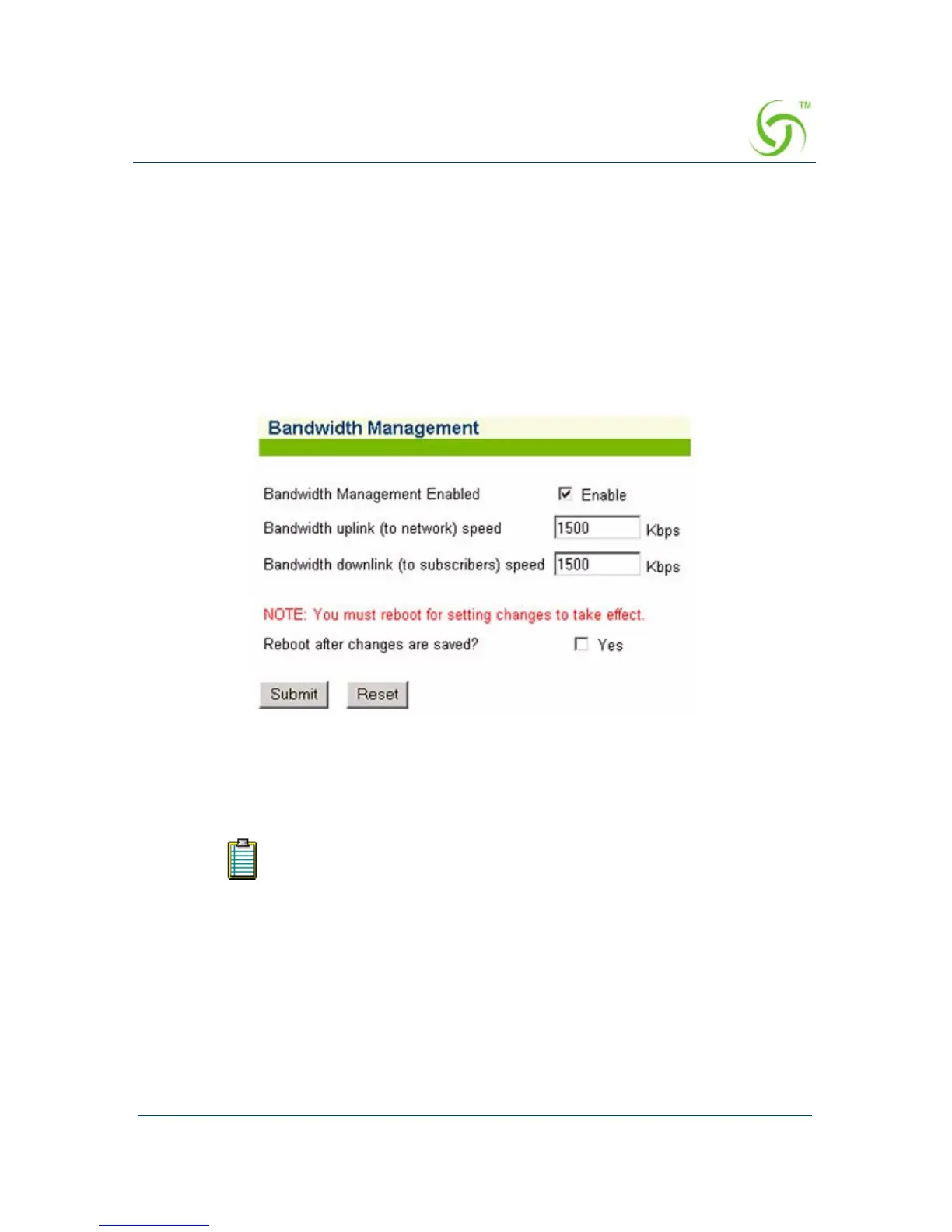
The Bandwidth Management screen appears:
2. If required, click the check box for Bandwidth Management Enabled.
3. If you enabled Bandwidth Management, enter the uplink and downlink speeds
(in Kbps) in the appropriate fields.
4. If you made any changes to the settings on this screen, you must click the check
box for
Reboot after changes are saved? (the HSG must be rebooted).
5. Click on the Submit button to save your changes and reboot the system, or click
on the
Reset button if you want to reset all the values to their previous state.
Setting the uplink or downlink speeds to anything greater than 100,000
Kbps is meaningless, because communication with the HSG is
established at 100 Mbps (100,000 Kbps).



 To Next Page