HOTSPOT GATEWAY
202 System Administration
Take care when mixing font and background colors. You may want to experiment
before establishing these settings to ensure that your chosen color scheme is both
presentable and readable to subscribers (see notes).
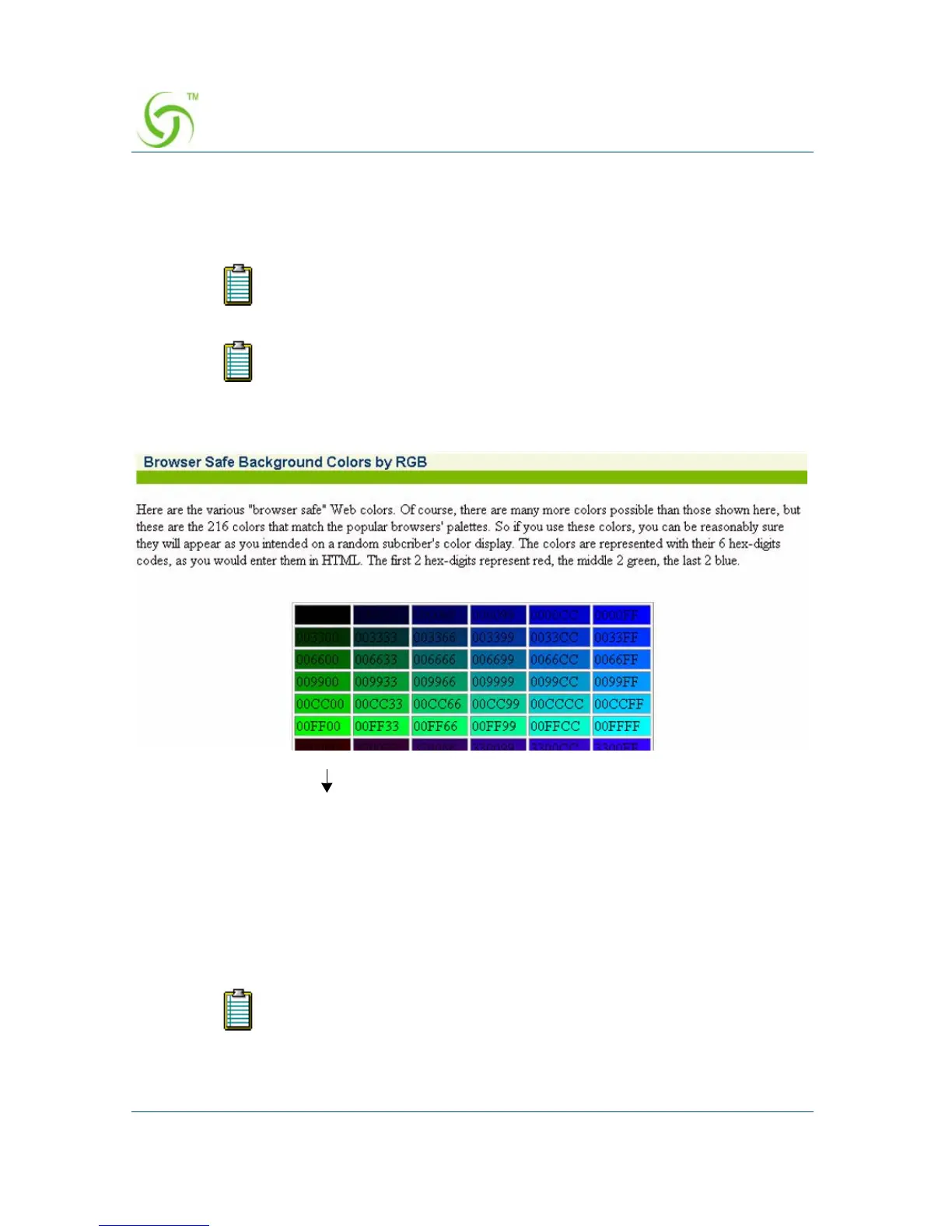
If you click on the “View Color Grid” link, the Browser Safe Background Colors
by RGB screen appears (partial view only shown here):
11. Click on the check box for Partner Image to enable this feature, then enter the
name of the image file in the
Partner Image File Name field.
12. If you made changes to the Image File Name or Partner Image File Name fields,
you must reboot the HSG for your changes to take effect. In this case, click on the
check box for
Reboot after changes are saved?.
13. Click on the Submit button to save your changes, or click on the Reset button if
you want to reset all the values to their previous state.
You must reboot the HSG for the “Image File Name” or “Partner Image
File Name” settings to take effect.
You can view a grid of acceptable screen colors. To view the grid, simply
click on the “View Color Grid” link.
The partner image (splash screen) is not the same screen that is defined
by the Image File Name (IWS screen) field.
More colors ...



 To Next Page