84
Polyend Tracker+ Manual
NOTES
Sequencing Steps
5
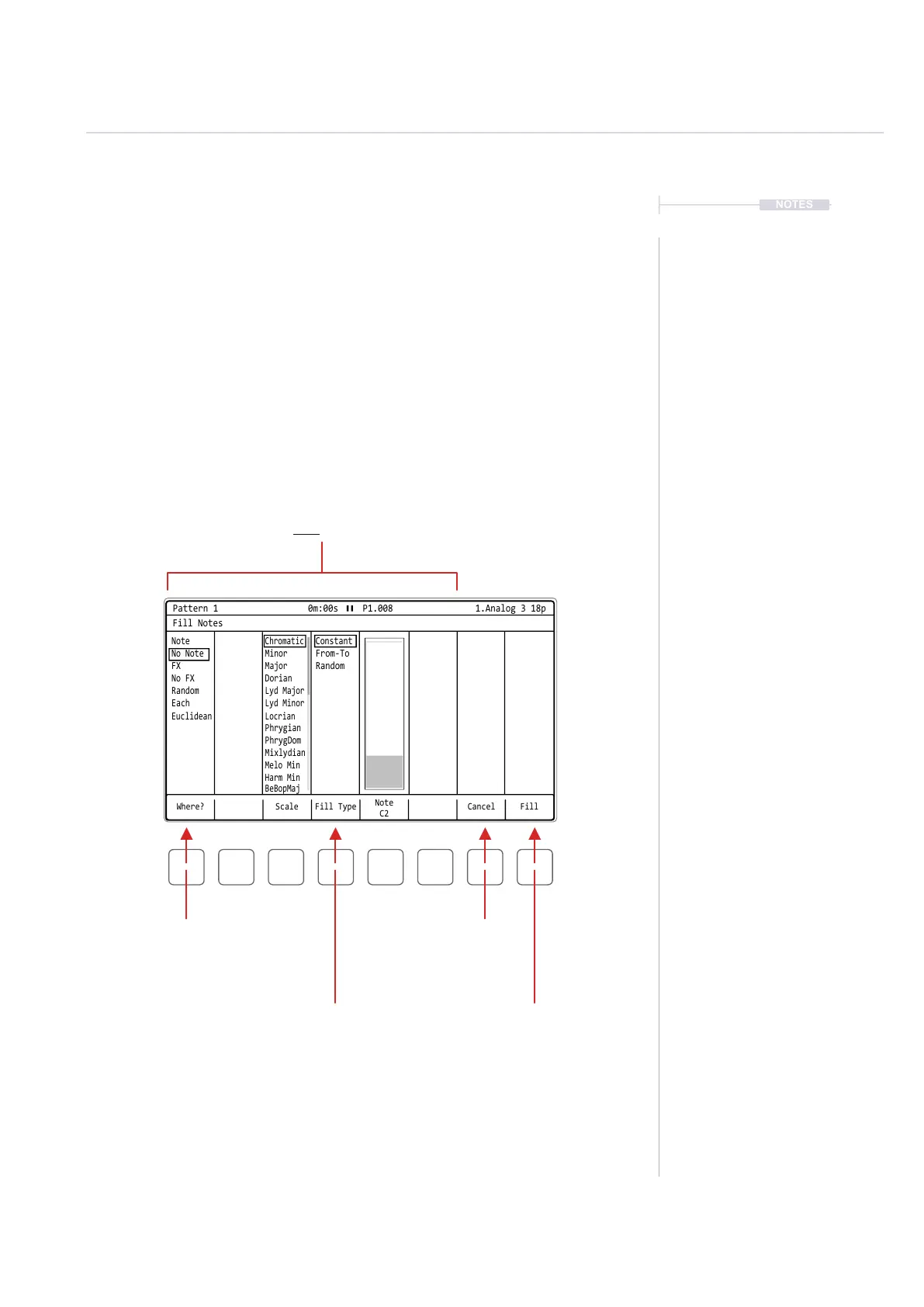
Dynamic area of 5 features containing the criteria specically required for 1) Parameter
selected, 2) Step range selected and 3) Options chosen in ‘Where’ & ‘Fill Type’.
Example Illustration shows a range of notes selected with the ‘note’ and ‘constant’ selections.
Ensure a range of steps is selected and the step parameter also selected before opening
the Fill utility. This range and parameter will be what determines the ll application.
Where?
Option of where to apply the ll
within the selected step range.
Example: Note would apply a note
ll to all steps containing a note.
Fill Type
Option of how to apply the parameter
within the selected step range.
Example: Constant would apply a
constant note value C2 into the range.
Fill
Activates the ll command.
Applies dened criteria into the
selected range.
Cancel
Exist without
applying.
Fill Utility Window
The window layout is similar for the step range and parameters selected.
However the content and features for ll will change depending on the
context of the selection and the options chosen. A typical Fill window is
shown below with a summary of common features. The Fill utility is mainly
controlled using the dynamic screen buttons under the Tracker+ screen.
To access Fill:-
Press [Fill] - Screen Button, when in [Rec] Mode of the [Pattern] Page.
Where? Scale Fill Type Cancel
Note
C2
Fill
Fill Notes
Note
Chromatic
Locrian
Constant
No Note
Minor
Phrygian
From-To
FX
Major
PhrygDom
Random
No FX
Dorian
Mixlydian
Random
Lyd Major
Melo Min
Each
Euclidean
Lyd Minor
Harm Min
BeBopMaj
Pattern 1 0m:00s P1.008 1.Analog 3 18p



 To Next Page