Page 267
STAT
IM
2000/2000S Service Guide
96-108639 Rev 3.0
13. Installation
STATIM 2000/2000S/2000 G4 Service Guide
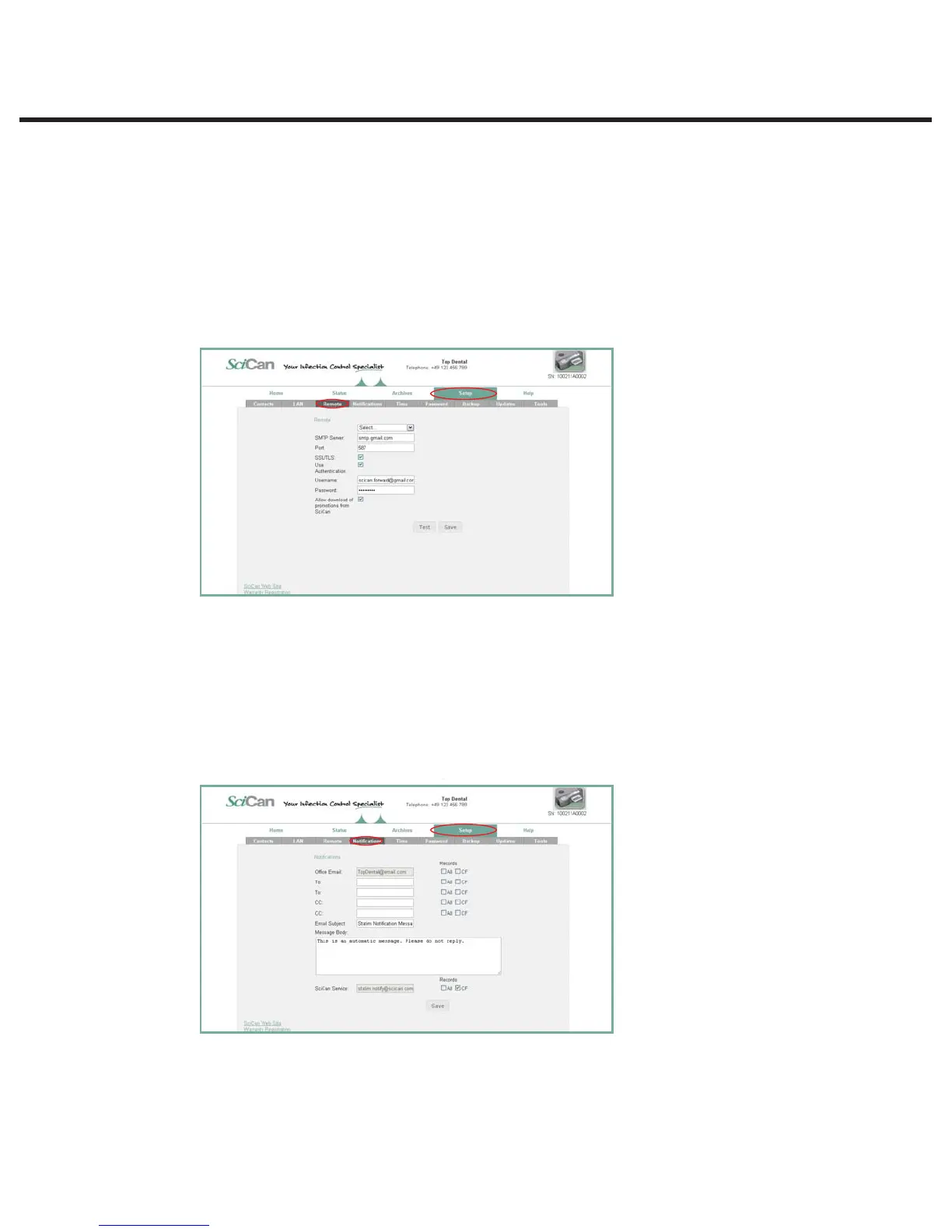
Setting up email
1. From the SETUP page, use the REMOTE tab to assign the unit an email address.
2. Your STATIM must use an email account set up either with your Internet service provider or
with a web-based email service. Populate the email account fields on this page with your
provider’s information if you are working with an email address from your Internet service
provider. To use one of the STATIM web portal’s preset email servers (choose from gmail, gmx
mail, Yahoo and MSN mail), you must create an account for your STATIM (e.g. drsmithstatim@
gmail.com).
3. A test email will be sent to verify your settings. Uncheck the box if the customer does not want
to receive downloads and promotions from SciCan.
Setting up email NOTIFICATIONS
1. From the SETUP page, use the NOTIFICATIONS tab to enter the email addresses to which will
be sent operating information and/or cycle faults.
2. A configurable message box lets you add details to identify the unit, such as its location.
3. Uncheck the box if the customer does not do not want SciCan Technical Service to
automatically receive the unit’s cycle fault emails.
NOTE: If you are not receiving emails from the unit, check the spam filter to be certain the
STAT
IM
has been identified as an accepted email source.



 To Next Page