Page 52
STAT
IM
2000/2000S Service Guide
96-108639 Rev 3.0
3. Troubleshooting Cycle Faults
per button can be accessed by pressing any specific button repeatedly until the desired cycle is
selected. This cycle is automatically the first cycle to show on the display the next time the cycle
button is pressed.
Note that units with Revision 6.x controller boards (rev 4.xx/5.xx software) DO NOT have a
service menu, so the locking/unlocking procedure is different.
If you do not require some of the extra cycles, each button can have the redundant cycles ‘locked
out’ to simplify cycle selection. Note that in ‘locked’ mode, each cycle button will only have
one cycle available. Single buttons cannot be locked, it must be all or none.
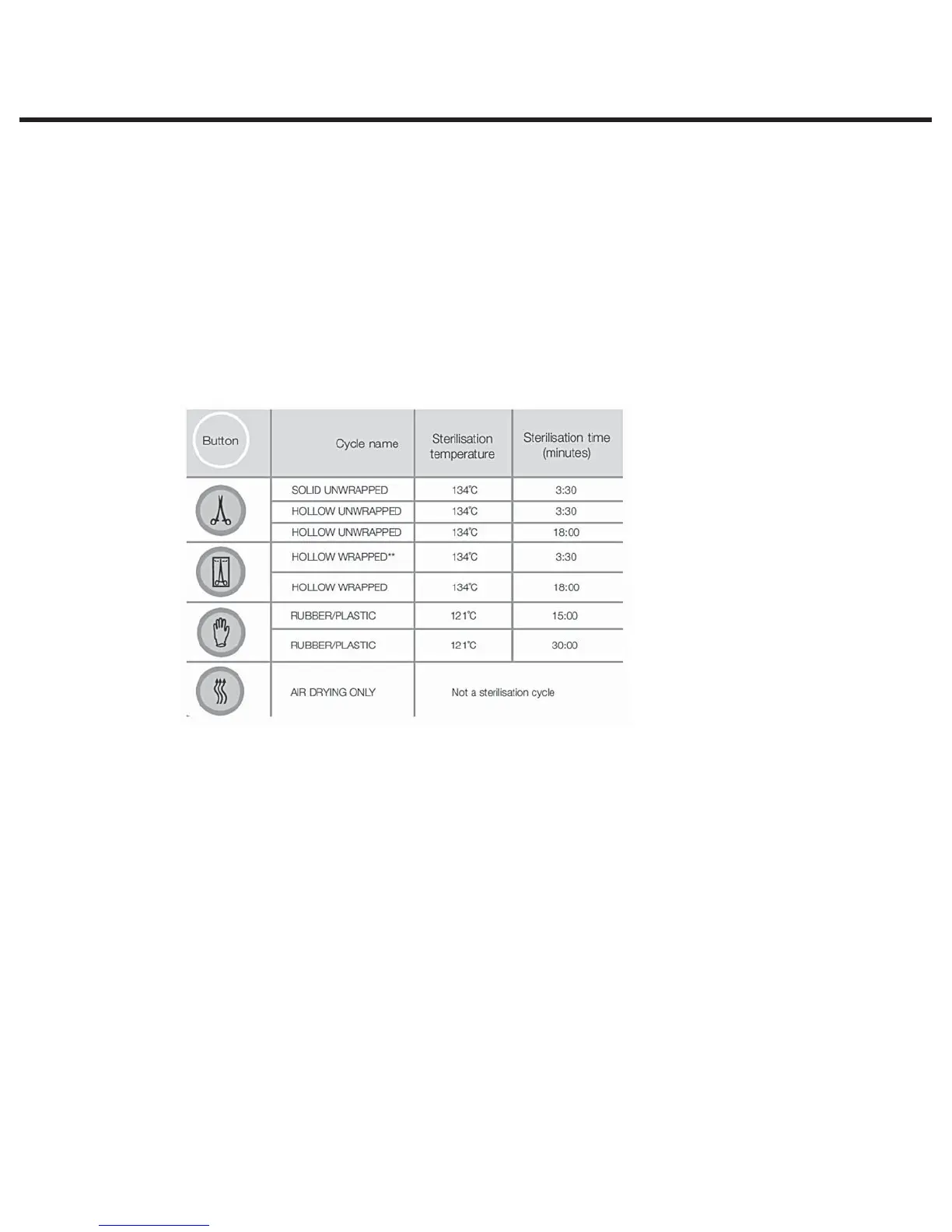
The cycles available on all ‘S’ class units mentioned above are as follows:
t4PMJE6OXSBQQFE$NJO/
t)PMMPX6OXSBQQFE$NJO4
t)PMMPX6OXSBQQFE$NJO4
t)PMMPX8SBQQFE$NJO4
t)PMMPX8SBQQFE$NJO4
t3VCCFSBOE1MBTUJDT$NJO4
t3VCCFSBOE1MBTUJDT$NJO4
Locking procedure for revision 6.x controller boards/software revision R4xx and R5xx
1. Turn the unit ON.
2. Press “Unwrapped” button repeatedly until the desired cycle is displayed.
3. Press “Wrapped” button repeatedly until the desired cycle is displayed.
4. Press “Rubber and Plastics” button repeatedly until the desired cycle is displayed.
5. Turn the unit OFF.
6. Install a calibration jumper on Controller Board pins marked W1.
7. Keep button “Rubber and Plastics” pressed and turn the unit ON. The unit will enter “Cycle
lock/unlock mode”
STATIM 2000/2000S/2000 G4 Service Guide



 To Next Page