PDW-700/V1 (E)
7-16
7-1-9. Removing/Reinstalling Lock Release Assembly
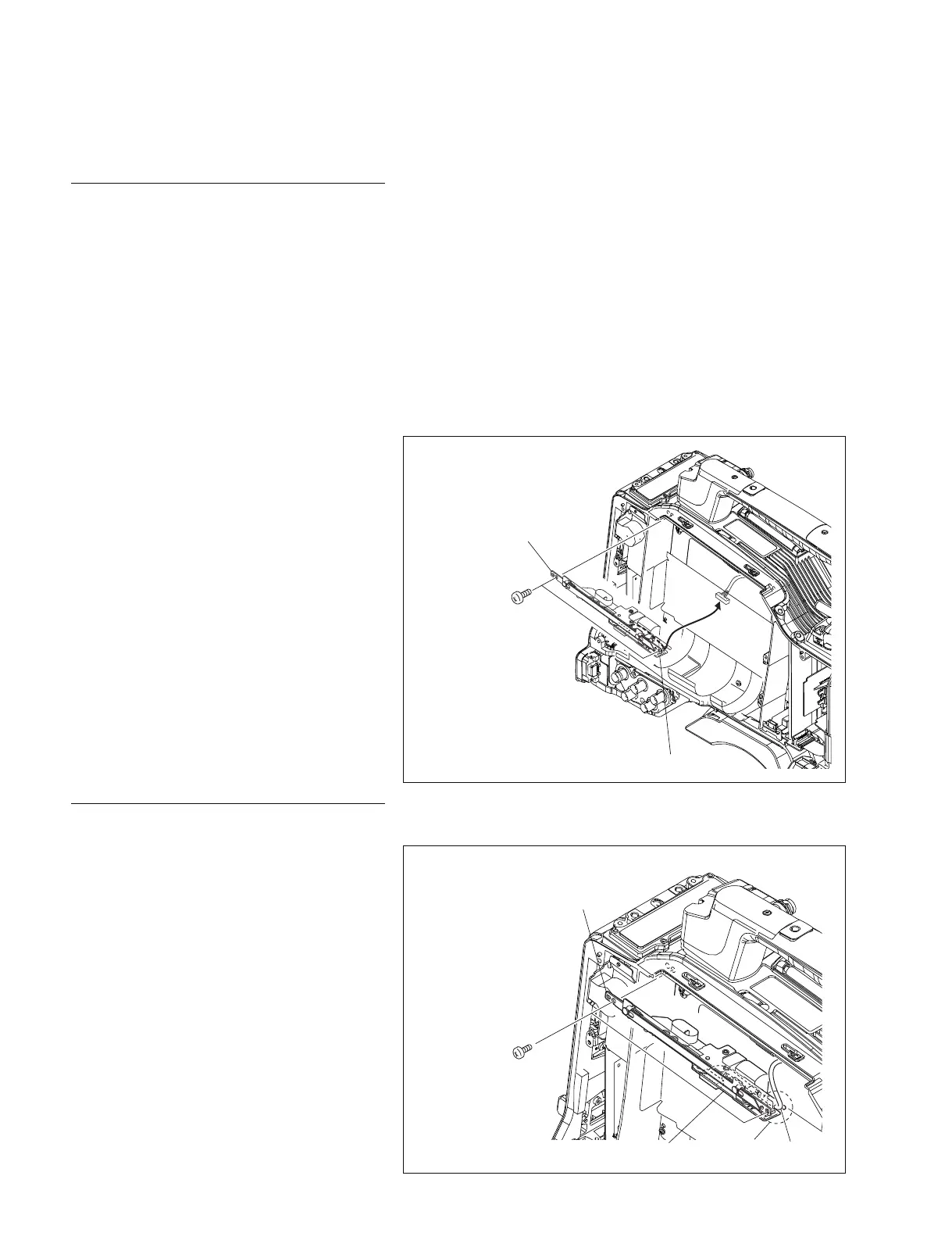
CN2/SW-1385 board
Lock release
assembly
P2 x 3
Removal
1. Remove the outside panel assembly.
(Refer to Section 1-7-1.)
2. Remove the laser caution sheet.
(Refer to Section 1-6-2 step 2.)
3. Remove the corner block with adhesive sheet
and cover sheet.
(Refer to Section 7-1-1 step 3.)
4. Remove the SW guard assembly.
(Refer to Section 1-7-6.)
5. Remove the loader assembly.
(Refer to Section 7-1-1.)
6. Remove the drive sub assembly.
(Refer to Section 7-1-2.)
7. Remove the two screws and remove the lock
release assembly.
8. Disconnect the harness from the connector
(CN2) on the SW-1385 board.
Reinstallation
1. Connect the harness to the connector (CN2)
on the SW-1385 board.
2. Install the lock release assembly with the two
screws while hooking the slacked portion of
the harness into the recess of the SW-1385
board.
3. Reinstall the removed parts by reversing
steps 1 to 6.
Lock release
assembly
Harness
P2 x 3
Recess
SW-1385 board



 To Next Page