1-53
PDW-700/V1 (E)
1-12-3. Stop Washer
Never re-use the pre-used stop washers.
When attaching the part, be sure to use the new stop
washer.
. Stop washer (Sony part number : 3-559-408-11)
How to remove stop washer
1. Remove the stop washer using a pair of small nippers
or tweezers.
m
. Be careful not to drop the stop washer in the unit.
. Be careful not to bring the tool into contact with the
other parts, especially the drum.
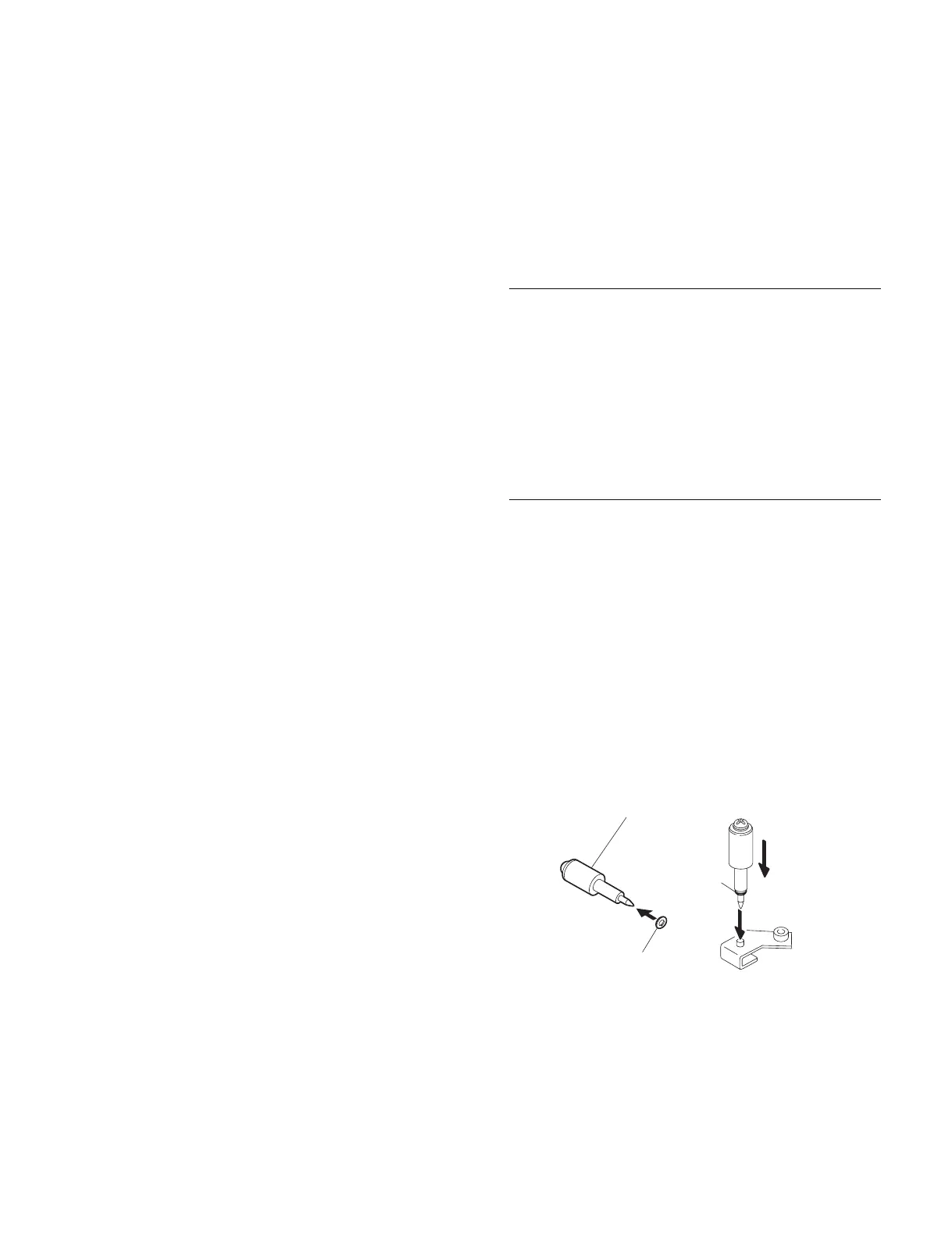
How to install stop washer
When attaching, it is recommended to use the following
tool.(Refer to “1-10-1. Service Tools”. for details)
Stop washer fastening tool
Stop washer fastening tool
1. Put the stop washer to the top thin part of the stop
washer fastening tool.
2. Stand the thin top of the tool on the top of the shaft in
an upright position.
3. Press thick part of the tool downward and attach the
stop washer to the shaft.
Stop washer fastening tool
Stop washer
Stop washer
1-12-2. Standard Torque for Screws
When tightening a screw, be sure to use the specified
torque driver and tightening torque.
When a tightening torque is specified in each removal,
reinstallation, replacement, or adjustment procedure in this
manual, be sure to use it. When no tightening torque is
specified, use the following standard tightening torques.
Fixtures
. Bit for torque driver (for M1.4 / M1.7)
. Bit for torque driver (for M2)
. Bit for torque driver (for M3)
. Torque driver (for 3 kg)
. Torque driver (for 6 kg)
. Torque driver (for 10 kg)
M1.7 (+) screw : 19 x 10
_2
± 0.01 N.m (1.9 ± 0.1 kgf.cm)
M2 (+) screw : 20 x 10
_2
± 0.01 N.m (2.0 ± 0.1 kgf.cm)
M2.6 (+) screw : 53 x 10
_2
± 0.01 N.m (5.3 ± 0.1 kgf.cm)
M3 (+) screw : 80 x 10
_2
± 0.01 N.m (8.0 ± 0.1 kgf.cm)



 To Next Page