PDW-700/V1 (E)
7-33
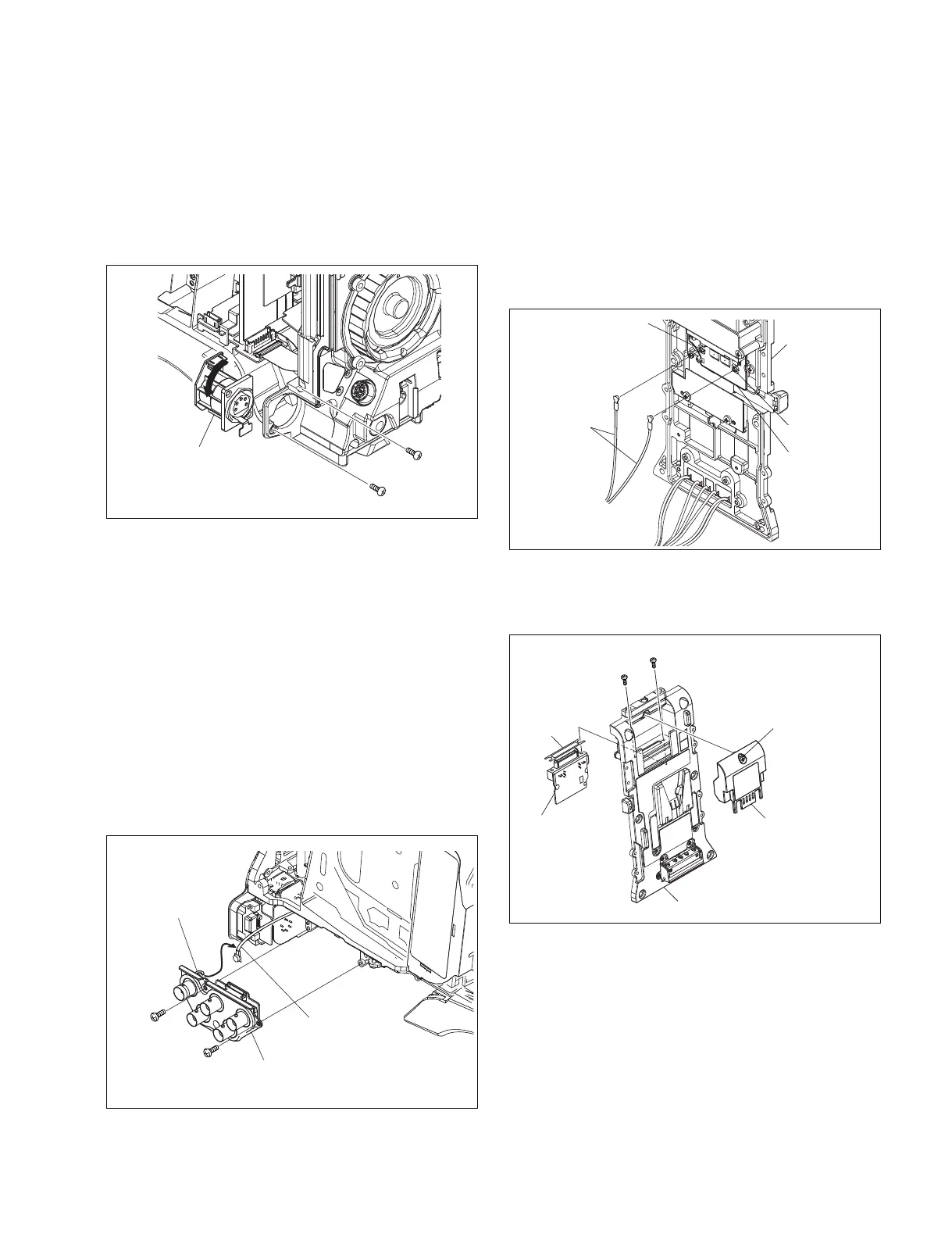
7-7-9. CN-3001 Board
1. Remove the outside panel. (Refer to Section 1-7-1.)
2. Remove the two screws.
3. Disconnect the harness from the connector (CN2) , and
remove the CN-3001 board by turning it in the
direction of the arrow.
7-7-10. IO-235 Board
1. Remove the outside panel. (Refer to Section 1-7-1.)
2. Remove the inside panel. (Refer to Section 1-7-3.)
3. Remove the connector cover. (Refer to Section 1-7-7.)
4. Remove the two screws.
5. Remove the coaxial cable from the coaxial connector
and coaxial cable hold washer.
6. Disconnect the harness from the connector (CN1) , and
remove the IO-235 board.
7-7-11. CI-37 Board
1. Remove the outside panel. (Refer to Section 1-7-1.)
2. Remove the inside panel. (Refer to Section 1-7-3.)
3. Remove the connector cover. (Refer to Section 1-7-7.)
4. Remove the connector panel. (Refer to Section 1-7-8.)
5. Remove the rear panel. (Refer to Section 1-7-9.)
6. Disconnect the two coaxial cables from connectors
(CN1, CN2) on the CI-37 board.
Turn CN-3001 board
90 degrees
P2.6 x 6
P2.6 x 6
Coaxial cable
hold washer
Coaxial cable
IO-235 board
B2.6 x 5
B2.6 x 5
B2.6 x 5
Screw (drop-safe)
B2.6 x 5
50P cover assembly
Rear panel
CI-37 board
Insulating
sheet
Rear panel
Coaxial cables
CN1
CN2
CI-37 board
7. Reinstall the removed parts by reversing steps 1 to 6 of
removal.
4. Reinstall the removed parts by reversing steps 1 to 3 of
removal.
7. Loosen the screw, and remove the 50P cover
assembly.
8. Remove the two screws, and remove the CI-37 board.
9. Reinstall the removed parts by reversing steps 1 to 8 of
removal.



 To Next Page