PDW-700/V1 (E)
7-25
7-5. Removing/Reinstalling CCD Unit
. Tool: L-wrench (across flat: 1.5 mm)
L-wrench (across flat: 1.5 mm)
7-5-1. Removing CCD Unit
1. Remove the outside panel assembly.
(Refer to Section 1-7-1.)
2. Remove the inside panel assembly.
(Refer to Section 1-7-3.)
3. Remove the front panel.
(Refer to Section 1-7-5.)
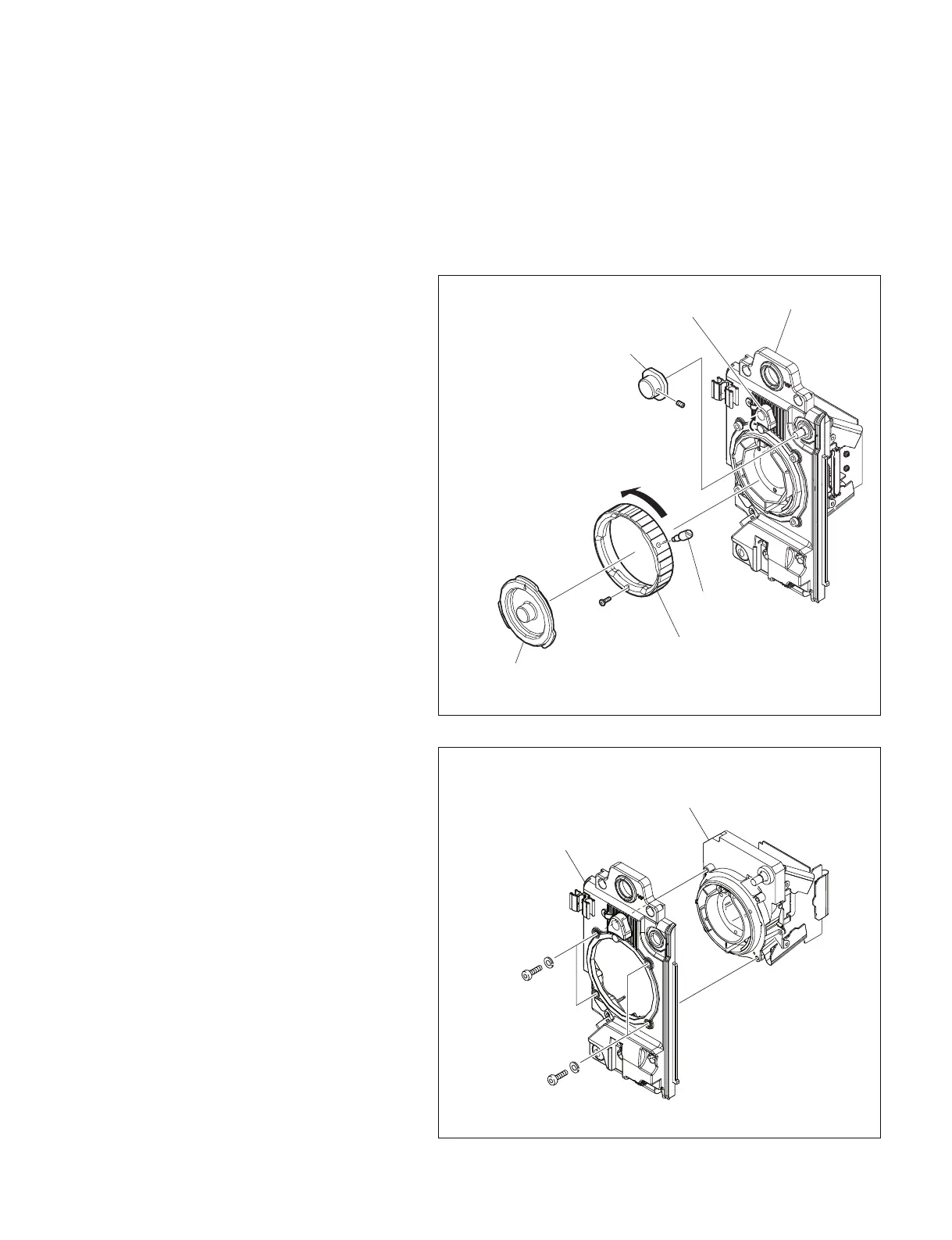
4. Loosen the filter knob setscrew, and remove
the filter knob.
5. Move the position of the lens mount holder.
6. Turn the lens mount counterclockwise, and
remove the mount cap.
n
Do not touch the filter while the mount cap is
removed.
7. Remove the screw (M2 x 4) and mount lever.
8. Turn the lens mount counterclockwise to
remove.
WP3 x 3
M2 x 4
Filter knob
Front panel
Lens mount holder
Lens mount
Mount cap
Mount lever
M3 x 8
M3 x 8
SW3
SW3
CCD block assembly
Front panel
9. Remove the four bolts (M3 x 8) and four
spring washers, and remove the CCD unit
from the front panel.



 To Next Page