1-34
PDW-700/V1 (E)
1-6. How to Take Out a Cartridge
Manually
1-6-1. Taking Out a Cartridge at Power-off
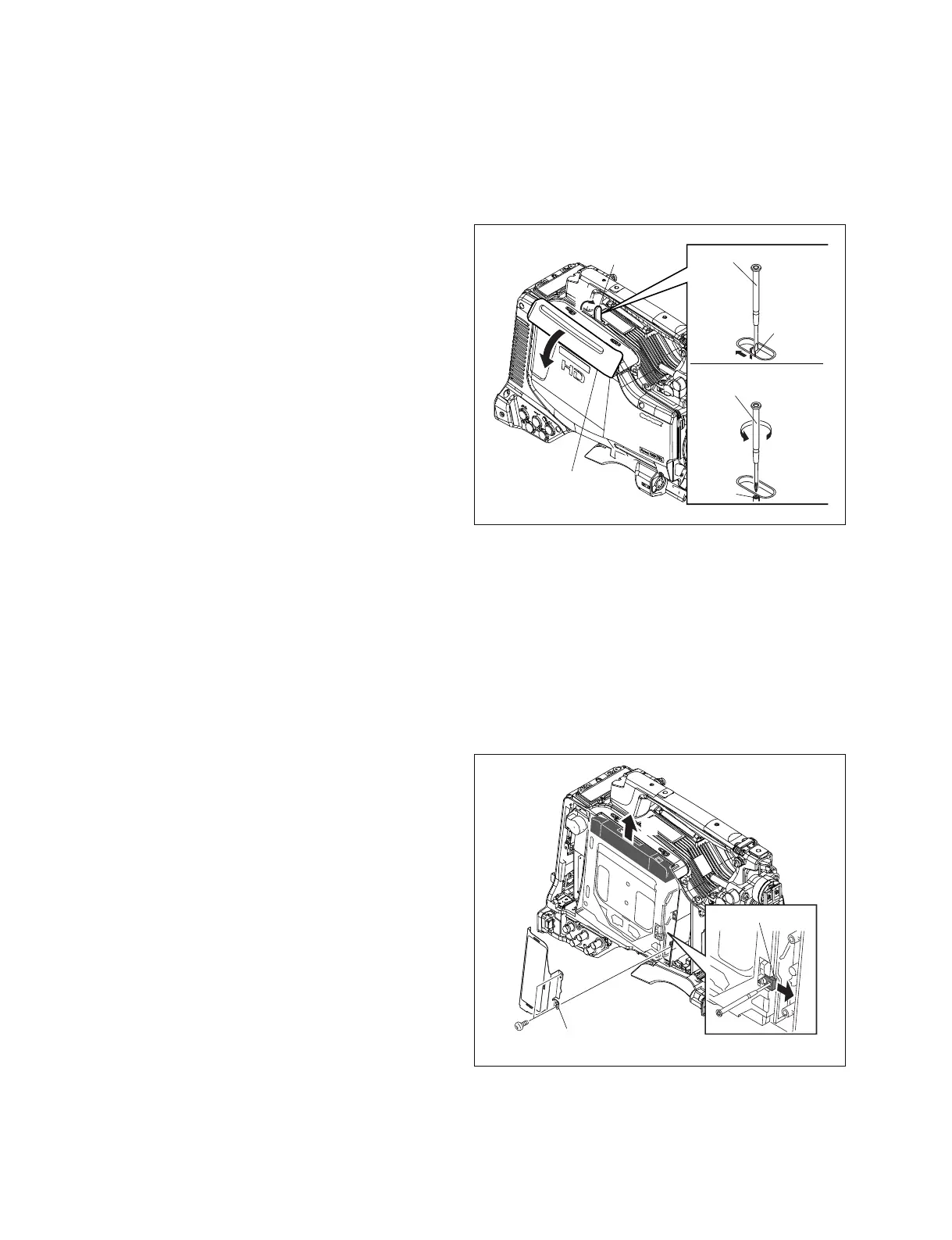
1. Open the cover in the direction of the arrow A.
2. Push the lock lever in the direction of the arrow B with
a screwdriver. The cartridge lid assembly is opened in
the direction of the arrow C.
3. Rotate the gear counterclockwise with a crosshead
screwdriver to eject the cartridge.
If a cartridge cannot be taken out, turn the gear
clockwise until it will go and then turn it counterclock-
wise again.
m
. Turn the gear slowly and gently. Be careful not to
force the gear past their stopping points.
. Be sure not to touch or forcibly take out the cartridge
until it is completely ejected.
. Even when the cartridge cannot be ejected with this
procedure, do not rotate the gear with an excessive
force. This error may be caused by a problem in the
loader assembly.
In this case, refer to Section 1-6-2.
1-6-2. When You Cannot Take Out a
Cartridge Even If Pressing the EJECT
Button at Power-on
1. Remove the outside panel. (Refer to Section 1-7-1.)
2. Remove the four screws and remove the laser caution
sheet.
3. Push the release pin in the direction arrow A, and pull
out the cartridge from the unit in the direction of the
arrow B.
n
Be careful not to touch the disc surface in the cartridge.
Flat-blade screwdriver
Cartridge lid
assembly
Cover
Lock
lever
Cross head (+)
screwdriver
Gear
A
C
B
A
B2.6 x 5
Laser caution
sheet
Release pin
B



 To Next Page