4-69
PDW-700/V1 (E)
4-9. SERVICE Menu
n
When the range of setting is surrounded by parenthesis ( )
in the setting column, the setup value is the relative value.
The range of setting in parenthesis ( ) can be different from
what shown in the manual depending on the setting in the
layer lower than this menu.
Display method 1
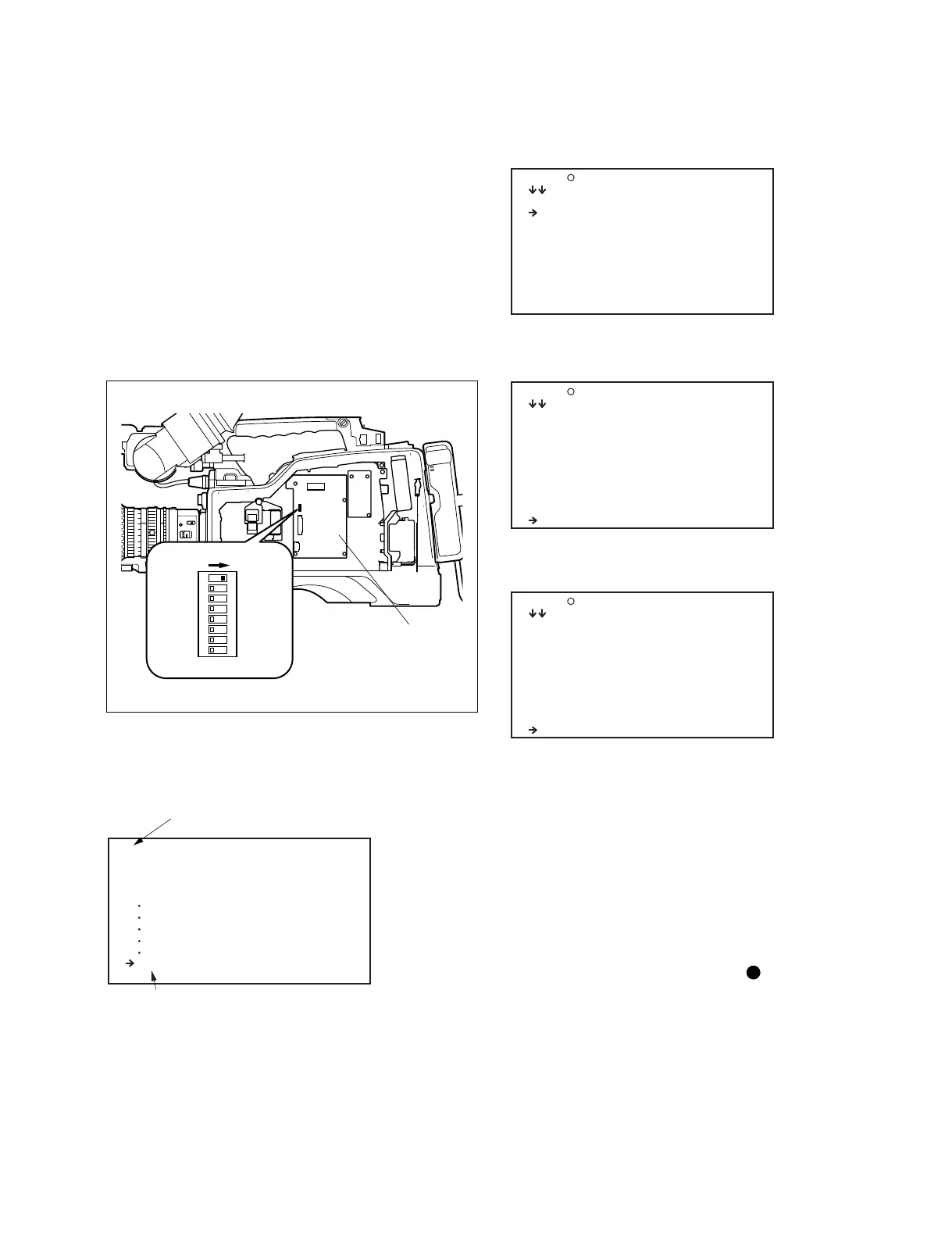
1. Open the inside panel. (Refer to Section 1-7-3, step 1.)
2. Set the S402-1/AT-177 board to the “ON” position.
3. Close the inside panel. (Refer to Section 1-7-3, step 1.)
4. Turn on the power and flip the MENU switch to ON.
5. Enter SERVICE mode to display the SERVICE menu.
AT-177 board
S402
1
2
3
4
5
6
7
8
O
N
SERVICE
S00 CONTENTS TOP
01.MENU SET
02.SP FUNC
03.WHITE SHADING
04.BLACK SHADING
05.SHADING
06.VCO ADJUST
07.CCD ADJUST 1
08.CCD ADJUST 2
09.REGI ADJUST
10.FBC ADJUST
S <TOP MENU>
USER
USER CUSTOMIZE
ALL
OPERATION
PAINT
MAINTENANCE
FILE
DIAGNOSIS
SERVICE
Indicate SERVICE mode
The SERVICE menu can be selected
6. The following contents are available in the SERVICE
menu.
7. Keep turning the MENU knob to display the next page
(11-20).
8. Keep turning the MENU knob further to display the
next page (21-25).
m
. After servicing is completed, make sure to set the
S402-1/AT-177 board to the “OFF” position, and exit
from SERVICE mode.
. When parameters are changed while the SERVICE menu
is displayed, run ALL PRESET from the RESET menu
after exiting from SERVICE mode to activate the
changed parameters.
Display method 2
. Select the DIAGNOSIS menu D00 CONTENTS
page.
. While pressing the MENU knob and the ASSIGN1
switch simultaneously, set the MENU ON/OFF switch
from OFF to ON. (However, if the switch S402-2/AT-
177 board is set to ON, or if the switch S400/AT-177
board is OFF, this method is disabled).
S00 CONTENTS TOP
11.LCD ADJUST
12.FLARE
13.GAMMA/DETAIL
14.MANUAL RPN
15.RPN MANAGE
16.VDR MAINTENANCE
17.FAN
18.MEASURE
19.FILTER CTEMP
20.BATTERY INFO
S00 CONTENTS TOP
16.VDR MAINTENANCE
17.FAN
18.MEASURE
19.FILTER CTEMP
20.BATTERY INFO
21.HOURS METER2
22.FUNCTION LIMIT
23.S/H DC
24.BOARD INFO
25.SERVICE FILE



 To Next Page