Customer Replaceable Units Z-Drive Belt
Page 217
© Copyright 2021 Stratasys. All rights reserved.
Z-Drive Belt
Required Tools
• 3 mm hex wrench
Removing the Z-Drive Belt
1. Using the touchscreen, move the Z-stage to its lower limit.
2. Power OFF the printer. See “Powering Off” (page 182).
3. Open the appropriate top side access door. See “Opening Top Access Doors Left/Right”
(page 183).
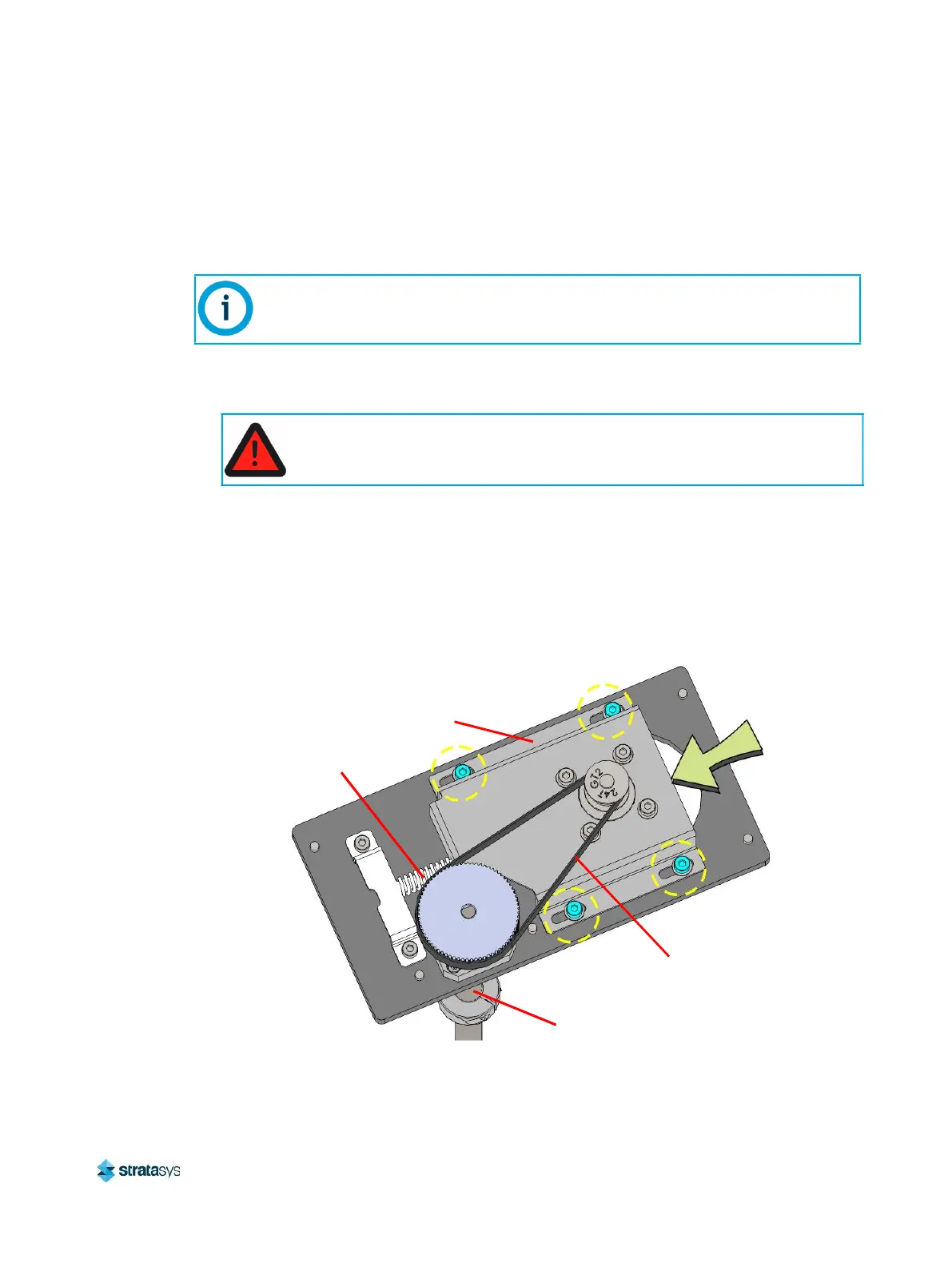
4. Use a 3 mm hex wrench to loosen the Z motor tension bracket screws (4). See Figure 50.
5. Relax the Z drive belt tension by pushing the Z-motor tension bracket against the
compression spring. See Figure 50.
Figure 50: Z-Motor tension bracket screw locations
6. While the belt tension is relaxed, remove the Z-drive belt from its pulleys and extract it from
the printer.
The following procedure depicts the right side Z drive belt only. The left side Z drive
belt procedure is identical to the right.
Always perform lockout-tagout of the AC power cord in accordance with
customer site procedures.
Z Drive Belt
Tension
Bracket
Compression
Spring
Z Axis Lead Screw














 To Next Page