Customer Replaceable Units Head Ribbon Cables
Page 200
© Copyright 2021 Stratasys. All rights reserved.
Head Ribbon Cables
Removing the Head Ribbon Cables
1. With the printer powered ON, open the top right access door. See “Opening Top Access
Doors Left/Right” (page 183).
2. Move the Y-bridge to the right side of the gantry enclosure.
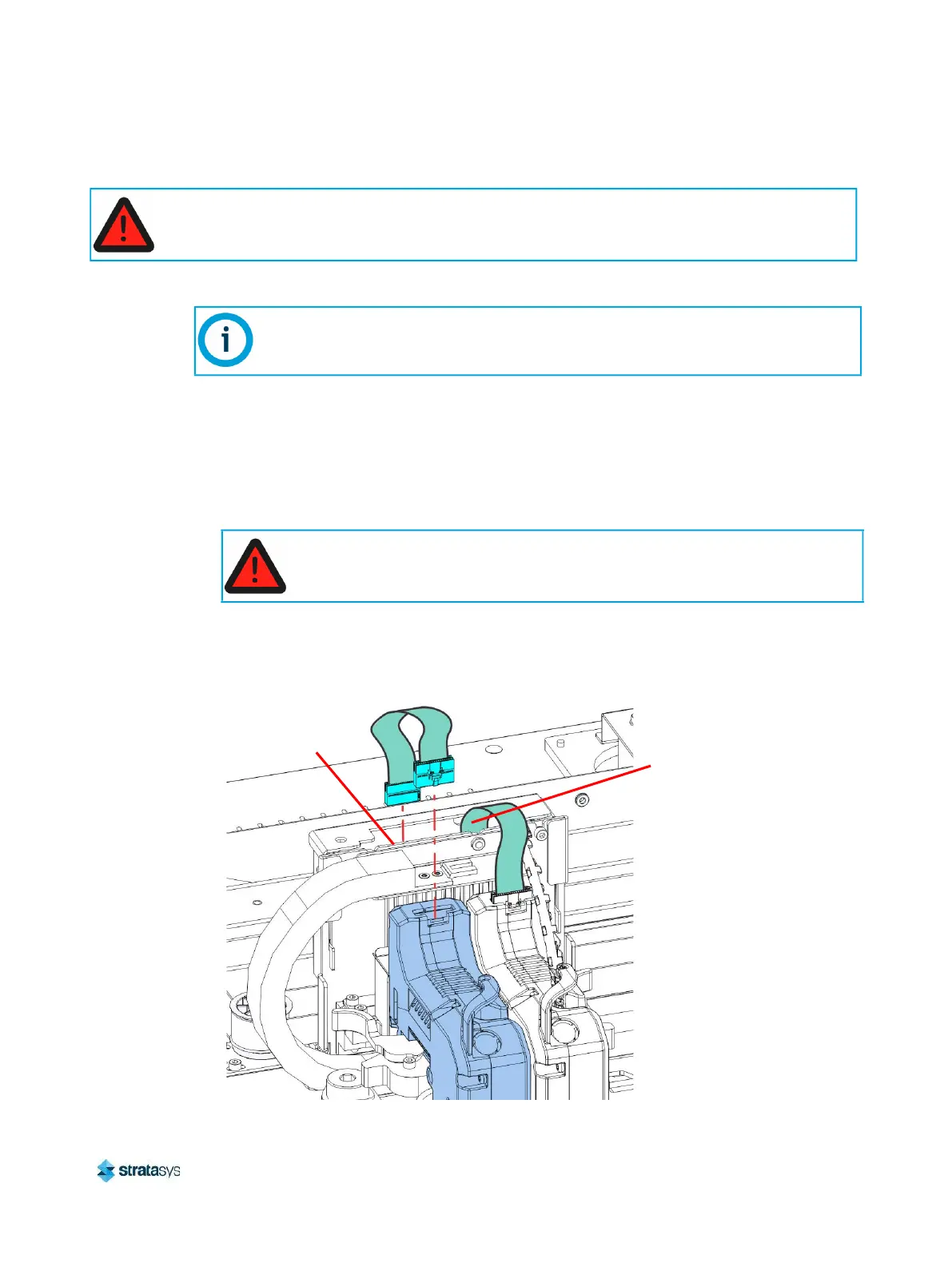
3. Disconnect the head ribbon cable connectors (2) from the tops of the material and support
heads. See Figure 36.
4. Power OFF the printer. See “Powering Off” (page 182).
5. Disconnect the head ribbon cable connectors (2) from the connectors on top of the head
board (J6 and J7). See Figure 36.
Figure 36: Head ribbon cable connections
When performing maintenance procedures inside the gantry area, power must be removed from
the printer, or the top right access door must remain open to ensure that the interlock is
disengaged.
Make sure to disconnect the head ribbon cables while the printer is powered ON to
ensure that auto-calibration occurs after re-installation.
Always perform lockout-tagout of the AC power cord in accordance with
customer site procedures.
Model
Head J6
Support
Head J7














 To Next Page