Customer Replaceable Units Y-Belt Idler Pulley
Page 211
© Copyright 2021 Stratasys. All rights reserved.
Y-Belt Idler Pulley
Required Tools
• 2.5 mm hex wrench
• 3 mm hex wrench
Removing the Y Belt Idler Pulley
1. Power off the printer. See “Powering Off” (page 182).
2. Open the top front access door. See “Opening Top Access Doors Front/Rear” (page 184).
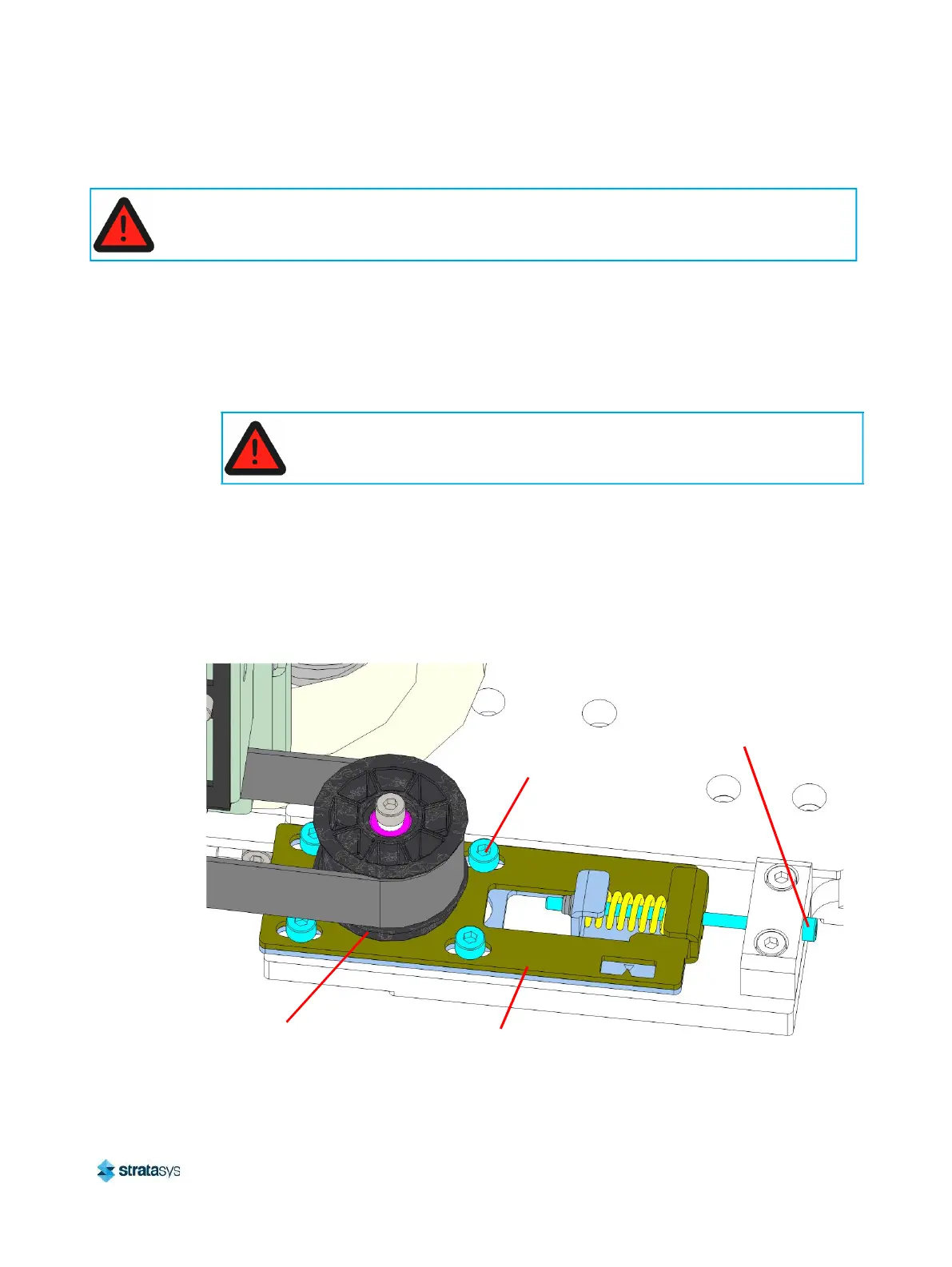
3. Using a 3 mm hex wrench, loosen the locking screws (4) that secure the Y belt tension
brackets. See Figure 43.
4. Use a 2.5mm hex wrench to loosen the Y belt tension adjustment screw to relax the belt
tension. See Figure 43.
Figure 43: Y belt tension adjustment bracket location
5. Remove the Y drive belt from the Y axis idler pulley.
When performing maintenance procedures inside the gantry area, power must be removed from
the printer, or the top right access door must remain open to ensure that the interlock is
disengaged.
Always perform lockout-tagout of the AC power cord in accordance with
customer site procedures.
Locking
Screws (4)
Y Belt Tension
Bracket
Y Belt Tension
Adjustment
Screw
Y Axis Idler
Pulley














 To Next Page