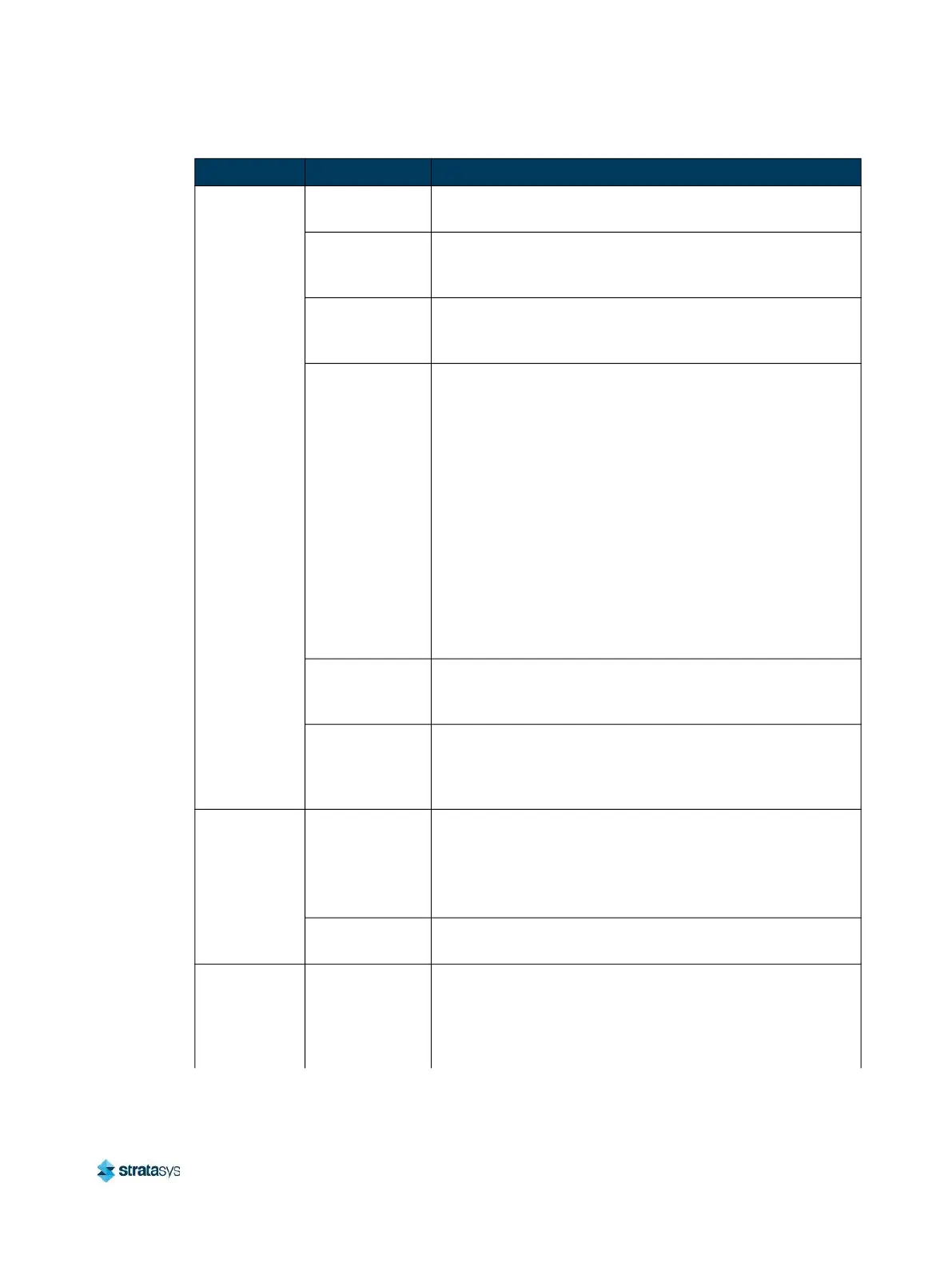
Finding a Remedy Head Errors
Page 247
© Copyright 2021 Stratasys. All rights reserved.
System
paused with
No material
detected at
head error
Material spinout
Unload and reload material. See “Unloading Material”
(page 11) and “Loading Material” (page 3).
Material coil box
is cross-wound
Pull material from the material coil box until the point were
the cross-winding is reached. Re-load material. See
“Loading Material” (page 3).
Calibration
performed
incorrectly
Perform an “Automatic Tip Calibration” (page 2). Next
perform a “Manual Tip Calibration” (page 5). Enter the results
using the touch screen GUI.
Filament
snagged within
material coil box.
Unload material. Open the material coil box and remove bag
and patch disc. Taking care not to shake or drop the material
coil bag, set the material coil bag gently on side its side.
Make a 20cm (8 in.) X-shaped incision into the material coil
bag. Locate and cut out snagged filament. If it is necessary to
remove the descant pouches from the material coil bag to
find the snagged filament, retain them. Remove remaining
filament from tube. Feed approximately meters of filament
through tube to confirm material feeds properly. Trim excess
material. Apply patch to material coil bag. While holding the
material coil bag from the sides, reinsert the material coil bag
into material coil box. Keep filament tube oriented 45° to box
slot. Trim any excess filament as required. Load material.
See “Unloading Material” (page 118), “Handling/Storing
Materials” (page 121), and “Loading Material” (page 107).
Broken material
clogging filament
tube
Locate broken material by manually feeding material to the
head from the material port.
Confirm the blue
elbow of the
material tube is
properly seated
If elbow is not properly seated, call reseller to order the
bracket designed to prevent this issue.
Loss of
extrusion
(head will not
extrude
material)
Plugged Tips
Verify that material purges by initiating a purge using the
model and/or support purge buttons. See “Head
Maintenance” (page 65).
Replace head with new head and recalibrate. See “Head
Replacement” (page 121).
Printer not
calibrated
Perform a Tip Offset Calibration. See “Tip Calibration”
(page 150).
Support
material is
difficult to
remove from
part
Support material
is embedded in
the vertical
surfaces of the
part.
Adjust the Tip Offset Calibration. See “Manual Tip
Calibration” (page 154).
Condition Possible Cause Remedy














 To Next Page