Model 100E Instruction Manual Calibration Procedures
045150102 Rev XB1 133
7.4. Manual Calibration with Zero/Span Valves
Zero and Span calibrations using the Zero/Span Valve option are similar to that described
in Section 7.2, except that:
• Zero air and span gas is supplied to the analyzer through the zero gas and span
gas inlets rather than through the sample inlet.
• The zero and cal operations are initiated directly and independently with dedicated
keys (CALZ & CALS)
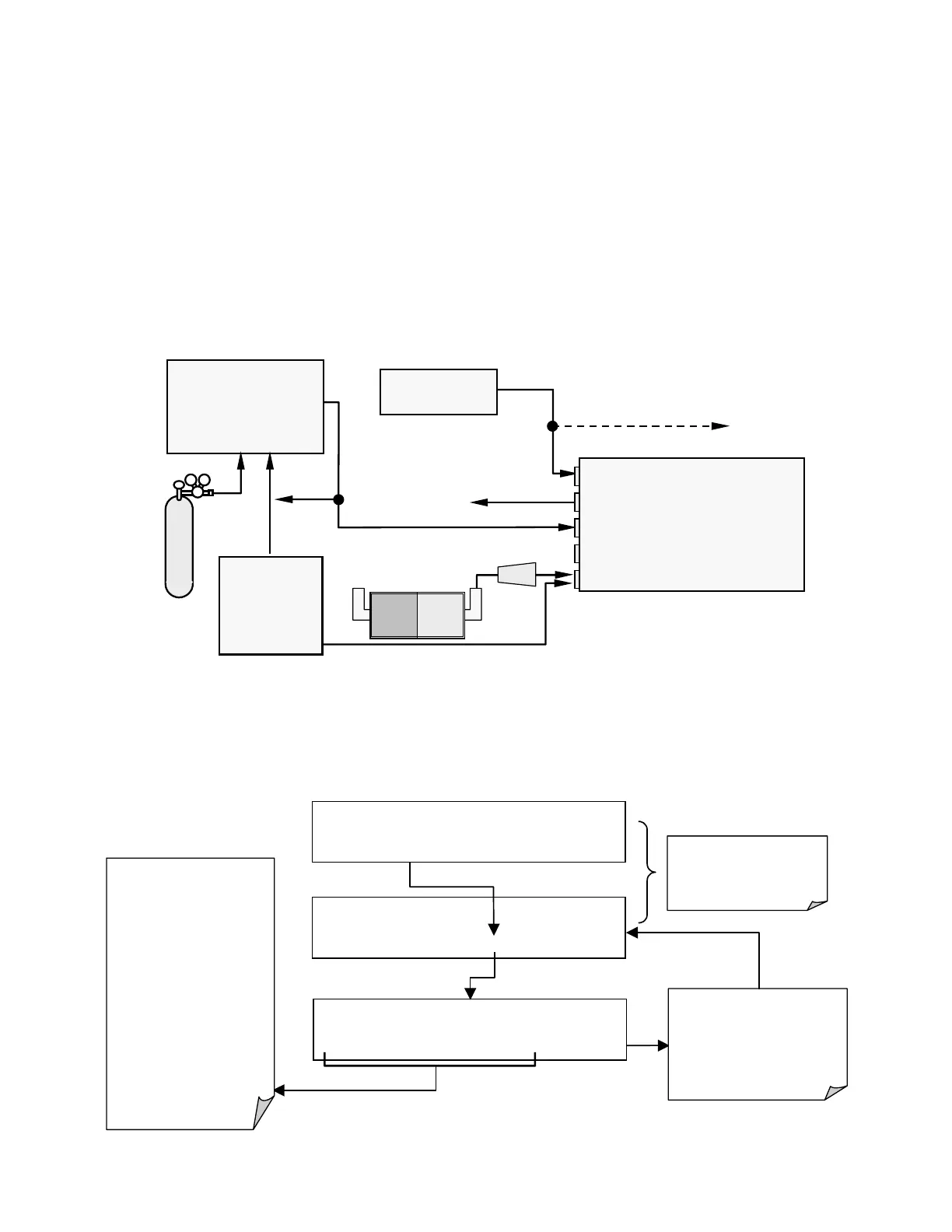
STEP ONE: Connect the sources of zero air and span gas to the respective ports on the
rear panel (Figure 3-2) as shown below.
External Zero
Air Scrubber
Filter
MODEL 701
Zero Air
Generator
Source of
SAMPLE Gas
VENT if input is pressurized
MODEL 700
Gas Dilution Calibrator
(with O
3
generator option)
VENT
MODEL
100E
Sam
le
Zero Air
Exhaust
S
an
Calibrated
SO
2
gas
(At high
concentration)
Figure 7-2: Setup for Manual Calibration with Z/S Valve Option Installed
Step Two: Set the expected SO
2
span gas value:
This sequence causes the
analyzer to prompt for the
expected NO and NO
x
span concentration.
M-P CAL SO2 SPAN CONC: 450.0 Conc
0 0 0 4 5 .0 ENTR EXIT
M-P CAL RANGE = 500.000 PPB SO2 =X.XXX
< TST TST > ZERO CONC EXIT
SAMPLE* RANGE = 500.000 PPB SO2 =X.XXX
< TST TST > CAL SETUP
The SO
2
span concentration
values automatically default
to 450.0 Conc.
To change this value to the
actual concentration of the
span gas, enter the number
by pressing the key under
each digit until the expected
value appears.
The span gas concentration
should always be 90% of the
selected reporting range
EXAMPLE
Reporting range = 800 ppb
Span gas conc.= 720 ppb
EXIT ignores the new setting
and returns to the previous
display.
ENTR
accepts the new setting
and returns to the
previous display..



 To Next Page