Operating Elements 107
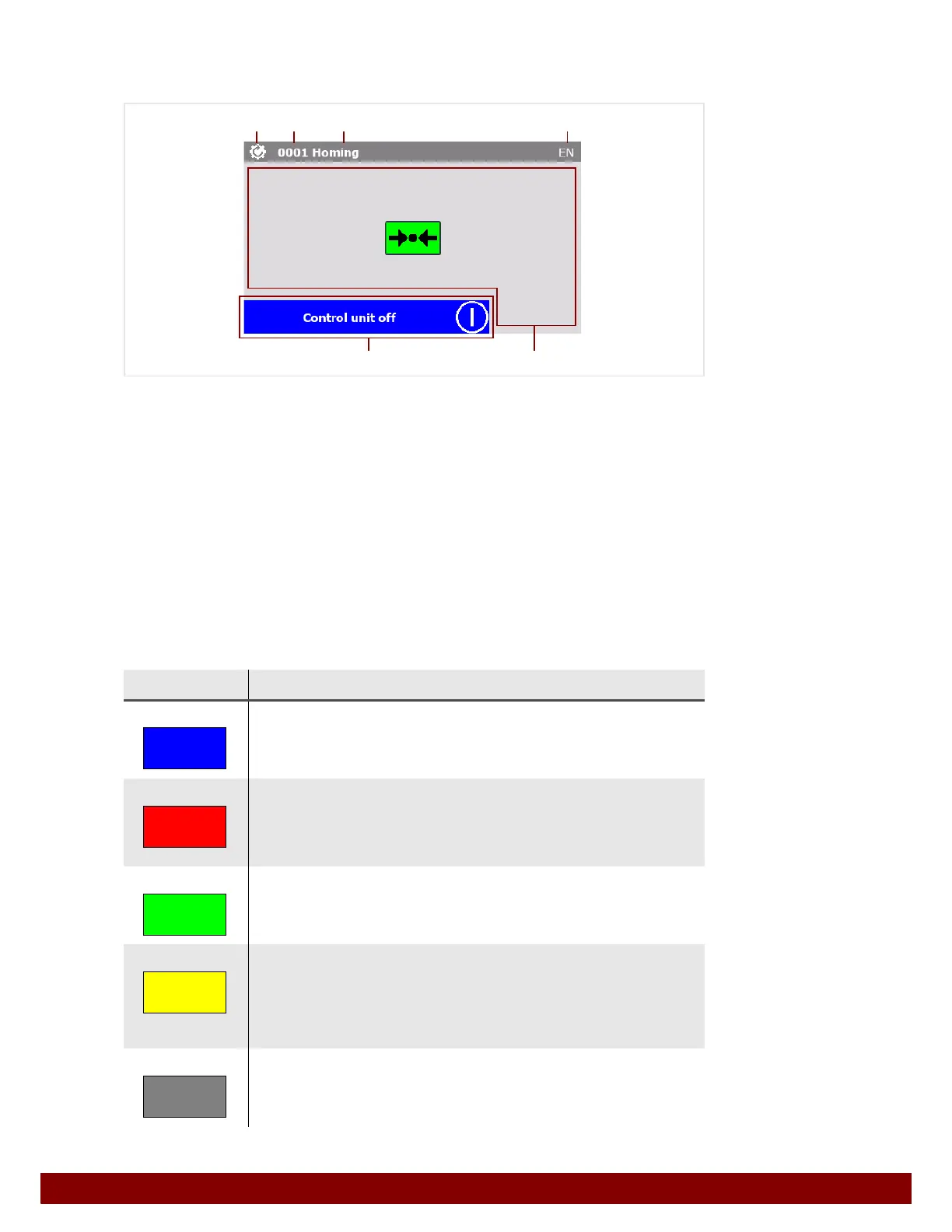
22.4 Layout of a Menu Window
The layout of all menu windows follows the same structure.
B Operation mode menu symbol.
C Number of the menu window.
D Name of the menu window.
E Initials for current selected language of user interface.
F Field for operating notifications and information. If no notification is displayed, the date
and time will be shown.
G Individual functions of the menu window.
22.5 Meaning of the Colors in the Menu
The colors of push buttons, notifications and symbols signify certain characteristics or con-
ditions.
Color Meaning
Blue Blue fields display current information.
Display of operating notifications.
Display of menu information and status conditions.
Red Red fields display malfunctions and errors.
Locked functions due to malpositions or operating errors.
Unsuccessful actions.
Light curtain interrupted.
Green Green fields display the status of functions.
Function selected.
Function activated.
Yellow Yellow fields are push buttons and can be operated directly by touching
the touch screen. The following functions are possible:
Navigation in the menu windows.
Selecting or activating a function.
Entering a value.
Grey Grey fields are deactivated functions.
The function cannot be carried out because the machine’s operating status
does not allow this or the function has been blocked because of a menu set-
ting.
B
C
DE
F G



 To Next Page