Settings 133
26.7.4 Cycle signal
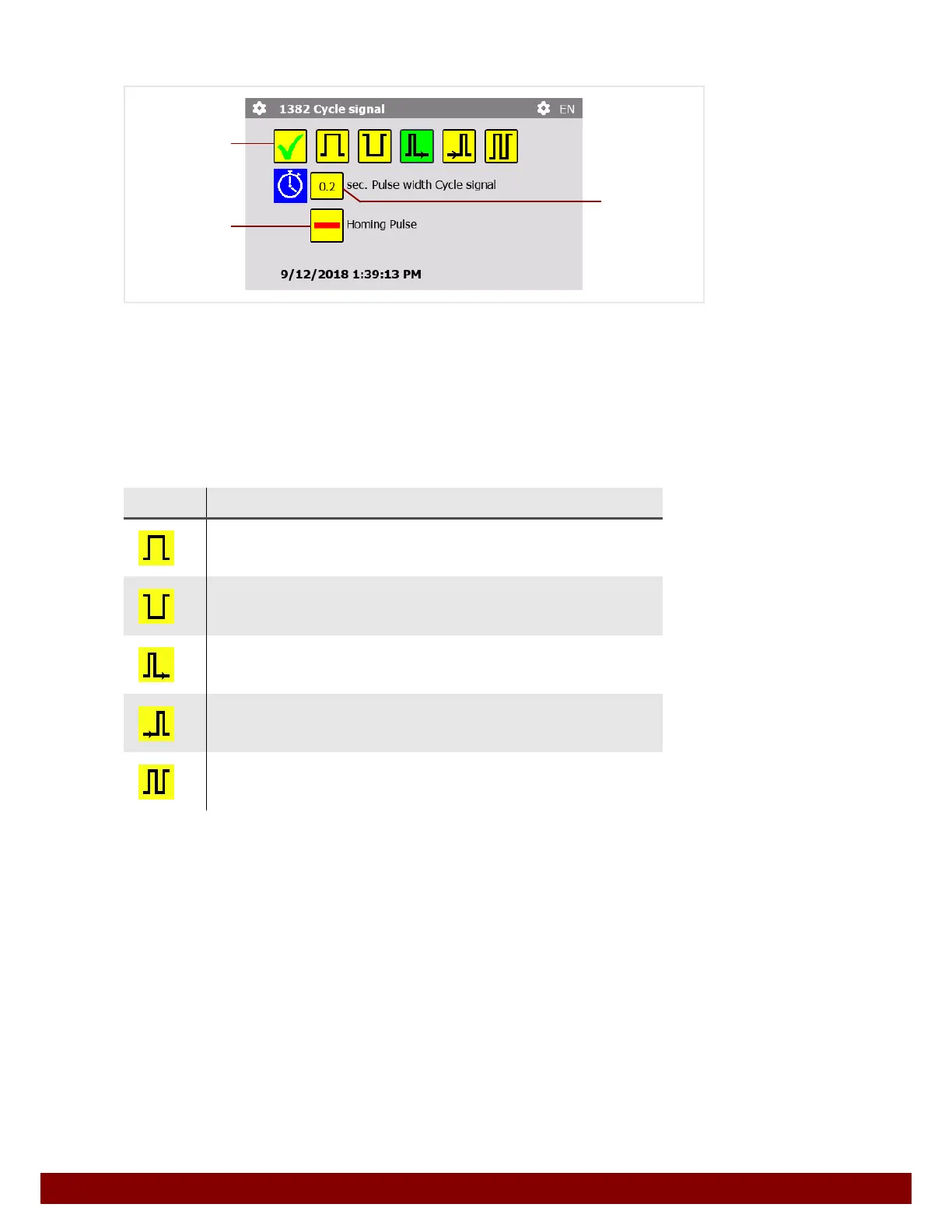
By pressing the push button B, the Cycle signal can be activated or deactivated at an
automation interface output.
The characteristics of the signal are described in Chapter 31 "Automation Interface" on
page 161.
The cycle signal is emitted dependent on a print cycle. If several print pulses are perfor-
med in a print cycle, the output signal is based on the entire print cycle. A pad cleaning
before or after the print cycle will not be taken into account.
Homing pulse
By pressing the push button
D a homing pulse can also be activated or deactivated for
the Cycle signal at an automation interface output.
The homing pulse is emitted once – after the control unit is switched on or when homing is
carried out – in order to move an external module (e.g. a rotary table) to the home position.
Symbol Function
Permanent signal
The signal switches to HIGH at the beginning of the print cycle and
LOW at the end.
Permanent signal inverted
The signal switches to LOW at the beginning of the print cycle and
HIGH at the end.
Pulse at beginning
The signal switches to HIGH at the beginning of the print cycle and
to LOW after the pulse width cycle
C.
Pulse at end
The signal switches to HIGH at the end of the print cycle and to
LOW after the pulse width cycle
C.
Signal change for every print cycle.
The signal changes state at the beginning of the print cycle.
(Alternating HIGH and LOW.)
B
C
D



 To Next Page