172 Automation Interface
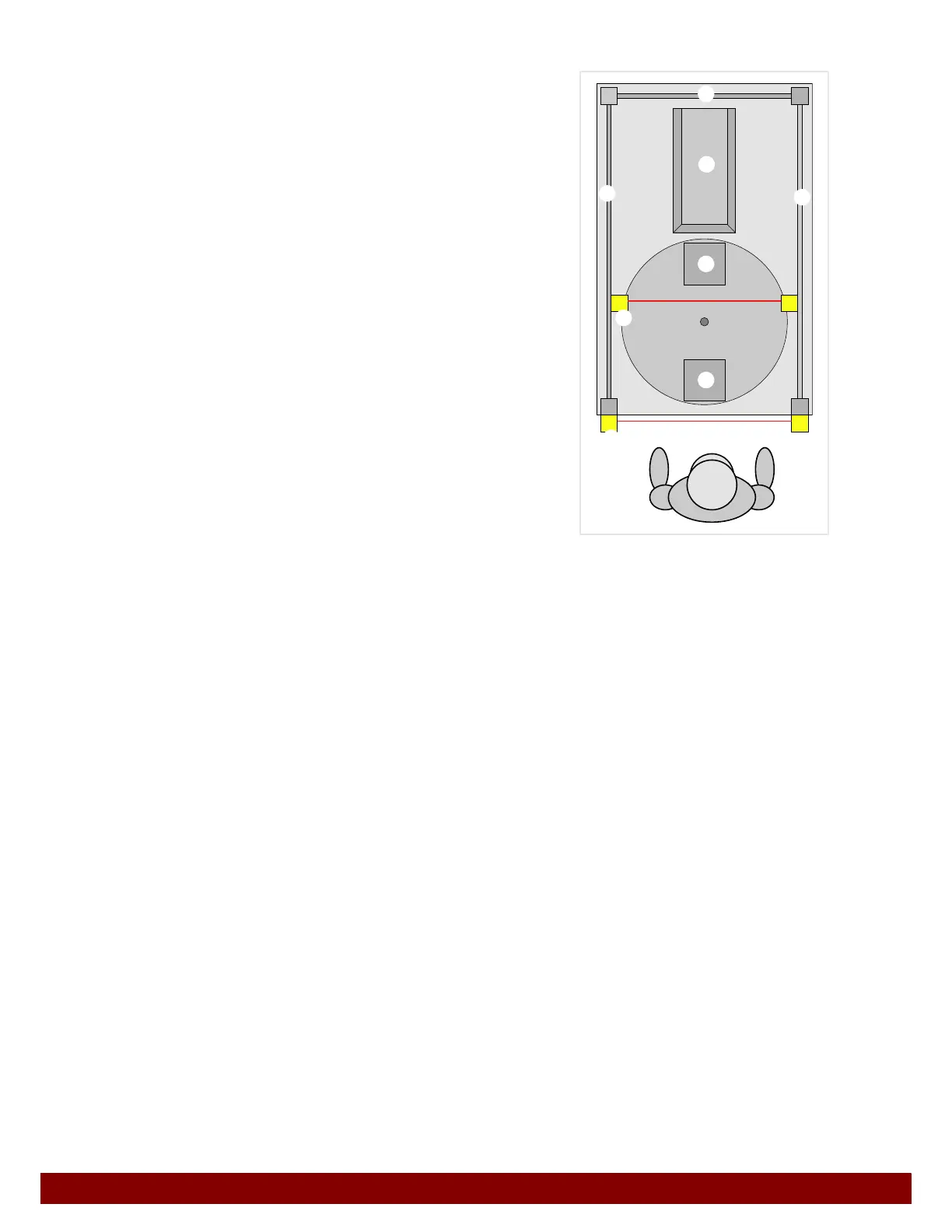
31.7.2 Safety guard with two light curtains
B
Printer
C Workpiece in insertion area
D Workpiece in print area
E Safety guard (in some cases with safety doors)
F Light curtain insertion area
G Light curtain print area
H Operator
The machine has a feed device for the workpieces. This example features a rotary table
with two workpiece fixtures. This set-up allows time savings to be achieved. The workpi-
ece can already be changed while the printer is carrying out a print process.
The safety guard is divided into two zones.
Insertion area: This is where the operator changes the workpiece.
Print area: This is where the printer carries out the print process.
Insertion area
• In order to insert a workpiece the operator must reach through the light curtain for the
insertion area.
• The light curtain may only be interrupted when the feed device (rotary table) is not car-
rying out movements.
• If the light curtain is interrupted while the feed device (rotary table) is moving, an
EMERGENCY STOP is activated immediately.
• The light curtain protects the operator from the hazards in the insertion area.
Print area
• The light curtain may only be interrupted when the printer is in the home position and
is not carrying out any movements.
• CIf the light curtain is interrupted during a machine movement, an EMERGENCY
STOP will be activated instantly.
• The light curtain protects the operator from the hazards in the print area.
B
D
E
E
E
F
H
G
C



 To Next Page