88 MCI ink cup
18.6 Magnetic ring insertion
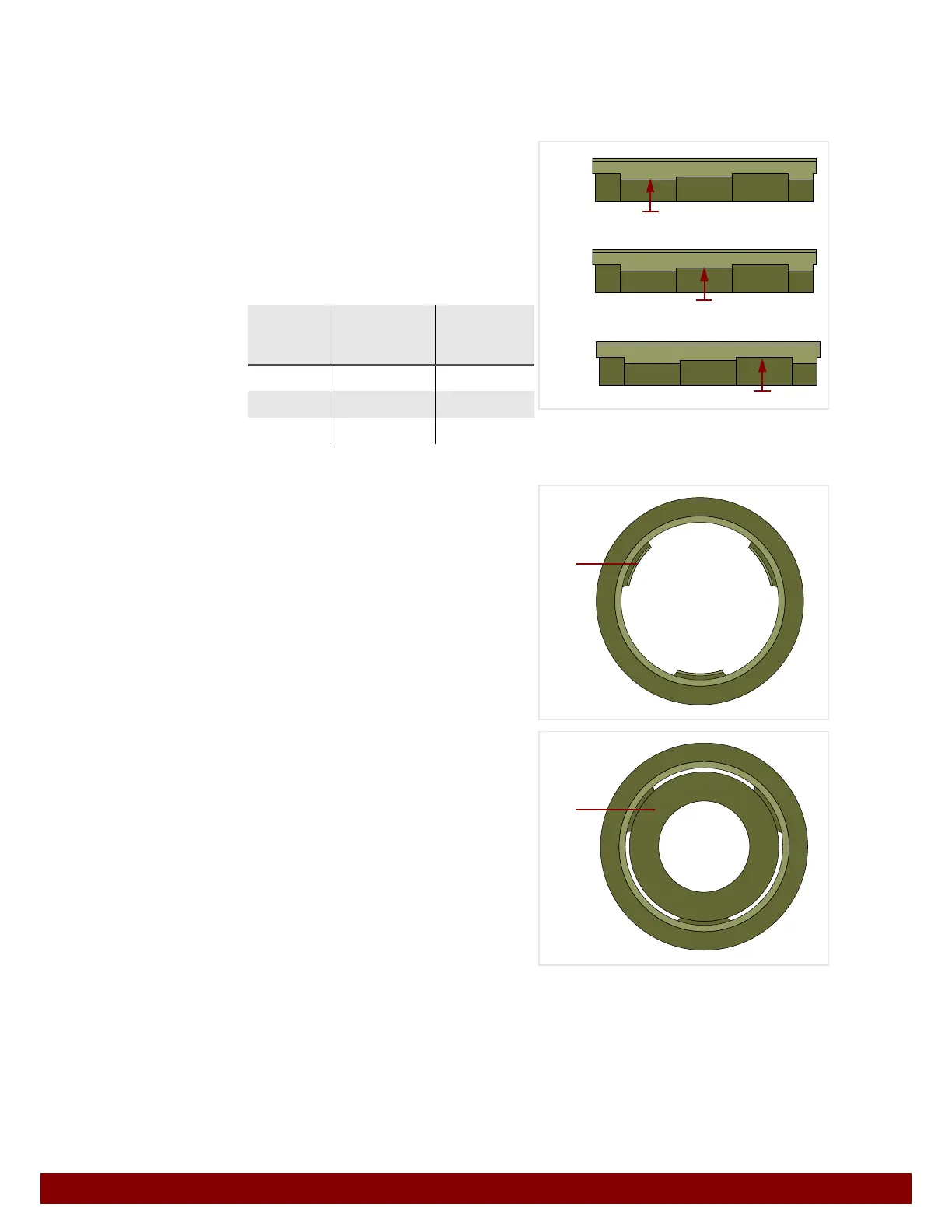
The ink cup is pulled onto the cliché via the pull of the magnetic ring.
The pull depends upon the distance between the magnetic ring and the cliché.
The magnetic ring can be installed in three positions at different distances to the cliché.
The magnetic ring is equipped with three-
level supporting surfaces. The magnetic
ring is supported by these supporting sur-
faces in the ink cup.
The magnetic ring sits higher or lower in the
ink cup depending upon the selected level.
The three support cams
E in the ink cup
hold the magnetic ring.
Insert magnetic ring
F with the desired
supporting surface level onto the support
cams in the ink cup.
In order to set the pull of the magnetic ring,
remove it, rotate to a different supporting
surface level and re-insert.
The pull should be set in such a manner that the doctor ring cleanly scrapes the ink from
the cliché. The result depends upon the scraping speed, ink characteristics, cliché type
and etching depth of the print image.
An excessively high pull leads to unnecessary wear of the cliché and doctor ring.
Sup-
porting
surface
Position in
the ink cup
Pull
B
High Weak
C
Medium Medium
D
Low Strong
B
C
D
E
F



 To Next Page