Climate control system
HVAC system (Heating, Ventilation, Air
Conditioning)
The machine can be equipped with different kinds
of systems, for example, with air conditioning unit
or heater with air conditioning unit. Before operating
the system, check the detailed information for your
machine.
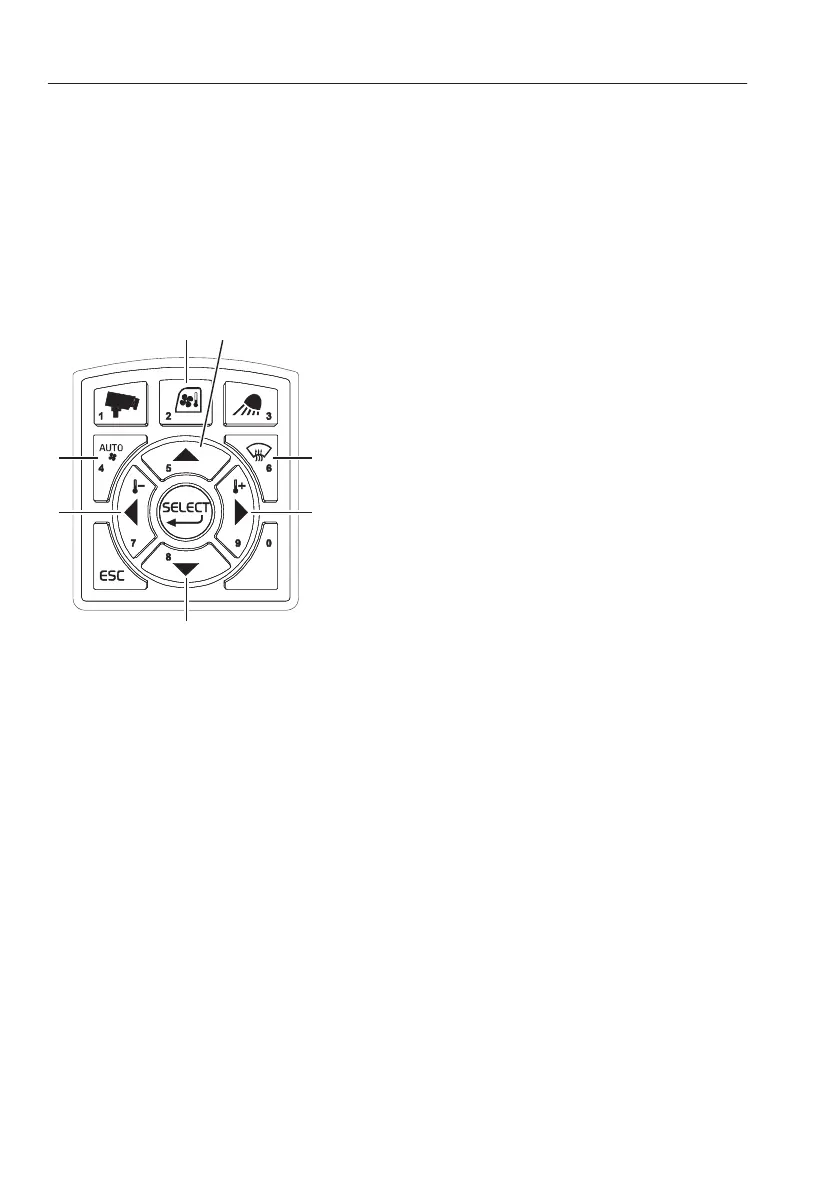
1) HVAC control button
- Press the button briefly to turn on/off the HVAC
system. All settings remain if the system is turned
off.
- Press and hold in the button to setup the HVAC
system.
NOTE!
Even if the HVAC system is turned off, when CCM
(Climate Control Module) gets an auxiliary heater
signal, the CCM turns on the cooling fan setting 1st
step in manual mode.
2) Arrow up button
This button is used to scroll between items and
adjust each segment on the screen.
3) Defroster select button
Press the button to activate the defroster. Fresh air
mode is selected automatically. In auto mode, if this
button is pressed, mode shall change to manual
mode.
NOTE!
After 20 minutes, this setting is automatically
returned to the previous mode.
4) Arrow right button
This button is used to scroll between items and
adjust each segment on the screen.
Press this button in order to increase the
temperature.
118
Other controls
Operator comfort



 To Next Page