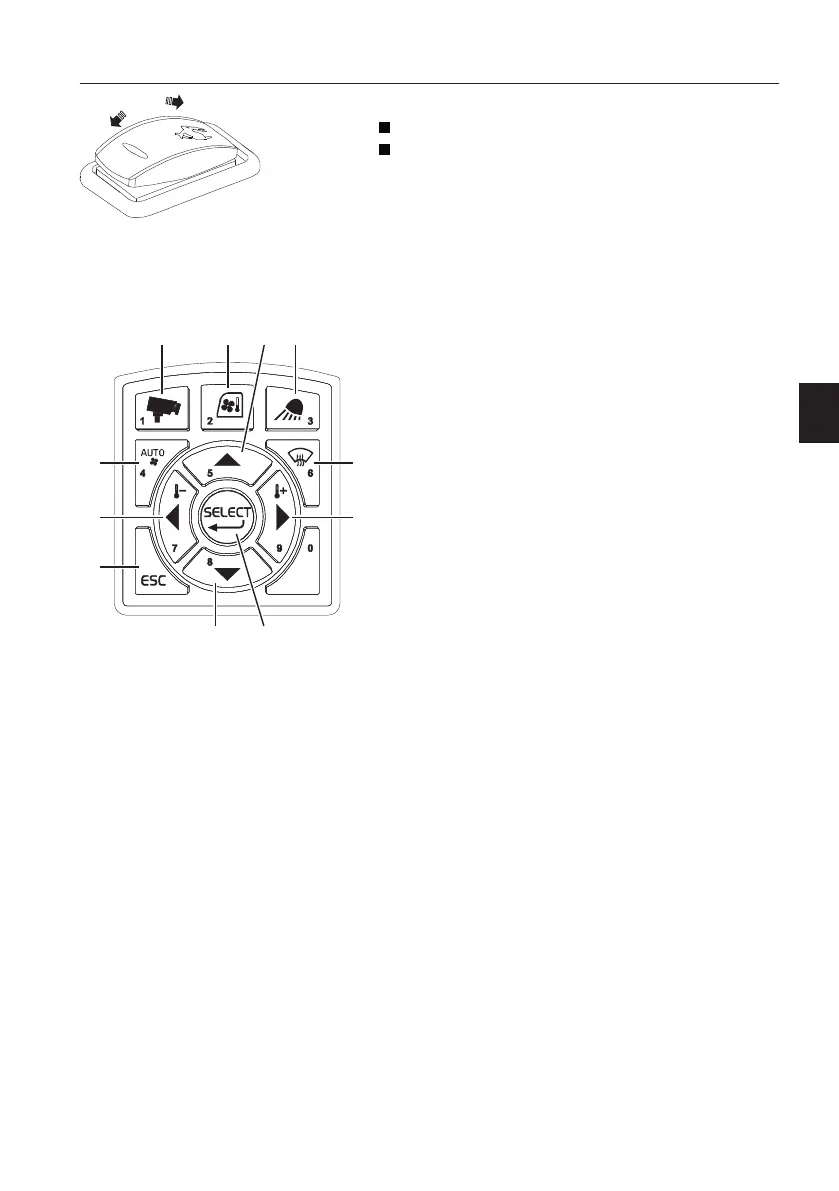
3 Travel speed switch
Position 0: Travel at LOW speed only
Position 1: Travel at LOW or HIGH by automatic
shift according to travel condition
NOTE!
Stop the machine before selecting a different travel
speed. Select "Position 0 (low speed)" for travelling
on a slope, on soft ground, in restricted spaces and
when the machine is loaded onto or unloaded from
a transport vehicle.
4 IC (Instrument Cluster) control keypad
1) Camera button (if installed)
This button is used to control the camera screen in
the IC (Instrument Cluster).
- A short press on the camera button shows the
camera view with the gauges at the top of the
screen.
- A long press on the camera button shows the
camera configuration bar. For detailed
information about camera control, see page
134
.
2) HVAC control button
This button is used to control the HVAC system.
See page
118
.
1 Camera button
2 HVAC control button
3 Work lights control button
4 HVAC auto-mode select button
5 Arrow up button
6 Defroster select button
7 Arrow left button
8 Arrow down button
9 Arrow right button
10 ESC button
11 SELECT button
Instrument panels
Instrument panel, right
81



 To Next Page