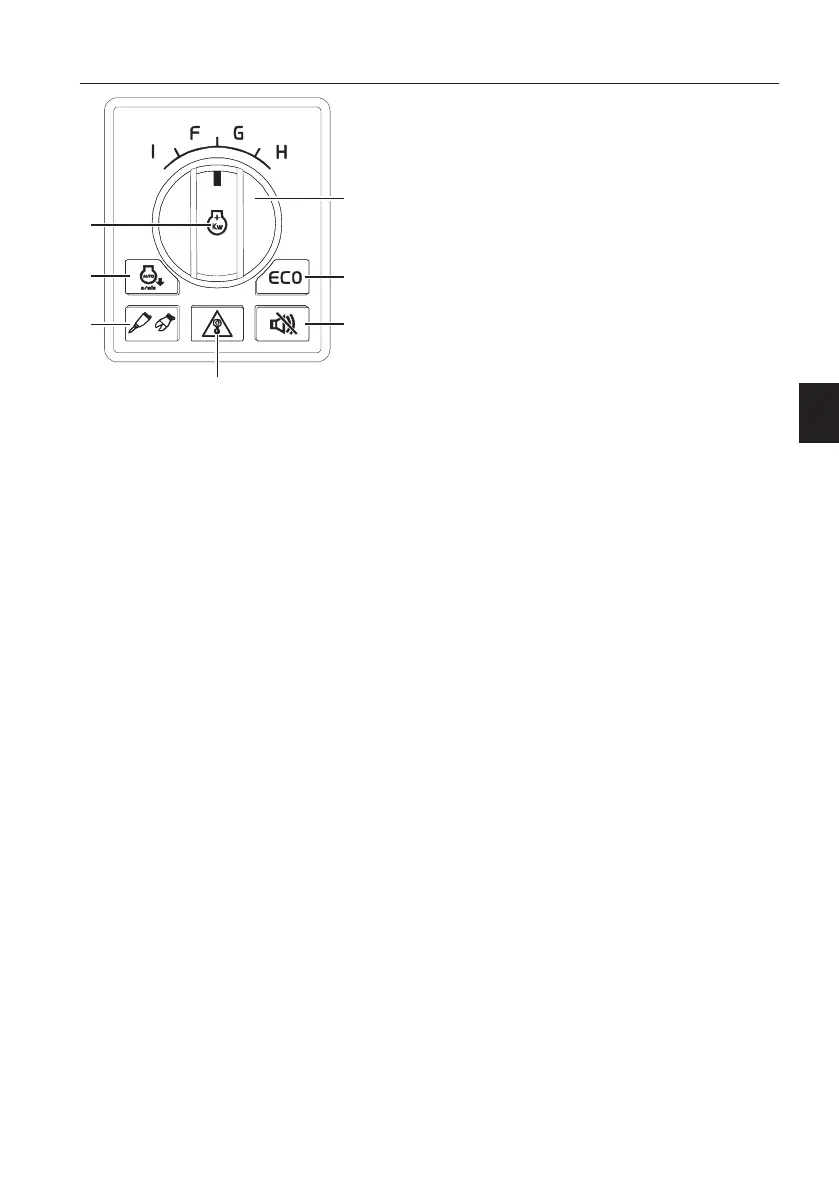
5 Machine control keypad
1) Power max. mode switch
Press down this switch to activate power maximum
mode.
At step 9 of the engine speed control switch,
Normal condition = H-mode
Press down the switch = P-mode
If the machine is not operated in P-mode for more
than 5 seconds and the auto idle selector switch is
activated, the engine speed automatically goes
down to idle mode. When the machine is operated
again, it returns to P-mode again. In P-mode, it
becomes H-mode if step 9 is selected after turning
the engine speed control switch to another step.
2) Auto idle button
Auto idle button activates or deactivates "Auto idle"
function of the GPMECU1 (General Purpose
Machine Electronic Control Unit1).
The engine speed will be reduced automatically to
idle in order to reduce fuel consumption if any of
control levers, travel levers (pedals) or engine
speed control switch are not operated for 5
seconds. If any one of the above is operated, the
engine speed returns to the speed set with the
engine speed control switch.
3) Hammer/Shear button
This button is used to activate the hammer/shear
function.
NOTE!
Select the X1 work tool on the IC (Instrument
Cluster), see page
44
for details.
Shortcut function for X1 work tool change in IC
By keeping the hammer/shear button (3) for more
than 2 seconds, the X1 work tool menu can be
opened directly without navigating through the
setup menu.
1 Power max. mode switch
2 Auto idle button
3 Hammer/Shear button
4 Overload warning button
5 Travel alarm stop button
6 ECO button
7 Engine speed/Work mode control
switch
Instrument panels
Instrument panel, right
83



 To Next Page