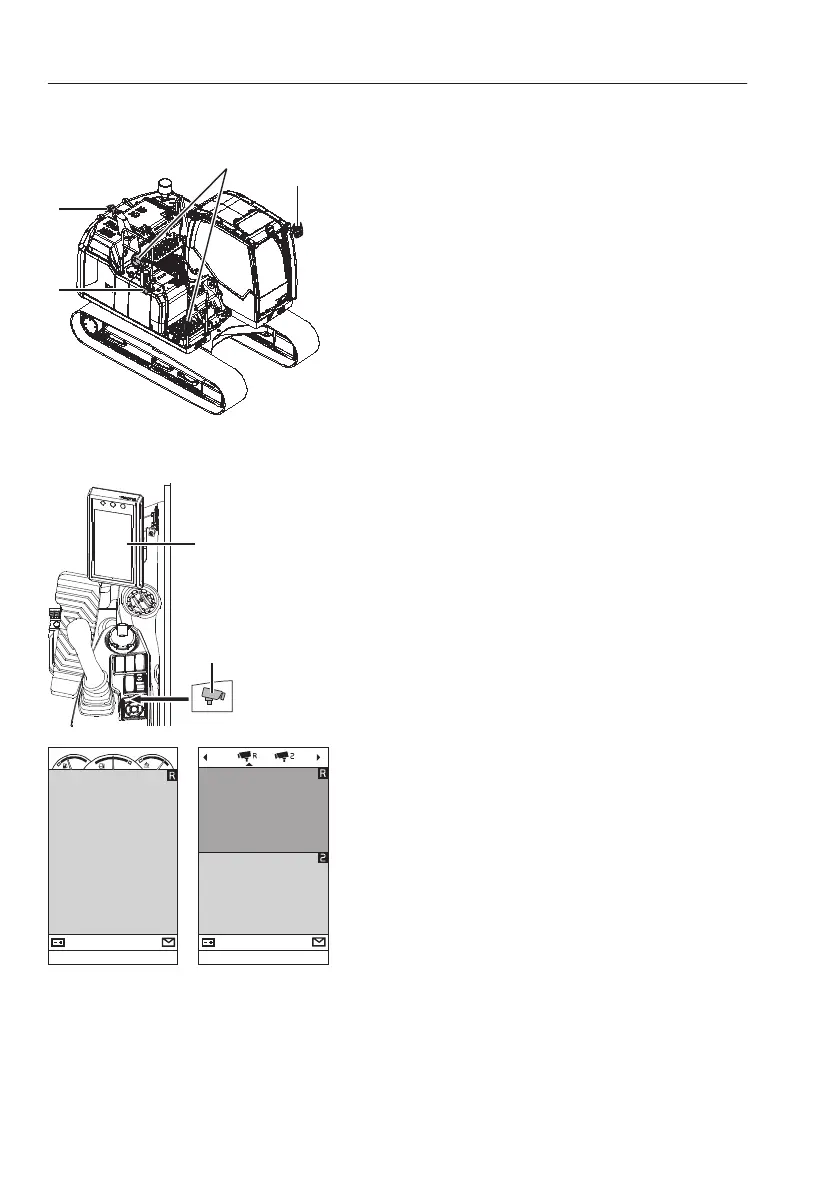
Vision system
The machine has a lot of equipment for the operator
to minimize visibility hazards. Using this equipment,
the operator must always ensure good visibility of
the surroundings when operating the machine.
1 Left mirror
2 Right mirrors
NOTE!
Right mirrors are used as aids for better visibility.
3 Rear-view camera
4 Side-view camera
NOTE!
Any modifications done to the machine that affect
the operator's visibility must be verified by a Volvo
dealer.
Camera system (if installed)
The camera screen in the IC (Instrument Cluster)
(A) is shown if any condition of below is met:
- by pressing the camera button (B) on the keypad
or
- when operating any control lever (joystick) / pedal
or
- without keypad signal during 10 seconds.
-
A short press on the camera button shows the
camera view with gauges (1):
This camera view (1) shows the camera screen
(depending on the selected configuration) with
the fuel level, engine coolant temperature, and
AdBlue®/DEF level.
- A long press on the camera button shows the
camera view with configuration bar (2):
This camera view (2) shows the camera screen
with the camera configuration bar at the top.
The camera configuration bar is used to show or
hide camera views on the IC (Instrument Cluster).
Press the camera button (B) on the keypad to
rotate the camera views clockwise.
Select one of the camera icons and press
SELECT on the keypad to show or hide this
camera view.
Mirrors and cameras (if installed)
1 Camera view with gauges
2 Camera view with configuration bar
134
Other controls
Operator comfort



 To Next Page