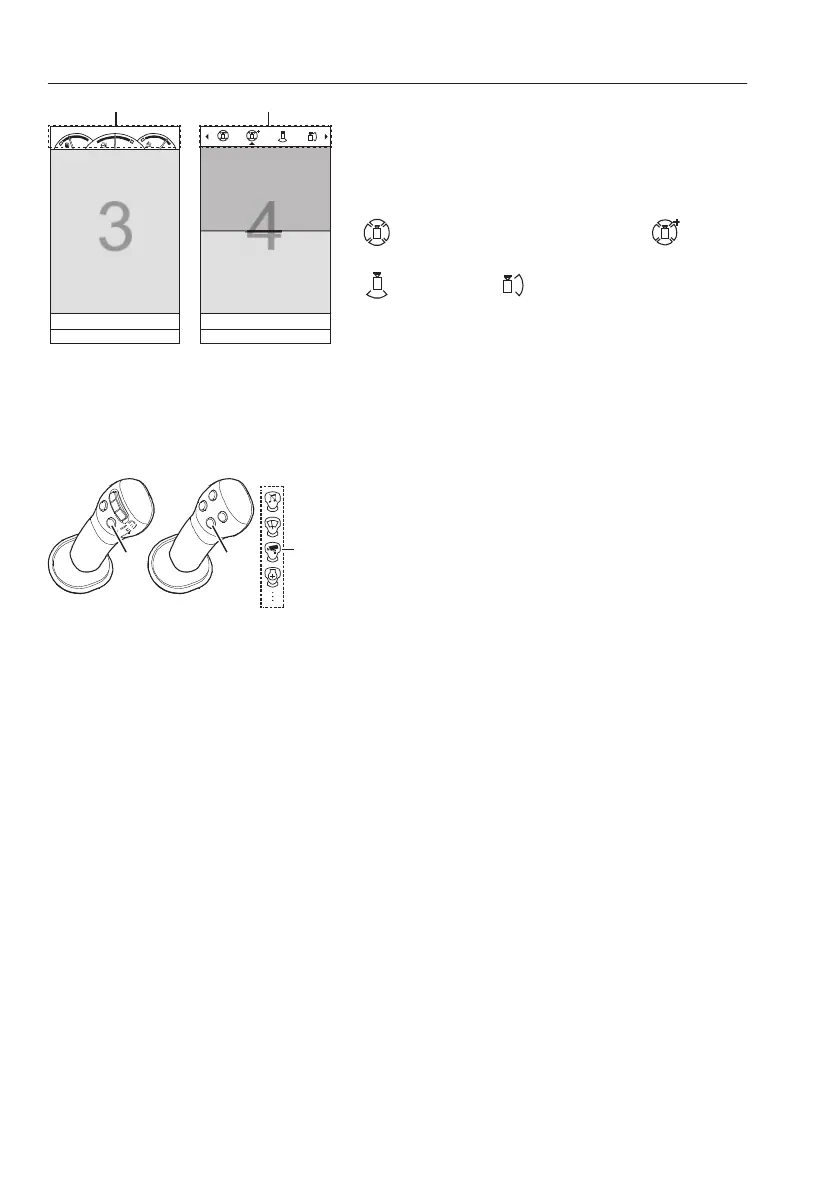
If the camera button (B) is pressed for more than 1
second:
configuration bar (2) is shown. Select two types of
views with 4 icons.
Split-view setting
Top view 2 (short range view) ↔ Side
mirror view ↔
Rear view ↔ Right side view
NOTE!
The displayed gauges (1) can be different
according to machine type.
NOTE!
VSV-system supports single view (3) among five
views or split-views (4) within
Top view 2, Mirror
view, Rear view and Right side view.
VSV can be turned ON using the shortkey button
(5) if this button is assigned to the camera function
(6). For more information about joystick shortkey,
see page
44
. (MENU —> Setup —> Joystick
shortkey —> Camera)
If necessary, an additional camera may be installed
according to user need. In this case, the VSV-
system can be turned ON using camera button (B)
on the keypad. An additional camera view is only
shown using joystick shortkey button (5). (MENU —
>
Setup —> Joystick shortkey —> Extension
camera)
NOTE!
According to machine options, an extension
camera can not be installed. Contact an authorized
Volvo dealer to install an extension camera and for
additional information.
D VSV-screen
E VSV-configuration screen
Shortkey (multifunctions) button (5) on
left lever
F Proportional switch type
G Four-button type
138
Other controls
Operator comfort



 To Next Page