Chapter 3 WCDMA Non-Call Mode
RF Analyzer for spectrum
WCDMA Options Version 6.20
99
Avg — Push the Softkey Start Avg. and use the arrow keys to go to the Avg field
to define the number of last measurements results over which to average. The
default value is 1, you can increase the value using the upward arrow key.
Count — Counter field displaying the number of measurements being
performed.
For a description of the frequency and channel parameter entry fields see “RF
Analyzer parameter fields” on page 103.
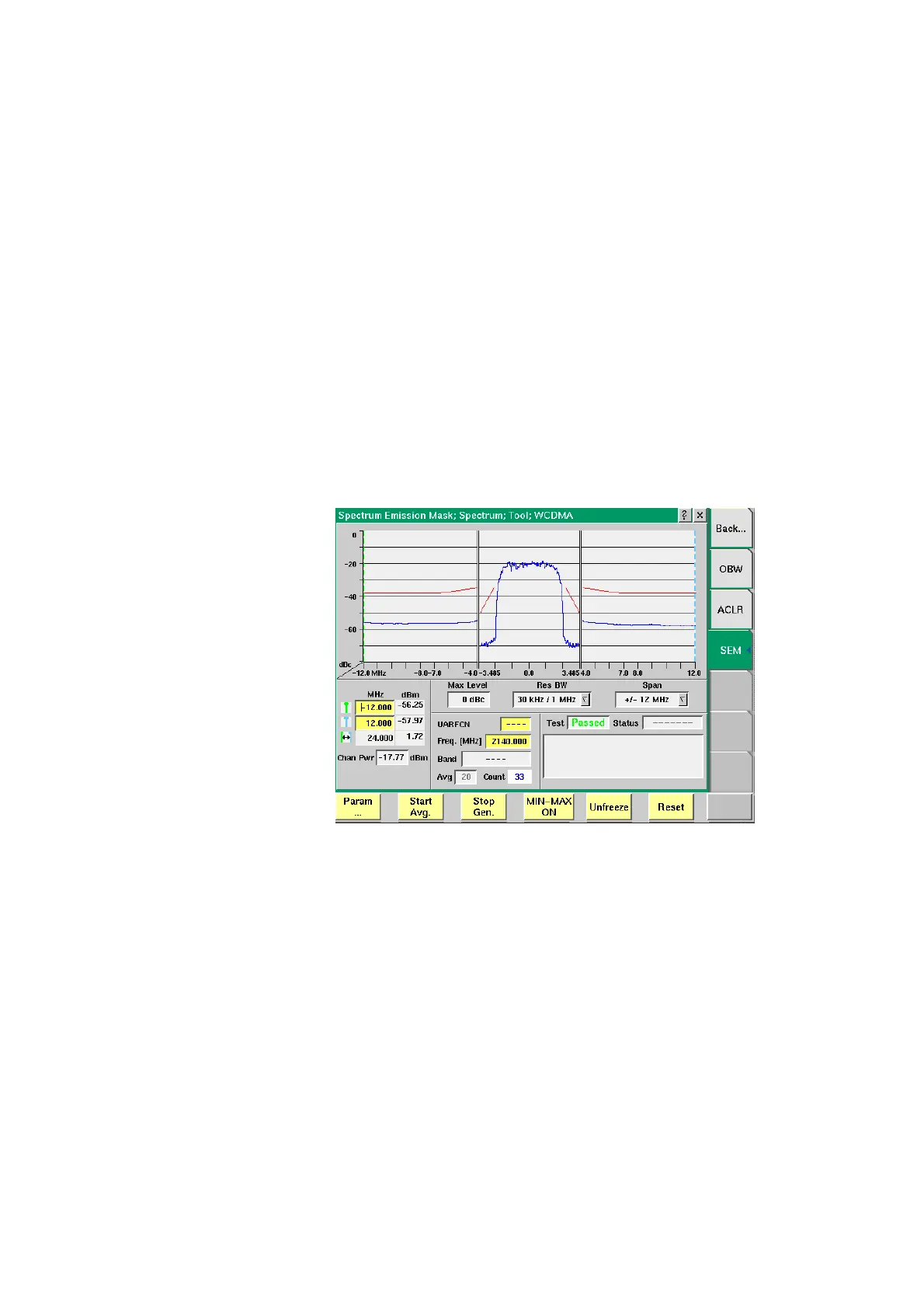
Reading the results Chan Pwr — Display field for the channel power measured in dBm.
Markers
The 4400 offers two markers for easy reading of the graphical displays. On the
input fields in the first column you set the markers to the required horizontal
positions. The corresponding result fields in the next column shows the measure-
ment values obtained for the respective positions. See following figure.
In this figure the signal spectrum measured outside the allocated channel does
not surpass the limits shown by the red limit lines onscreen. Accordingly, the test
verdict displayed in the Test field reads “Passed“. You can display and hide
minimum and maximum results using the MIN-MAX ON/OFF softkey. For details
on the usage of softkeys see “Softkeys of the RF Analyzer” on page 102.



 To Next Page