Chapter 4 Tools
Configuration
108 WCDMA Options Version 6.20
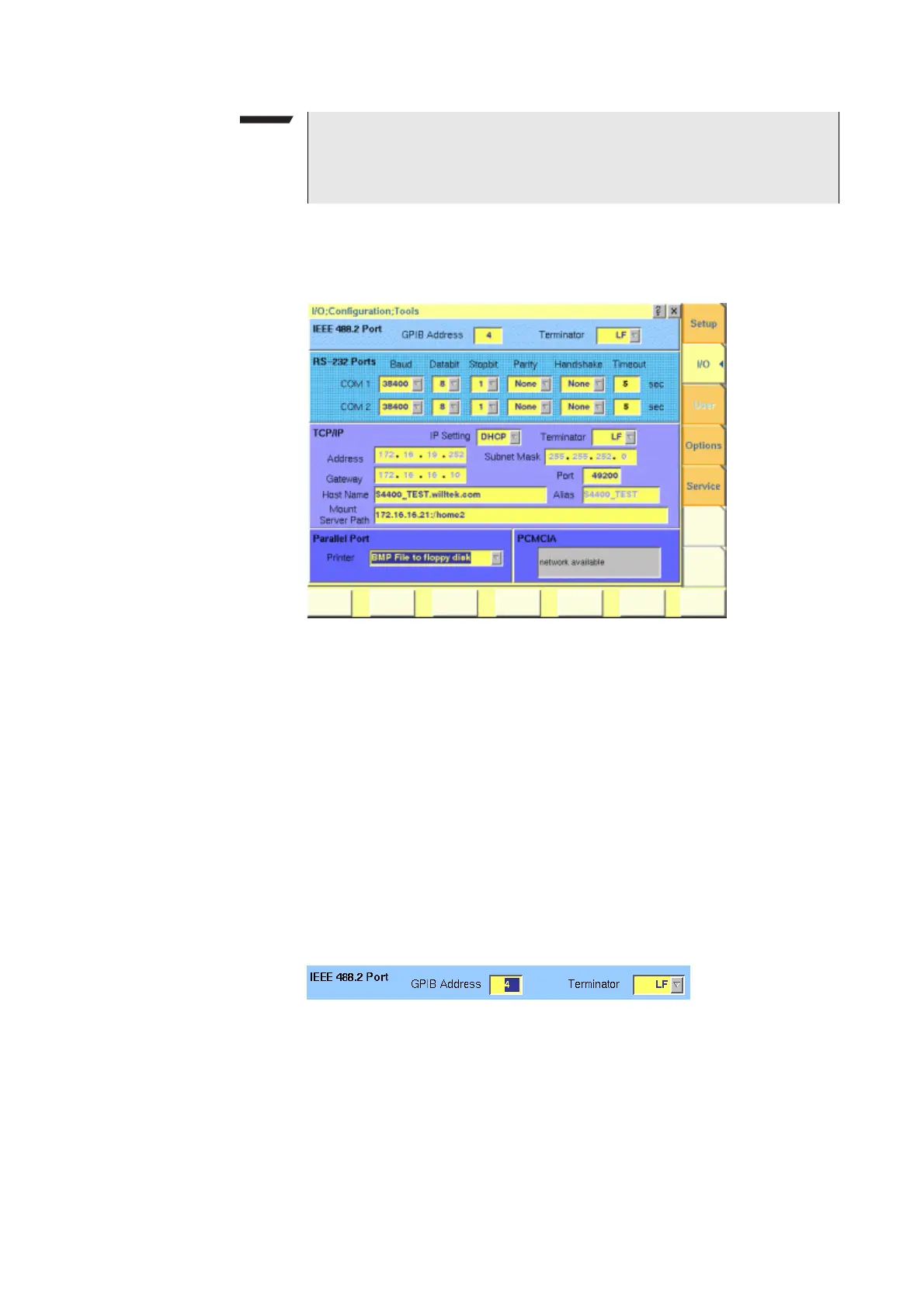
I/O configuration Push the [I/O] marker tab to gain access to this menu.
This menu consists of five areas:
–
IEEE 488.2 Port is the area where you set the GPIB address and termi-
nator to be used by the 4400.
–
RS-232 Ports. These entry fields do not have a function in this software
release.
–
TCP/IP. In this area, you can configure the TCP/IP port of the 4400 and
define an address on the network that you want to access from the 4400.
–
Parallel Port provides a selection of printer drivers (or alternatively a
file format) to print out the screens of the 4400.
–
PCMCIA informs you about the PCMCIA connections currently available.
IEEE 488.2 port settings This area of the menu gives access to the following parameters:
GPIB Address — Entry field to set the GPIB address of the 4400 in case the test
set is controlled externally (and not used as the GPIB controller).
Entry range: 0 to 31. Default is 4.
Terminator — Selection field to set the terminator for GPIB commands.
Settings possible are: LF (default), CR and CR/LF.
NOTE
Any change on this selection field will require a reboot of the test set. You will
be reminded by the
Please reboot message appearing on the display field
just below this selection field.



 To Next Page