Service Manual – Corrective maintenance
SERVICE MANUAL • X-MIND prime 3D • (19) • 11/2019 • NXMPEN080A
11.2.5
EEPROM Memory values verification and modification
Note
DO NOT CHANGE ANY EEPROM VALUES DIFFERENT FROM THE ONES
REQUIRED BY THIS MANUAL (eg. Required by a troubleshooting or Errors
procedures).
An incorrect and improper modification of an EEPROM value may affect the
correct functioning of the unit. The service technician is responsible for the
following operations.
1.
Switch ON the unit and when the green keyboard LED blinks slow press the >0<
button.
2.
Open the “PhD_C_test.exe” (folder path: C:\Program Files (x86)\Acteon
Imaging\Panoramic X-MIND Prime Ceph), wait the unit connection and enter
in SETUP mode.
3.
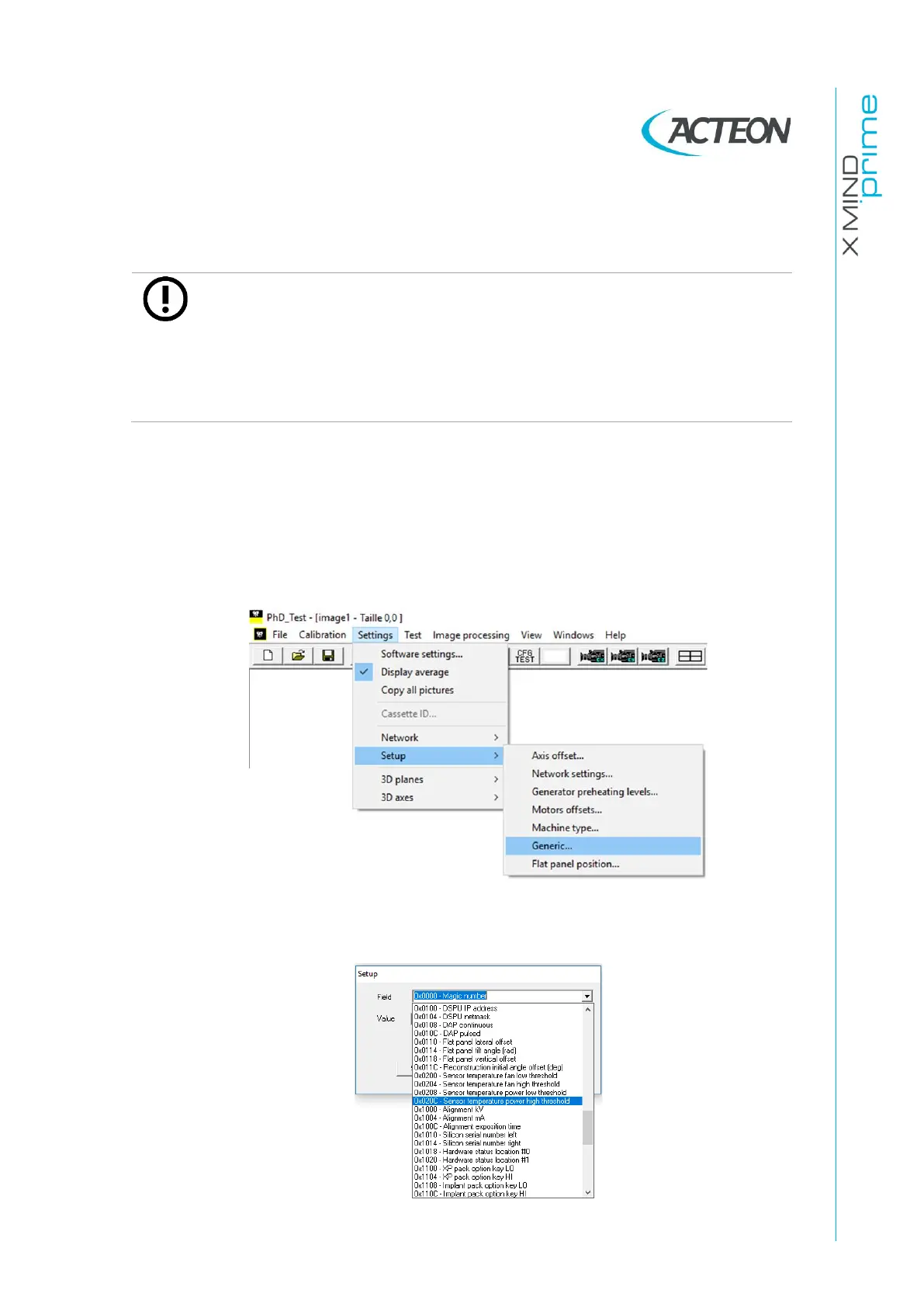
Click on the menu Settings
→
Setup
→
Generic:
4.
In the “Setup” window select the field needed value: 0x#### - [name of the
EEPROM variabiles]:















 To Next Page