Service Manual – Corrective maintenance
SERVICE MANUAL • X-MIND prime 3D • (19) • 11/2019 • NXMPEN080A
11.2.6
3D Sensor static IP address setting
1.
Switch ON the unit and when the green keyboard LED blinks slow press the >0<
button.
2.
Open the “PhD_C_test.exe” (folder path: C:\Program Files (x86)\Acteon
Imaging\Panoramic X-MIND Prime Ceph) and wait the unit connection.
3.
Click on the SET-UP button and in the windows that will open type the
password
PhdAccess.
4.
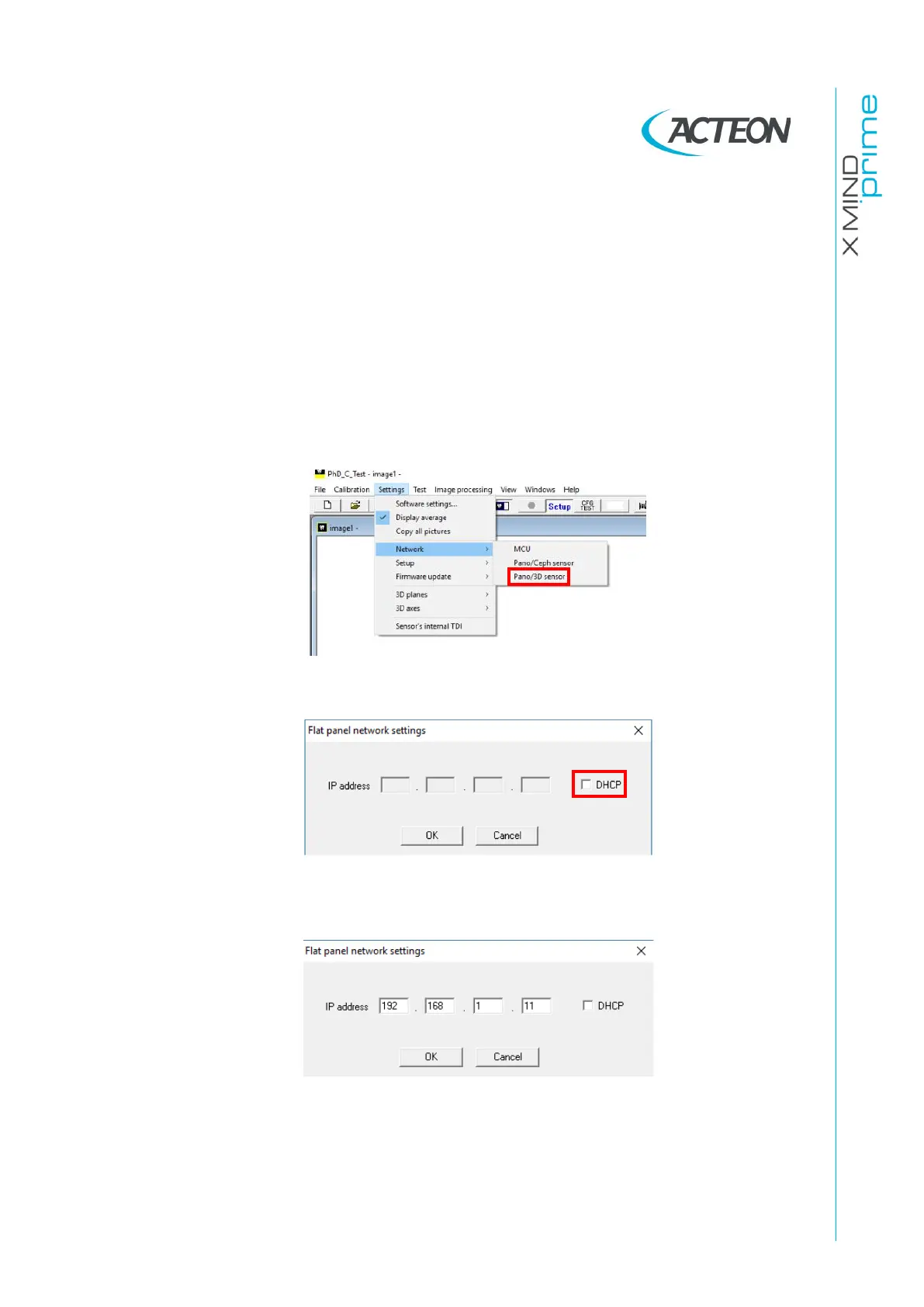
Click on the menu Settings
→
Network
→
Pano/3D sensor:
5.
Unflag “DHCP” mode box:
6.
Write a compatible static IP address in the IP address fields (different from the
MCU one (see paragraph 8.1).
7.
Click on OK button and close “PhD_C_test” program.















 To Next Page