7.7
PC configuration
7.7.1
Network Interface board configuration
The equipment is supplied with a dedicated dual port Network Interface Card (NIC).
In order to connect the X-MIND prime 3D to the PC it is necessary to configure the
properties of the dedicated NIC following the procedure described below.
1.
Go to
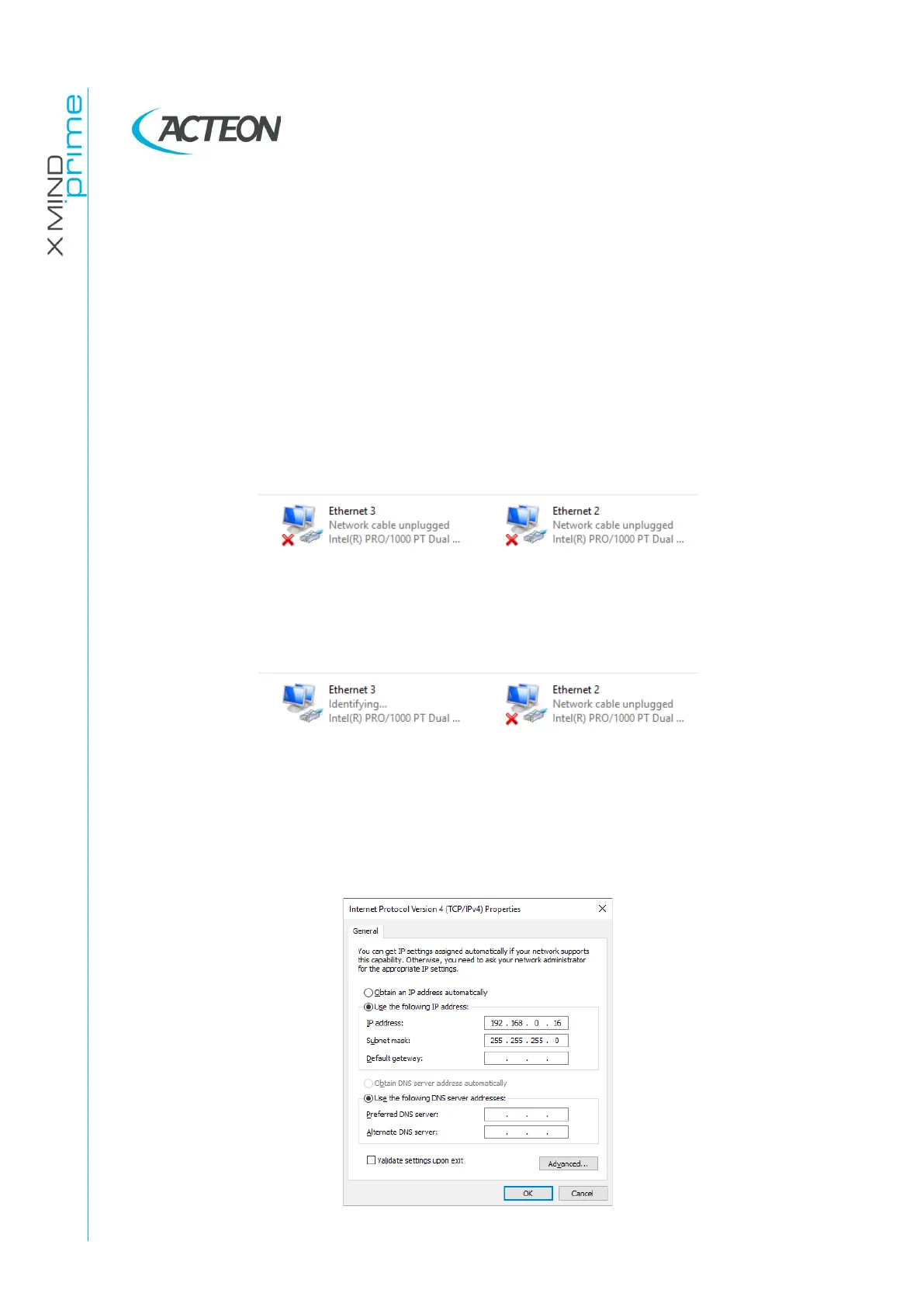
Control Panel > Network and Internet > Network and Sharing Center > Change
adapter settings
. The network adapters are labelled with the NIC model that is
either Intel I350-T2 or Intel PRO/1000.
2.
Plug the MCU board Ethernet cable i.e. the one connected to the machine port
labelled with “Ethernet” to the left port of the NIC.
3.
Switch on the unit. The network adapter connected to the MCU will become
active.
4.
Right click on it and select “Properties”.
5.
Select the item “Internet Protocol Version 4” and click on “Properties”.
Configure the IP address as follows:
•
IP address: 192.168.0.16
•
Subnet Mask: 255.255.255.0
and then click “OK”.















 To Next Page