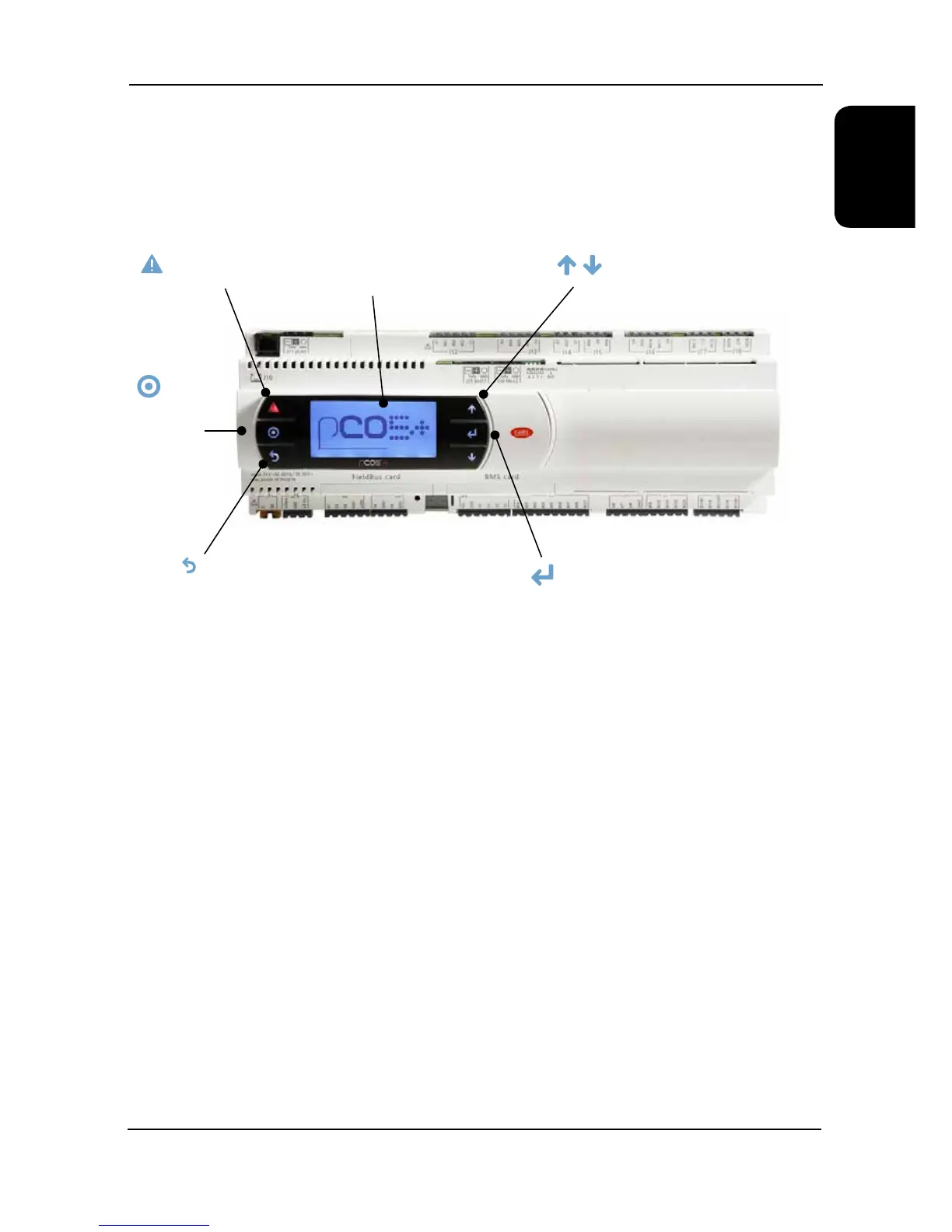
Display/Keypad
1 UP/DOWN KEYS - To change adjustable elds & scrolls up & down available menus
2 ENTER -Selects menus & moves cursor to adjustable elds green LED
3 ESC - Green LED lit when operating page displayed, returns to operating page screen when pressed
4 PROGRAM - Opens the available menus
5 ALARM - Red LED Indicates alarm present
6 8 ROW LCD DISPLAY
7 CURSOR (FLASHING) Top Left Position = “HOME” Indicates adjustable Fields
Monitoring
The microprocessor also monitors and displays the following measured parameters:
● Supply Water Temperature
● Return Water Temperature
● Suction Pressure of each circuit
● Liquid Pressure of each circuit
● Suction Temperature of each circuit
● Superheat for each circuit
LCD
Display
ALARM - Red LED Indicates
Alarm Present
PROGRAM
Opens the
Available Menus
ESC - Green LED lit when
Operating Page displayed,
Returns to Operating Page
Screen when pressed
UP/DOWN KEYS - To change
Adjustable Fields & Scrolls up &
down available Menus
ENTER -Selects Menus
& Moves Cursor to
Adjustable Fields
Green LED




 To Next Page