CHAPTER 5 REFERENCE GUIDE
EFD1000/500 MFD Pilot’s Guide
Page 5-10 091-00006-001 REV B
EFD1000/500 MFD Pilot’s Guide
Page 5-11091-00006-001 REV B
NOTE
You can change multiple feature group settings
without exiting the Main Menu.
Changing Feature Group Display Setting
1. Access the Main Menu.
2. Navigate to the MAP SETTINGS A or B page that lists the feature group you
want to change.
3. Push the Menu Key that corresponds to the name of the feature group you
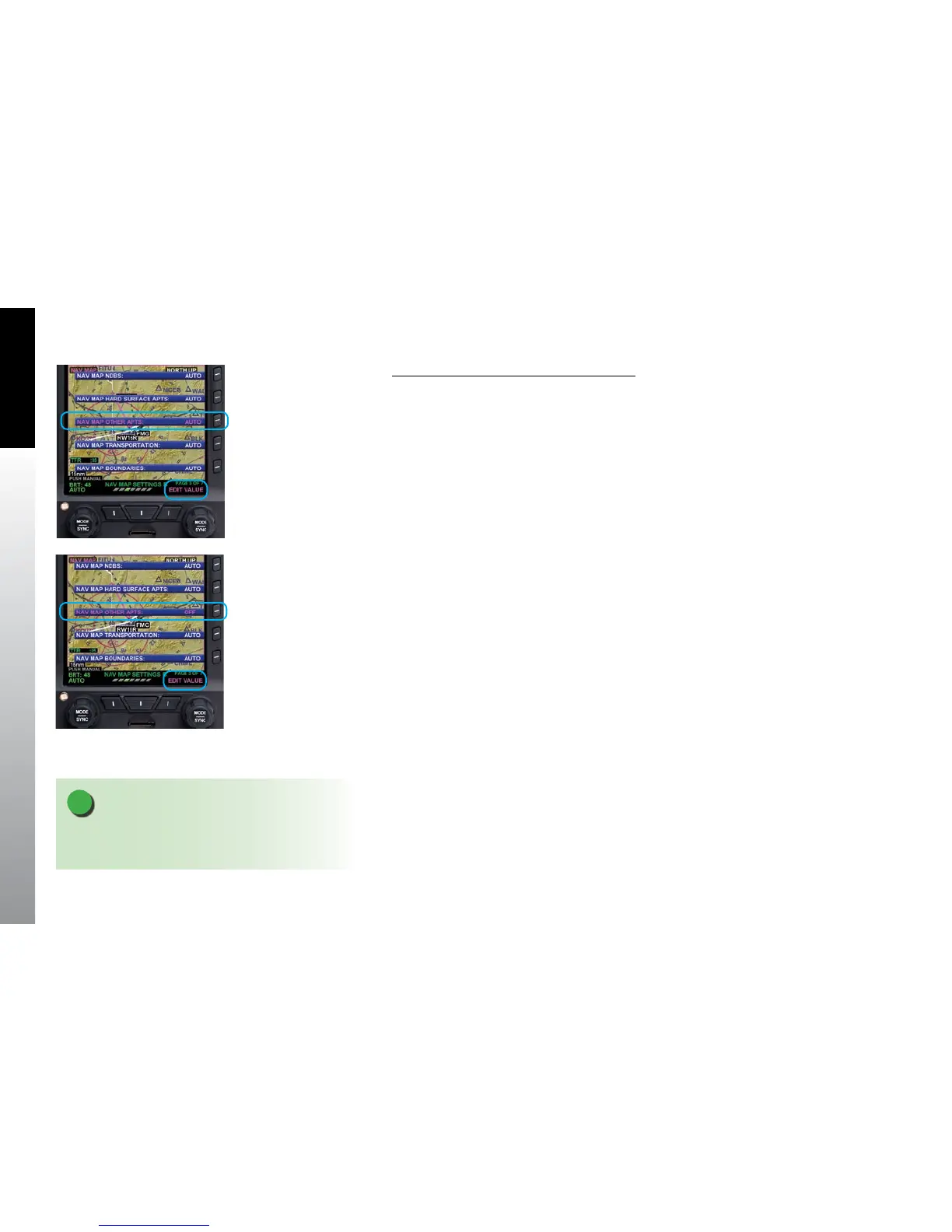
want to change. The feature group menu label turns magenta and the EDIT
VALUE label displays above the Right Knob (Figure 5-4).
4. Rotate the Right Knob to the desired value, AUTO/ OFF (Figure 5-5).
5. If you want to change other feature group settings, push the corresponding
Menu Key. Your selection for the feature group changed in step 4 is saved and
the new feature group label turns magenta.
6. Rotate the Right Knob to the desired value, AUTO or OFF.
7. Repeat steps 5 and 6 as desired.
8. Push the Right Knob to return to menu navigation mode.
9. Push the MENU Button to exit the Main Menu.
Figure 5-4
Editing OTHER APTS Feature
Group
Figure 5-5
OTHER APTS Feature Group
Set to OFF



 To Next Page