CHAPTER 5 REFERENCE GUIDE
EFD1000/500 MFD Pilot’s Guide
Page 5-18 091-00006-001 REV B
EFD1000/500 MFD Pilot’s Guide
Page 5-19091-00006-001 REV B
5.1.8. Map Styles
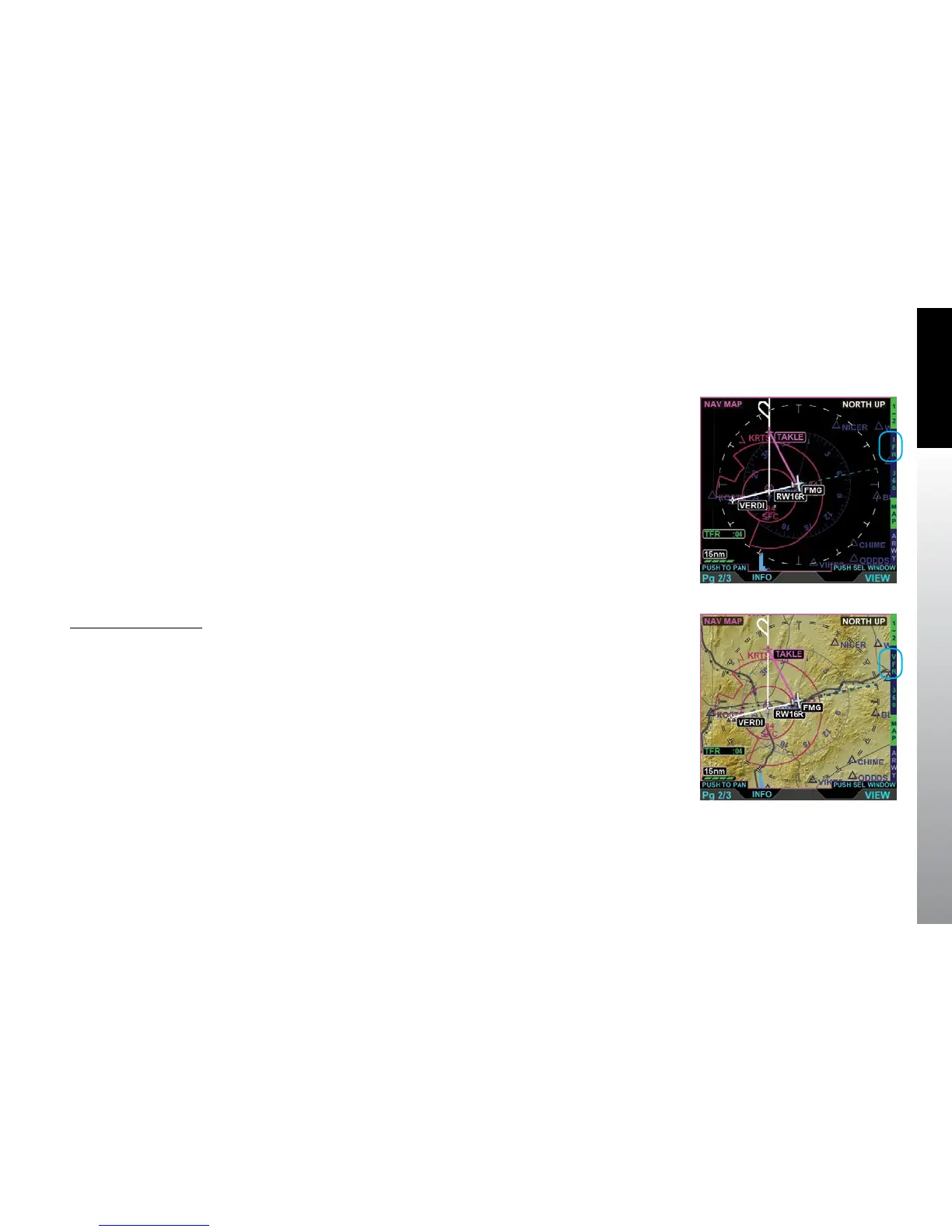
The Navigation Map basemap is displayed as either an IFR (Figure 5-21) or VFR
(Figure 5-22) style map. The map data source for the Navigation Map VIEW is the
Jeppesen Database saved on the micro SD Card. Airways, Relative Terrain, Stormscope®
WX-500, Data Link Weather, and Trac are available as overlays via Hot Keys.
The VFR Map Style is a topographical style map similar to VFR Sectional Aeronautical
Charts, coloring absolute terrain background based on MSL as described in
Appendix7.5. The VFR Map Style shows cultural data such as highways, roads, railroads,
water, and boundaries. The pilot can control the data displayed via the Main Menu.
The IFR Map Style is a blank map background similar to IFR En Route Charts, showing
navaids, airports, and controlled and special use airspace. Topographical data, highways,
roads, and railroads are not shown.
Change the Map Style
• With the Navigation Map VIEW selected, push the IFR/VFR Hot Key.
Figure 5-21
Navigation Map VIEW with
IFR Map Style Selected
Figure 5-22
Navigation Map VIEW with
VFR Map Style Selected



 To Next Page