• Outbound TCP connections from WAN port 5060-5061 sent to any destination
must be matched to Traffic Shaping class “VOIP Tx”. Outbound packets on this
connection will originate from an arbitrary port, but will be destined to port 5060-
5061.
SIP UDP connections: Outbound UDP packets sent from WAN port 5060 to any
destination must be matched to Traffic Shaping class “VOIP Tx”.
RTP UDP: Outbound UDP packets sent from WAN port 7000-8000 to any destination
must be matched to Traffic Shaping class “VOIP Tx”.
To define VoIP traffic matching rules:
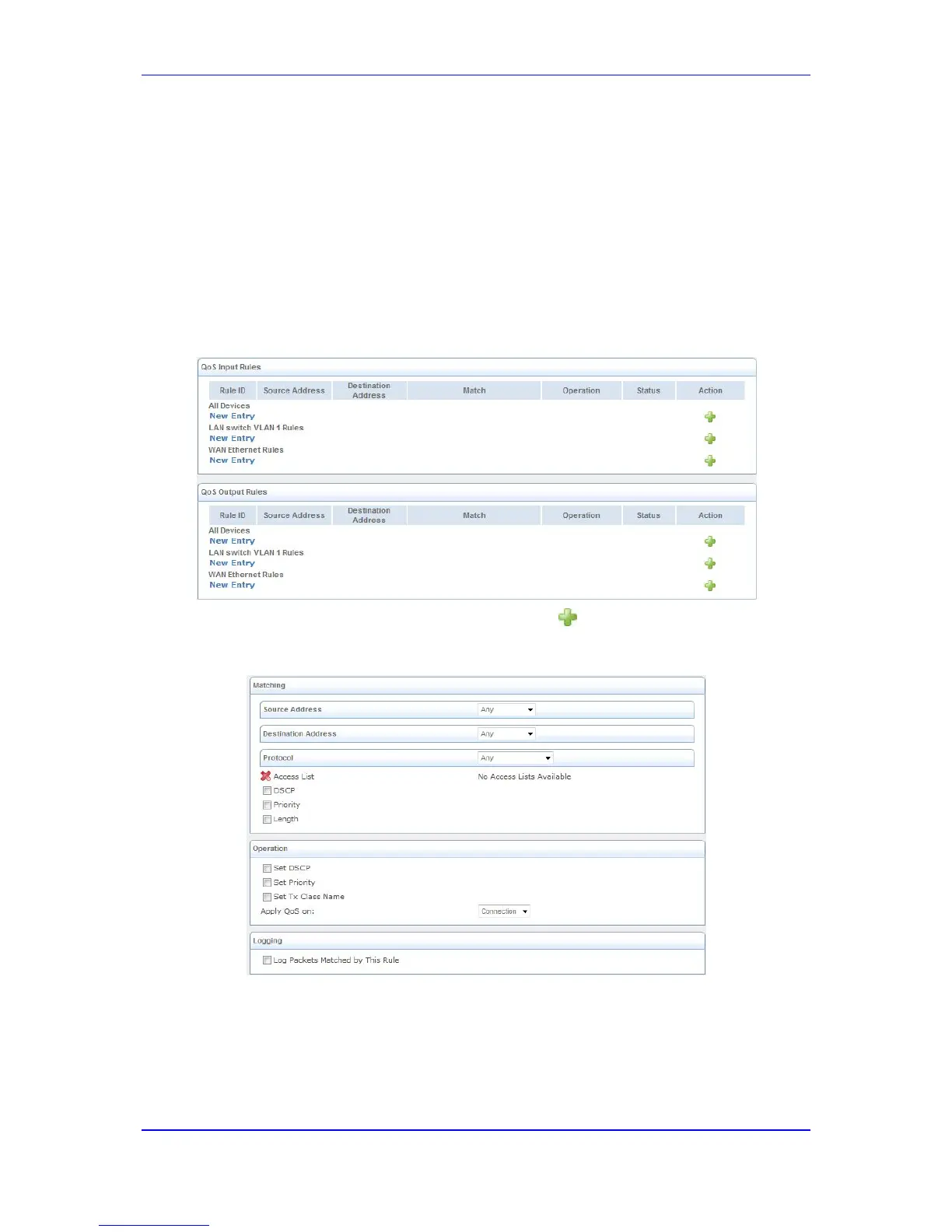
1. Open the Match Rules page (Configuration tab > Data menu > QoS > Match Rules).
Figure 3-14: Match Rules Page
2. In the QoS Output Rules table, click the New button corresponding to the 'WAN
Ethernet Rules' rule ID; the following page appears:
Figure 3-15: Adding a Traffic Priority Rule
3. Add a new output traffic rule for VoIP SIP signaling to the WAN:
a. From the 'Protocol' drop-down list, select Show All Services to view all protocols
and then select SIP; “SIP” is displayed under the Protocol group.
b. From the drop-down list appearing below “SIP”, select User Defined; the
following appears.


 To Next Page
 Loading...