2-111
CHAPTER 2 NEW FUNCTIONS
COPYRIGHT
©
2001 CANON INC. 2000 2000 2000 2000 CANON CLC5000 REV.0 JAN. 2001
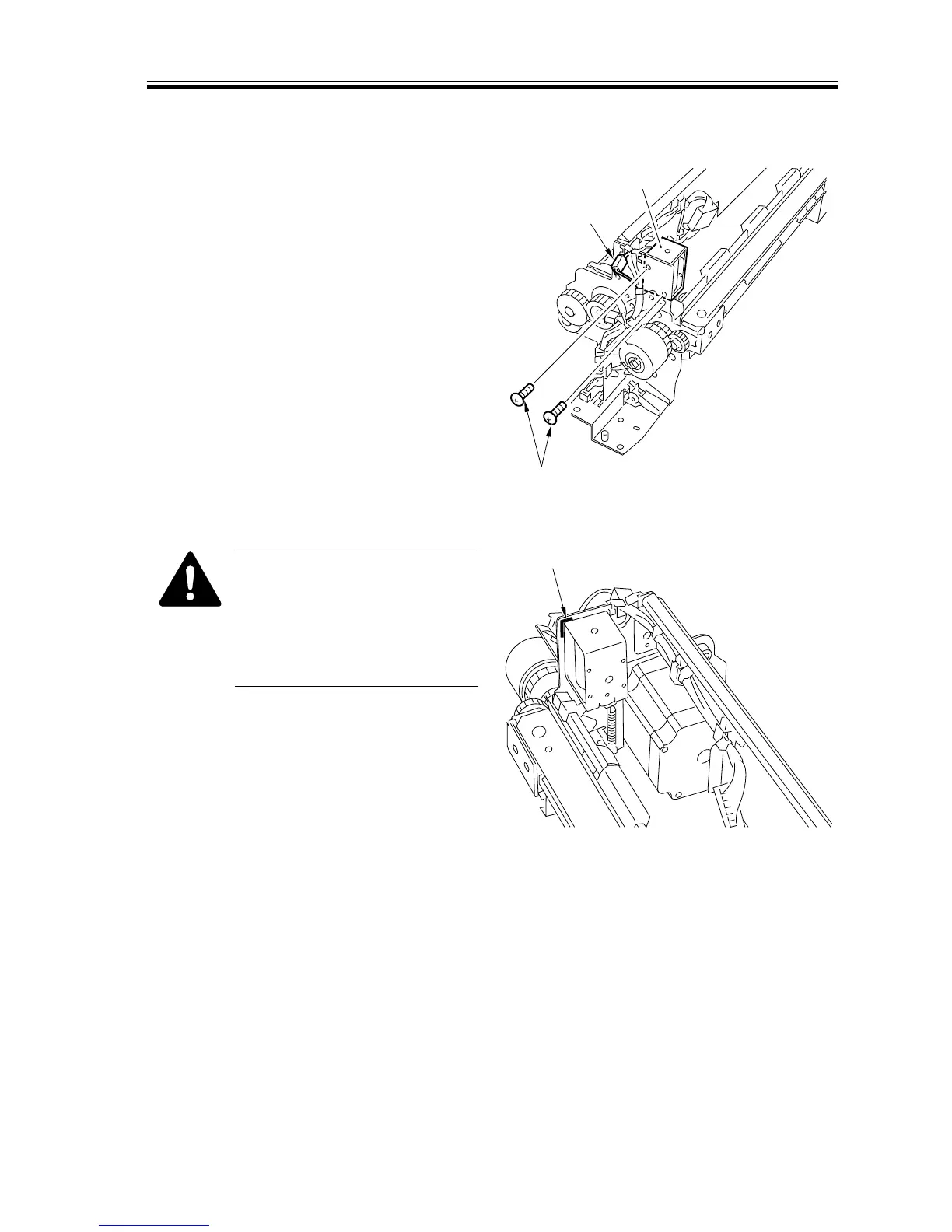
5.7.6 Removing the Re-Pickup Shutter Solenoid
1) Remove the right cover. (See F02-507-
02.)
2) Remove the re-pickup assembly. (See
5.7.3 “Removing the Re-Pickup Assem-
bly.”)
3) Remove the two screws [1], and discon-
nect the connector [2]; then, detach the
pickup shutter solenoid [3].
F02-507-12
When Mounting the Re-Pickup
Shutter Solenoid
You will have to make adjust-
ments. Be sure to mark the posi-
tion with a scribe (A in the fig-
ure before) removing it.
F02-507-13
[2]
[3]
[1]
[A]














 To Next Page