COPYRIGHT
©
2001 CANON INC. 2000 2000 2000 2000 CANON CLC5000 REV.0 JAN. 2001
CHAPTER 5 TROUBLESHOOTING IMAGE FAULTS/MALFUNCTIONS
5-40
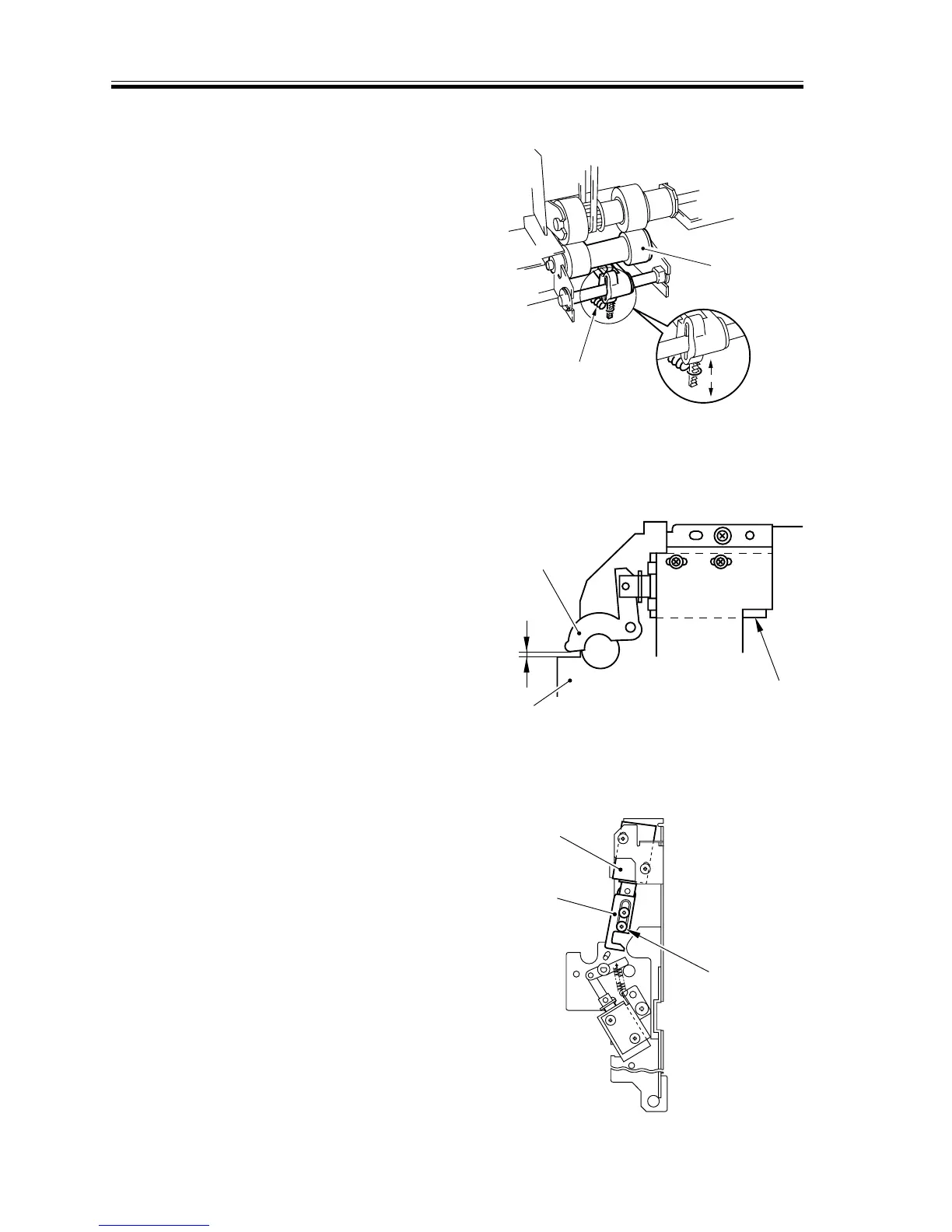
2.7.12 Adjusting the Pressure of the Multifeeder Separation Roller
If double-feeding or pick-up faults occur
during pick-up operation, change the posi-
tion of the pressure spring [2] of the separa-
tion roller [1].
a. If double-feeding occurs, hook the pres-
sure spring on the direction of A.
b. If pick-up faults occur, hook the pres-
sure spring on the direction of B.
F05-207-13
2.7.13 Adjusting the Position of the Multifeeder Pick-Up Roller Releasing
Solenoid (SL5)
Install the solenoid so that the distance
between the solenoid arm [2] and the rear
side plate [3] is 3.5 ±0.2 mm when the
plunger of the solenoid [1] is pushed in.
F05-207-14 (rear)
2.7.14 Adjusting the Position of the Delivery Paper Deflecting Plate Solenoid
(SL14)
1) Place the delivery assembly upright on a
flat surface.
2) Fix the solenoid in position where the
arm [2] hits the stepped screw [3] and
stops with the arm lifted and the
plunger of the solenoid [1] pushed in.
F05-207-15 (rear)














 To Next Page