2-9
CHAPTER 2 NEW FUNCTIONS
COPYRIGHT
©
2001 CANON INC. 2000 2000 2000 2000 CANON CLC5000 REV.0 JAN. 2001
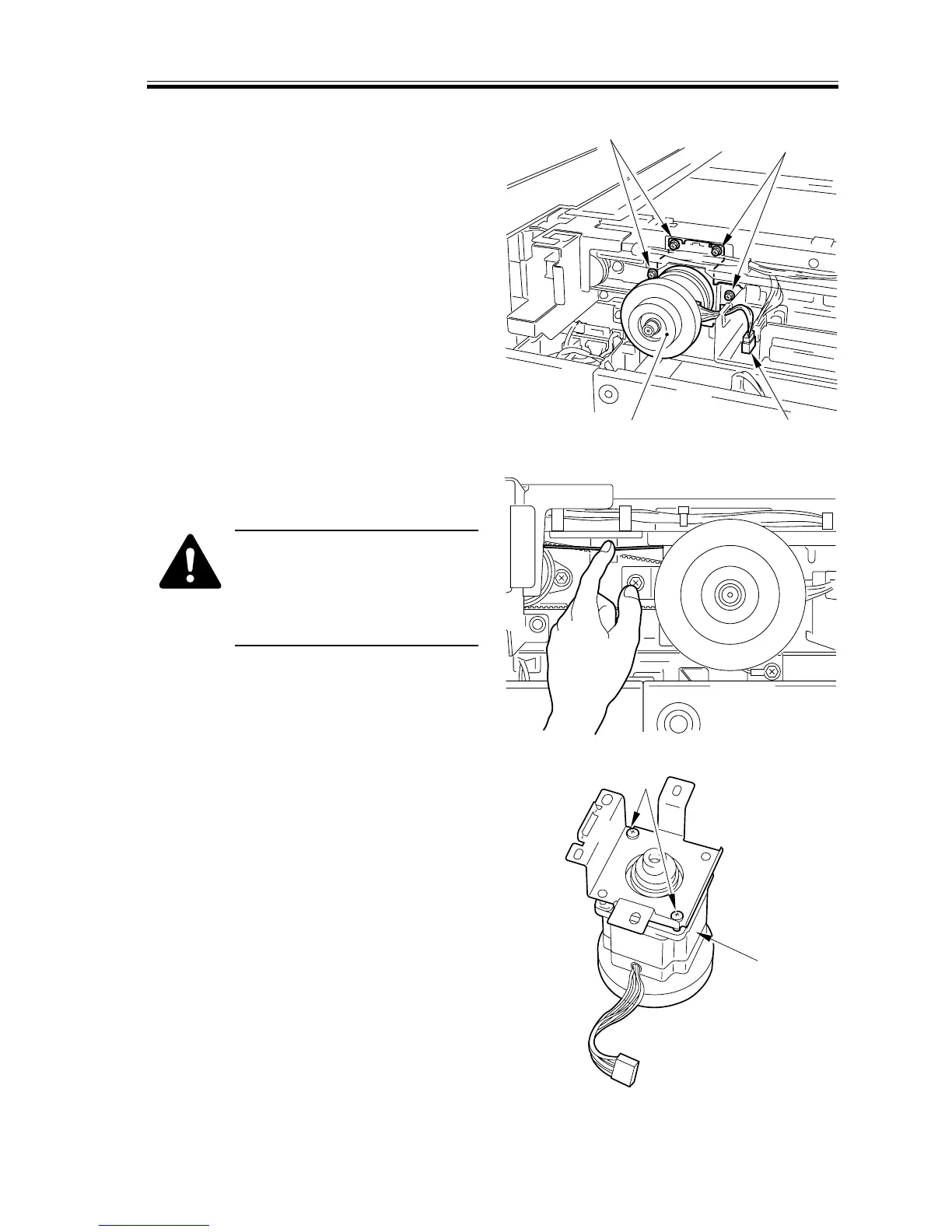
1.6.1 Removing the Scanner Motor
1) Remove the right glass retainer and the
vertical size plate; then, detach the
copyboard glass.
2) Remove the reader rear cover.
3) Remove the left rear upper cover.
4) Disconnect the connector [1], and re-
move the four screws; then, detach the
scanner motor [3] together with the
mounting support as if to pull it out to
the bottom.
F02-106-01
When removing the scanner
motor, push down the wire as
shown, thus preventing damage
to the wire by the edge of the
stay.
F02-106-02
5) Remove the two screws [4], and detach
the scanner motor [3].
F02-106-03
[2]
[2]
[3] [1]
[4]
[3]














 To Next Page