COPYRIGHT
©
2001 CANON INC. 2000 2000 2000 2000 CANON CLC5000 REV.0 JAN. 2001
CHAPTER 5 TROUBLESHOOTING IMAGE FAULTS/MALFUNCTIONS
5-41
[1]
[3]
[2]
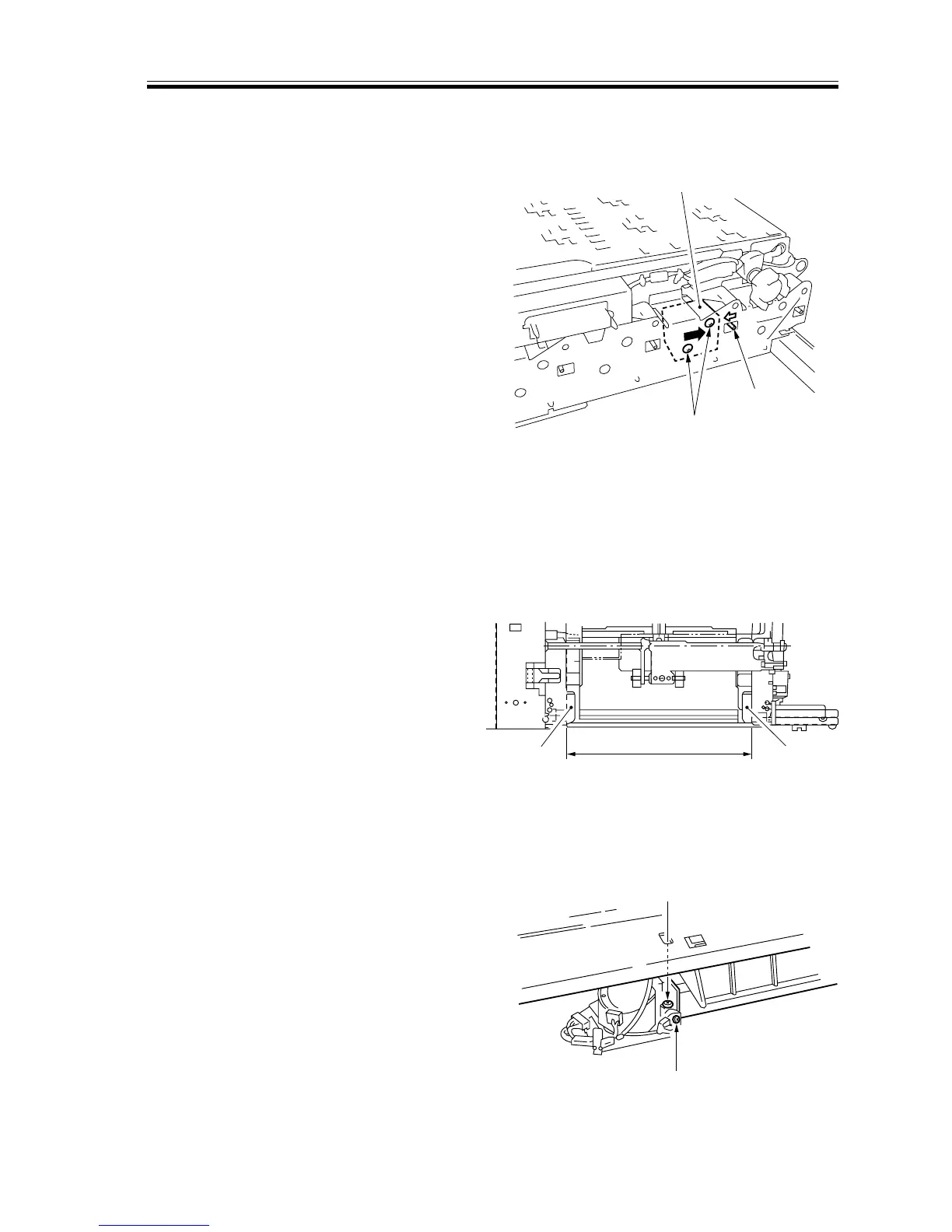
2.7.15 Adjusting the Position of the Duplexing Unit Paper Deflecting Plate
Solenoid (SL11)
1) Remove the duplexing unit.
2) Fix the solenoid in place with a mount-
ing screw [3] after moving the solenoid
to the delivery direction while the
plunger [2] of the solenoid [1] is pushed
in.
F05-207-16 (rear)
2.7.16 Adjusting the Position of the Duplexing Unit Stacking Assembly Paper
Guide Plate
1) Select A3 or 11x17, and copy on the
first side of a two-sided copy.
2) Slide out the duplexing unit to the front.
3) Measure the distance L of the paper
guide plate [1].
A3 : L = 297.5 ±0.5 mm
11x17 : L = 297.5 ±0.5 mm
F05-207-17
4) If the measurement is outside the stan-
dards, remove the duplexing unit front
cover.
5) Loosen the screw [2], and turn the ad-
justing screw [3]; then, adjust the posi-
tion of the paper guide plate home posi-
tion sensor.
F05-207-18
L
[1]
[1]
[2]
[3]














 To Next Page