2-10
CHAPTER 2 NEW FUNCTIONS
COPYRIGHT
©
2001 CANON INC. 2000 2000 2000 2000 CANON CLC5000 REV.0 JAN. 2001
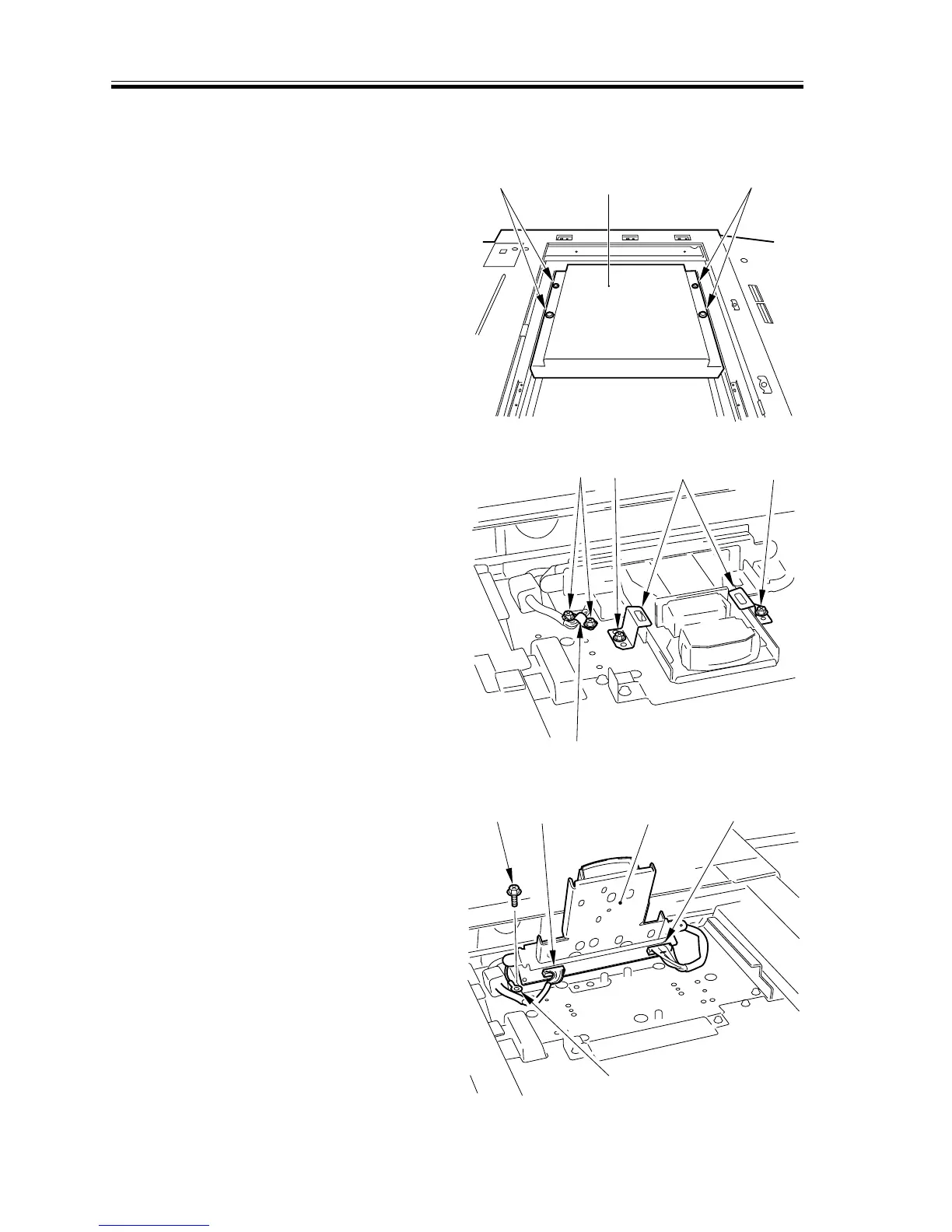
1.6.2 Removing the Lens Base Cover/CCD Cover/CCD Unit
1) Disconnect the power plug.
2) Detach the copyboard glass.
3) Remove the four screws [1], and detach
the lens base cover [2].
[1]
[2]
[1]
F02-106-04
4) Remove the two screws [3], and remove
the two CCD unit retaining screws [4].
5) Remove the two screws [5], and detach
the grounding plate [6].
[3][3]
[4]
[5]
[6]
F02-106-05
6) Lift the CCD unit [7], and disconnect
the two connectors [8]; then, remove the
screw [9]. Thereafter, remove the
grounding wire [10], and detach the
CCD unit [7].
[8] [8][9]
[10]
[7]
F02-106-06














 To Next Page